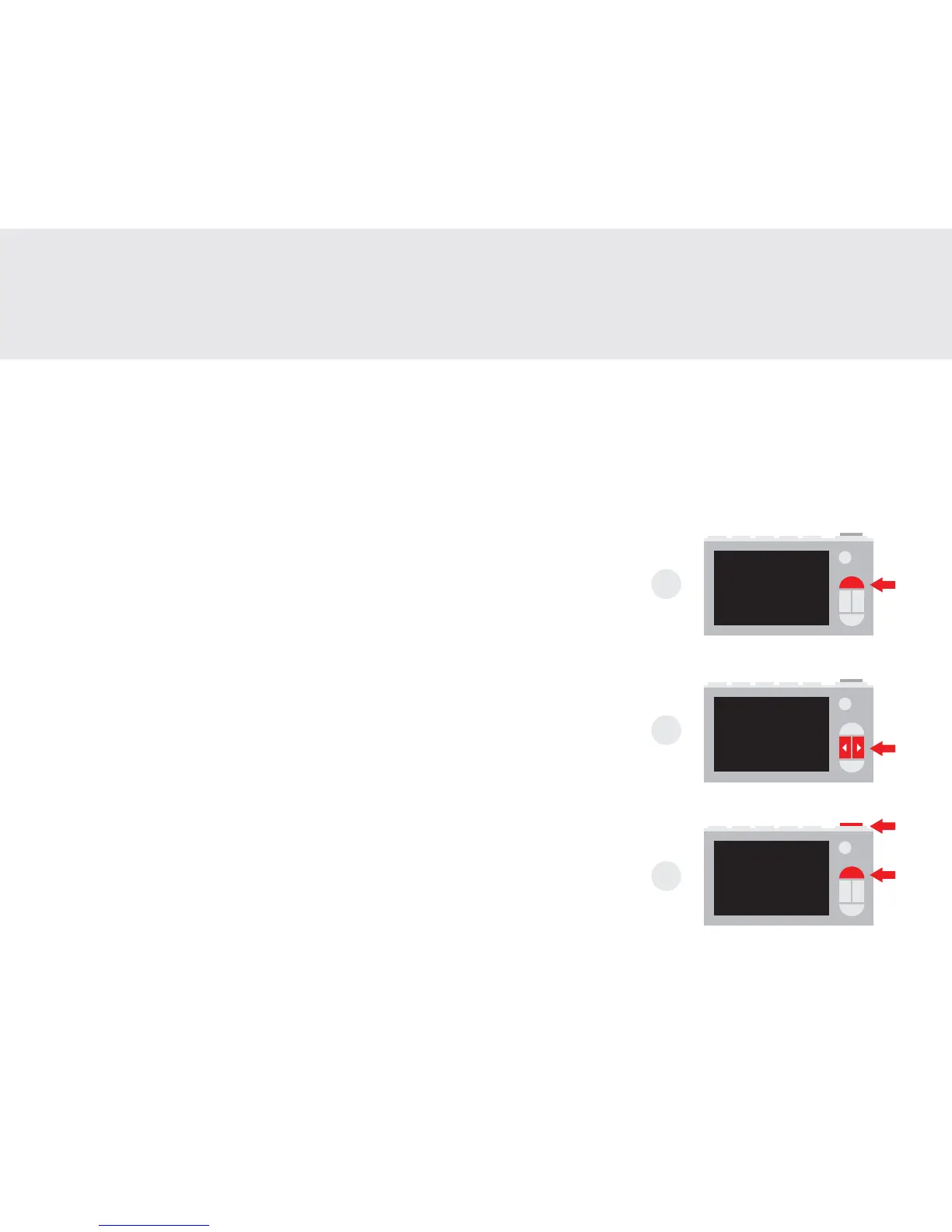
1. When camera is turned on, press the ‘Settings’ button to enter the settings menu
2. Navigate using the ‘Left’ and ‘Right’ buttons.
3. To select, press the ‘Shutter’ button. To cancel, ‘press the ‘Settings’ button.
FR: 1. Lorsque l’appareil photo est allumé, appuyez sur le bouton ‘Paramètres’
pour accéder au menu des paramètres.
2. Naviguez à l’aide des boutons ‘Gauche’ et ‘Droite’.
3. Pour sélectionner, appuyez sur le bouton ‘Shutter’. Pour annuler,
appuyez sur le bouton ‘Paramètres’.
ES: 1. Cuando la cámara está encendida, presione el botón ‘Conguración’
para ingresar al menú de conguración
2. Navegue con los botones "Izquierda" y "Derecha".
3. Para seleccionar, presione el botón ‘Obturador’. Para cancelar, ‘presione
el botón‘ Conguración ’.
JA: 1. カメラの電源を入れたら、「設定」ボタンを押して設定メニューに入り
ます
2.'左'と'右'ボタンを使用してナビゲートします。
3. 選択するには、「シャッター」ボタンを押します。キャンセルするには、'
設定'ボタンを押してください。
6
Settings
Réglages | Ajustes | 設定
1
2
3


 To Next Page