EasyManua.ls Logo

Oberheim XK - Selecting A Song; Tuning a Instrument Remotely

Oberheim XK
41 pages
Print Icon
To Next Page IconTo Next Page
To Previous Page IconTo Previous Page
Loading...
MISCELLANEOUS
MIDI
FUNCTIONS
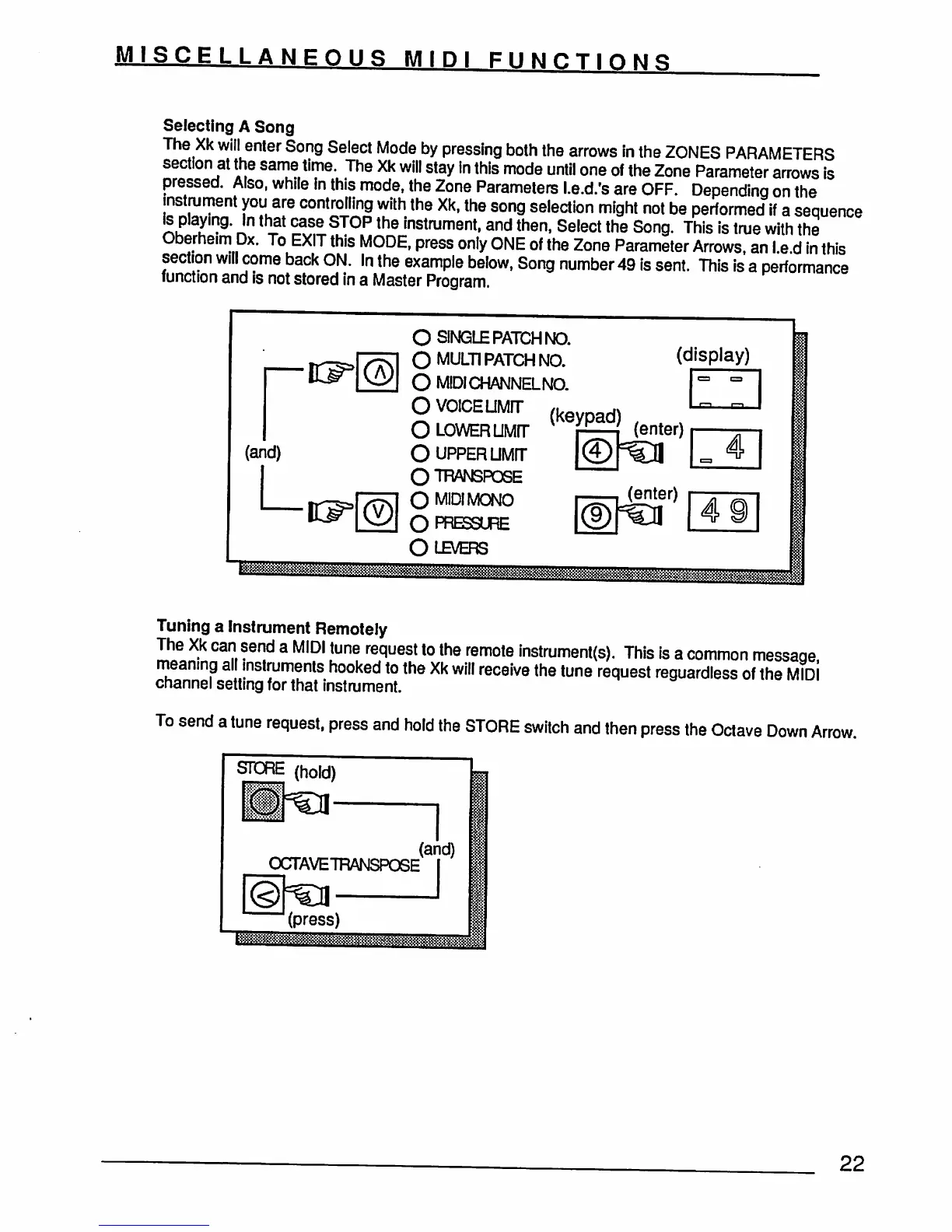
Selecting
A
Song
The
Xk
will
enter
Song
Select
Mode
by
pressing
both
the
arrows
in
the
ZONES
PARAMETERS
section
at
the
same
time.
The
Xk
will
stay
in
this
mode
until
one
of
the
Zone
Parameter
arrows
is
pressed.
Also,
while
in
this
mode,
the
Zone
Parameters
l.e.d.'s
are
OFF.
Depending
on
the
instrument
you
are
controlling
with
the
Xk, the
song
selection
might
not
be
performed
if
a
sequence
\s
playing.
In
that
case
STOP
the
instrument,
and
then,
Select
the
Song.
This
is
true
with
the
Oberheim
Dx.
To
EXIT
this
MODE,
press
only
ONE
of
the
Zone
Parameter
Arrows,
an
I.e
d
in
this
section
will
come
back
ON.
In
the
example
below,
Song number
49
is
sent.
This
is
a
performance
function
and
is
not
stored
in
a
Master
Program.
(and)
L
O
SINGLE
PATCH
NO.
O
MULTI
PATCH
NO.
(display)
O
MIDICHANNELNO.
OVOICEUMFT
{k
d)
O
LOWER
UMrr
r=-i
(en^)
O
upper
UMrr
O™NSFQSE
O
MO
MONO
r-=—i
(enter)
Olb/ers
Tuning
a
Instrument
Remotely
The
Xk
can
send
a
MIDI
tune
request
to
the
remote
instrument(s).
This
is
a
common
message
meaning
all
instruments
hooked
to
the
Xk
will
receive
the
tune
request
reguardless
of
the
MId!
channel
setting
for
that
instrument.
To
send
a
tune
request,
press
and
hold
the
STORE
switch
and
then
press
the
Octave
Down
Arrow.
SPORE
(hold)
mm
OCTAVE7FIANSPOSE
(press)
22