EasyManua.ls Logo

Oberheim XK - User Manual

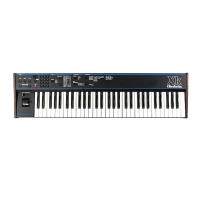
Oberheim XK
41 pages
Print Icon
To Next Page IconTo Next Page
Loading...
0WN
ER
S
MANUAL
Oberiieim
A
Division
of
ECC
Development
Corporation
Question and Answer IconNeed help?

Do you have a question about the Oberheim XK and is the answer not in the manual?

Summary

INTRODUCTION

Welcome to the Xk

Introduces the Oberheim Xk MIDI keyboard as a powerful and versatile remote controller.

Features

Lists the key features of the Oberheim Xk MIDI keyboard, including its keyboard, zones, arpeggiator, and controls.

PICTURES

System Hookup

Diagram illustrating how to connect the Oberheim Xk to external MIDI devices like Xpanders and DX.

I WANT TO USE IT

Make It GO

Basic instructions on connecting the Xk and selecting the initial Master Program 00 for basic operation.

MASTER PROGRAM

What is Programmable?

Details the programmable parameters of the Xk, including zones, velocity, controllers, and arpeggiator settings.

Selecting A Master Program

Explains how to select and set a Master Program using the keypad or arrow buttons on the Xk.

Storing A Master Program

Guides on how to save the current configuration as a Master Program by using the STORE switch.

Copying A Master Program

Instructions on how to copy one Master Program to another location on the Xk.

Block Copy Of Master Programs

Details the process of copying a Master Program to multiple locations, creating a 'Shell'.

ZONES

What is a Zone?

Explains the concept of Zones in the Xk for separating instruments and assigning MIDI channels.

Selecting A Zone

Describes how to select which Zone (1, 2, or 3) to program using the SELECT switch.

Selecting A Patch Number

Details how to select a Single or Multi Patch number for a Zone to control a remote instrument.

Selecting A MIDI Channel

Explains how to assign a MIDI channel (1-16) for a Zone to send data to a specific instrument.

Setting The Voice Limit For Voice Spill-Over

Describes the Voice Limit and Spill-Over system, allowing notes to play on the next MIDI channel when limits are reached.

Setting Voice Limit For MIDI Mono

Explains the MIDI Mono mode, where notes are sent on sequential MIDI channels up to the voice limit.

Setting the Lower Keyboard Limit

Details how to set the lowest note playable in a Zone, or turn the Zone off.

Setting the Upper Keyboard Limit

Describes how to set the highest note playable in a Zone, or turn the Zone off.

Setting The Key Transpose

Explains how to set a key transpose value for a Zone to shift notes up or down by semitones.

Setting MIDI Mono

Explains how to enable or disable MIDI Mono mode for a Zone, affecting note channel assignment.

Setting Pressure

Details how to enable or disable channel pressure (after-touch) transmission for a Zone.

Setting Levers

Describes how to enable or disable the transmission of Pitch Bend and Modulation levers for a Zone.

Setting The Continuous Controller Value

Explains how to assign a continuous controller number and value, like volume, for a Zone.

Setting The Mod Lever Negative Controller Value

Details how to program the Mod Lever's negative direction to send a specific controller value.

Setting the Foot Switch Controller Value

Guides on setting the controller value for the Foot Switch input for a Zone.

VELOCITY

Velocity Scales

Explains the two user-selectable velocity scales (1 and 2) and the option to turn velocity off.

Release Velocity

Details how the Xk sends release velocity information, especially when notes are turned off automatically.

Velocity Range

Describes the velocity range (1-127) and how it is represented on the Xk's display.

ARPEGGIATOR

Arpeggiate On;Off

Explains how to turn the arpeggiator function on and off using the ARPEG switch.

Arpeggiator Play Order

Details the different play orders for the arpeggiator: forward, reverse, up/down, and random.

Arpeggiator Play Mode

Explains the play modes for the arpeggiator: keyboard notes, held notes, or both.

Arpeggiator Transpose

Describes how to set arpeggiator transposition intervals, allowing notes to play transposed.

Programming Arpeggiator Transpositions

Guides on how to program specific arpeggio transposition intervals using the STORE switch.

Arpeggiator Zone Assignment

Explains how to assign the arpeggiator to a specific Zone (1, 2, or 3).

Internal Arpeggiator Tempo

Details how to set the tempo for the internal arpeggiator, from slow to fast.

External Arpeggiator Tempo

Explains how to use an external clock source to control the arpeggiator tempo.

HOLD;CHORD

Holding Notes or Chords

Explains how to use the HOLD switch to sustain played notes or chords indefinitely.

Canceling Held Notes

Details how to cancel the HOLD function and stop sustained notes.

Holding Notes and Zones

Explains how held notes are affected by active zones and how zones can be turned off.

Holding Notes and the Arpeggiator

Describes how held notes can continue to arpeggiate even if their zone is turned off.

Chord;Hold

Explains how to use HOLD and CHORD switches together to transpose chords based on keyboard input.

MISCELLANEOUS MIDI FUNCTIONS

Starting A Drum Machine or Sequencer

Explains how to send a MIDI Start Command from the Xk to a drum machine or sequencer.

Continuing A Drum Machine or Sequencer

Details how to send a MIDI Continue Command from the Xk.

Stopping A Drum Machine or Sequencer

Explains how to send a MIDI Stop Command from the Xk.

Selecting A Song

Describes how to enter Song Select Mode and send song number data to a MIDI device.

Tuning a Instrument Remotely

Explains how to send a MIDI tune request to remote instruments.

Sending an ALL NOTES OFF to the remote instruments

Details how to send an 'ALL NOTES OFF' MIDI command to stop stuck notes.

OCTAVE TRANSPOSE

Transposing the Keyboard

Explains how to transpose the keyboard +/- 2 octaves using arrow switches, affecting new notes.

LEVERS; CONTINUOUS CONTROLLER (slider)

Pitch and Modulation Levers

Details the function of the Pitch Bend Lever and the Modulation Lever on the Xk.

Programming the Mod Lever Negative Direction

Guides on programming the Mod Lever's negative direction to control specific MIDI controller values.

SETTING THE PRESSURE SENSITIVITY

Adjusting Pressure Sensitivity

Explains how to set the pressure sensitivity for the keyboard, stored in memory.

CALIBRATING

Continuous Controller (slider)

Details the procedure for calibrating the continuous controller slider if it feels incorrect.

Levers

Explains that the levers are calibrated automatically on power-up and not to move them during startup.

MIDI

How was MIDI 1.0 Implemented?

Details the Xk's MIDI implementation, including channel modes, note on/off, and control changes.

System Exclusive Codes

Lists System Exclusive codes for Single Patch Select and Multi Patch Select on the Xk.

What happens when selecting a Single or Multi Patch?

Explains the system exclusive code transmission behavior when switching between single and multi patches.

SPECIFICATIONS

KEYBOARD

Details the keyboard specifications: octaves, velocity, notes, scales, and maximum notes per zone.

PROGRAMS

Specifies the number of programs (100) and the functions programmed within them.

ZONES

Lists the number of zones (3) and the functions programmable per zone.

Voice Spillover System

Describes the voice spillover system, allowing multiple synthesizers to play as one unit.

ARPEGGIATOR

Details arpeggiator capabilities: plays any zone, orders, modes, transpositions, and clock input.

CONTROLLERS

Lists controller specifications: bend lever, modulation lever, continuous controller, and footswitch.

Other Functions

Details other functions like Bank Patch Copy, inputs, outputs, and weight.

WARRANTY

IF YOU HAVE A PROBLEM

Provides initial advice for users experiencing problems with their Oberheim product.

OBERHEIM LIMITED CUSTOMER WARRANTY (Non-Transferable)

Outlines the terms and conditions of the customer warranty, including coverage and exclusions.

WHAT IS COVERED

Specifies what the Oberheim warranty covers, including defects in materials and workmanship.

WHAT IS NOT COVERED

Details what the Oberheim warranty does not cover, such as misuse or consequential damages.

IMPORTANT NOTICE: The warranty is VOID

Warns that the warranty is void if the product is electronically or mechanically modified or tampered with.

HOW TO OBTAIN WARRANTY SERVICE

Provides a step-by-step guide on how to get warranty service for the Oberheim product.

OWNERS MANUAL ADDENDUM

HOLD;CHORD

Details changes to the HOLD/CHORD function, making it separate per Zone and introducing Chord Play.

VELOCITY SCALE ADJUST Mode

Explains the new Velocity Scale Adjust mode, allowing per-zone adjustment of upper velocity limits.

Summary

INTRODUCTION

Welcome to the Xk

Introduces the Oberheim Xk MIDI keyboard as a powerful and versatile remote controller.

Features

Lists the key features of the Oberheim Xk MIDI keyboard, including its keyboard, zones, arpeggiator, and controls.

PICTURES

System Hookup

Diagram illustrating how to connect the Oberheim Xk to external MIDI devices like Xpanders and DX.

I WANT TO USE IT

Make It GO

Basic instructions on connecting the Xk and selecting the initial Master Program 00 for basic operation.

MASTER PROGRAM

What is Programmable?

Details the programmable parameters of the Xk, including zones, velocity, controllers, and arpeggiator settings.

Selecting A Master Program

Explains how to select and set a Master Program using the keypad or arrow buttons on the Xk.

Storing A Master Program

Guides on how to save the current configuration as a Master Program by using the STORE switch.

Copying A Master Program

Instructions on how to copy one Master Program to another location on the Xk.

Block Copy Of Master Programs

Details the process of copying a Master Program to multiple locations, creating a 'Shell'.

ZONES

What is a Zone?

Explains the concept of Zones in the Xk for separating instruments and assigning MIDI channels.

Selecting A Zone

Describes how to select which Zone (1, 2, or 3) to program using the SELECT switch.

Selecting A Patch Number

Details how to select a Single or Multi Patch number for a Zone to control a remote instrument.

Selecting A MIDI Channel

Explains how to assign a MIDI channel (1-16) for a Zone to send data to a specific instrument.

Setting The Voice Limit For Voice Spill-Over

Describes the Voice Limit and Spill-Over system, allowing notes to play on the next MIDI channel when limits are reached.

Setting Voice Limit For MIDI Mono

Explains the MIDI Mono mode, where notes are sent on sequential MIDI channels up to the voice limit.

Setting the Lower Keyboard Limit

Details how to set the lowest note playable in a Zone, or turn the Zone off.

Setting the Upper Keyboard Limit

Describes how to set the highest note playable in a Zone, or turn the Zone off.

Setting The Key Transpose

Explains how to set a key transpose value for a Zone to shift notes up or down by semitones.

Setting MIDI Mono

Explains how to enable or disable MIDI Mono mode for a Zone, affecting note channel assignment.

Setting Pressure

Details how to enable or disable channel pressure (after-touch) transmission for a Zone.

Setting Levers

Describes how to enable or disable the transmission of Pitch Bend and Modulation levers for a Zone.

Setting The Continuous Controller Value

Explains how to assign a continuous controller number and value, like volume, for a Zone.

Setting The Mod Lever Negative Controller Value

Details how to program the Mod Lever's negative direction to send a specific controller value.

Setting the Foot Switch Controller Value

Guides on setting the controller value for the Foot Switch input for a Zone.

VELOCITY

Velocity Scales

Explains the two user-selectable velocity scales (1 and 2) and the option to turn velocity off.

Release Velocity

Details how the Xk sends release velocity information, especially when notes are turned off automatically.

Velocity Range

Describes the velocity range (1-127) and how it is represented on the Xk's display.

ARPEGGIATOR

Arpeggiate On;Off

Explains how to turn the arpeggiator function on and off using the ARPEG switch.

Arpeggiator Play Order

Details the different play orders for the arpeggiator: forward, reverse, up/down, and random.

Arpeggiator Play Mode

Explains the play modes for the arpeggiator: keyboard notes, held notes, or both.

Arpeggiator Transpose

Describes how to set arpeggiator transposition intervals, allowing notes to play transposed.

Programming Arpeggiator Transpositions

Guides on how to program specific arpeggio transposition intervals using the STORE switch.

Arpeggiator Zone Assignment

Explains how to assign the arpeggiator to a specific Zone (1, 2, or 3).

Internal Arpeggiator Tempo

Details how to set the tempo for the internal arpeggiator, from slow to fast.

External Arpeggiator Tempo

Explains how to use an external clock source to control the arpeggiator tempo.

HOLD;CHORD

Holding Notes or Chords

Explains how to use the HOLD switch to sustain played notes or chords indefinitely.

Canceling Held Notes

Details how to cancel the HOLD function and stop sustained notes.

Holding Notes and Zones

Explains how held notes are affected by active zones and how zones can be turned off.

Holding Notes and the Arpeggiator

Describes how held notes can continue to arpeggiate even if their zone is turned off.

Chord;Hold

Explains how to use HOLD and CHORD switches together to transpose chords based on keyboard input.

MISCELLANEOUS MIDI FUNCTIONS

Starting A Drum Machine or Sequencer

Explains how to send a MIDI Start Command from the Xk to a drum machine or sequencer.

Continuing A Drum Machine or Sequencer

Details how to send a MIDI Continue Command from the Xk.

Stopping A Drum Machine or Sequencer

Explains how to send a MIDI Stop Command from the Xk.

Selecting A Song

Describes how to enter Song Select Mode and send song number data to a MIDI device.

Tuning a Instrument Remotely

Explains how to send a MIDI tune request to remote instruments.

Sending an ALL NOTES OFF to the remote instruments

Details how to send an 'ALL NOTES OFF' MIDI command to stop stuck notes.

OCTAVE TRANSPOSE

Transposing the Keyboard

Explains how to transpose the keyboard +/- 2 octaves using arrow switches, affecting new notes.

LEVERS; CONTINUOUS CONTROLLER (slider)

Pitch and Modulation Levers

Details the function of the Pitch Bend Lever and the Modulation Lever on the Xk.

Programming the Mod Lever Negative Direction

Guides on programming the Mod Lever's negative direction to control specific MIDI controller values.

SETTING THE PRESSURE SENSITIVITY

Adjusting Pressure Sensitivity

Explains how to set the pressure sensitivity for the keyboard, stored in memory.

CALIBRATING

Continuous Controller (slider)

Details the procedure for calibrating the continuous controller slider if it feels incorrect.

Levers

Explains that the levers are calibrated automatically on power-up and not to move them during startup.

MIDI

How was MIDI 1.0 Implemented?

Details the Xk's MIDI implementation, including channel modes, note on/off, and control changes.

System Exclusive Codes

Lists System Exclusive codes for Single Patch Select and Multi Patch Select on the Xk.

What happens when selecting a Single or Multi Patch?

Explains the system exclusive code transmission behavior when switching between single and multi patches.

SPECIFICATIONS

KEYBOARD

Details the keyboard specifications: octaves, velocity, notes, scales, and maximum notes per zone.

PROGRAMS

Specifies the number of programs (100) and the functions programmed within them.

ZONES

Lists the number of zones (3) and the functions programmable per zone.

Voice Spillover System

Describes the voice spillover system, allowing multiple synthesizers to play as one unit.

ARPEGGIATOR

Details arpeggiator capabilities: plays any zone, orders, modes, transpositions, and clock input.

CONTROLLERS

Lists controller specifications: bend lever, modulation lever, continuous controller, and footswitch.

Other Functions

Details other functions like Bank Patch Copy, inputs, outputs, and weight.

WARRANTY

IF YOU HAVE A PROBLEM

Provides initial advice for users experiencing problems with their Oberheim product.

OBERHEIM LIMITED CUSTOMER WARRANTY (Non-Transferable)

Outlines the terms and conditions of the customer warranty, including coverage and exclusions.

WHAT IS COVERED

Specifies what the Oberheim warranty covers, including defects in materials and workmanship.

WHAT IS NOT COVERED

Details what the Oberheim warranty does not cover, such as misuse or consequential damages.

IMPORTANT NOTICE: The warranty is VOID

Warns that the warranty is void if the product is electronically or mechanically modified or tampered with.

HOW TO OBTAIN WARRANTY SERVICE

Provides a step-by-step guide on how to get warranty service for the Oberheim product.

OWNERS MANUAL ADDENDUM

HOLD;CHORD

Details changes to the HOLD/CHORD function, making it separate per Zone and introducing Chord Play.

VELOCITY SCALE ADJUST Mode

Explains the new Velocity Scale Adjust mode, allowing per-zone adjustment of upper velocity limits.

Oberheim XK Specifications

General IconGeneral
MIDIYes
Velocity SensitivityYes
AftertouchNo
Pitch Bend WheelYes
Modulation WheelYes
KeybedSemi-weighted
Drawbars9
MIDI ConnectivityMIDI In, MIDI Out