EasyManua.ls Logo

Oberheim XK - Holding Notes and the Arpeggiator; Chord;Hold

Oberheim XK
41 pages
Print Icon
To Next Page IconTo Next Page
To Previous Page IconTo Previous Page
Loading...
HOLD/CHQRn
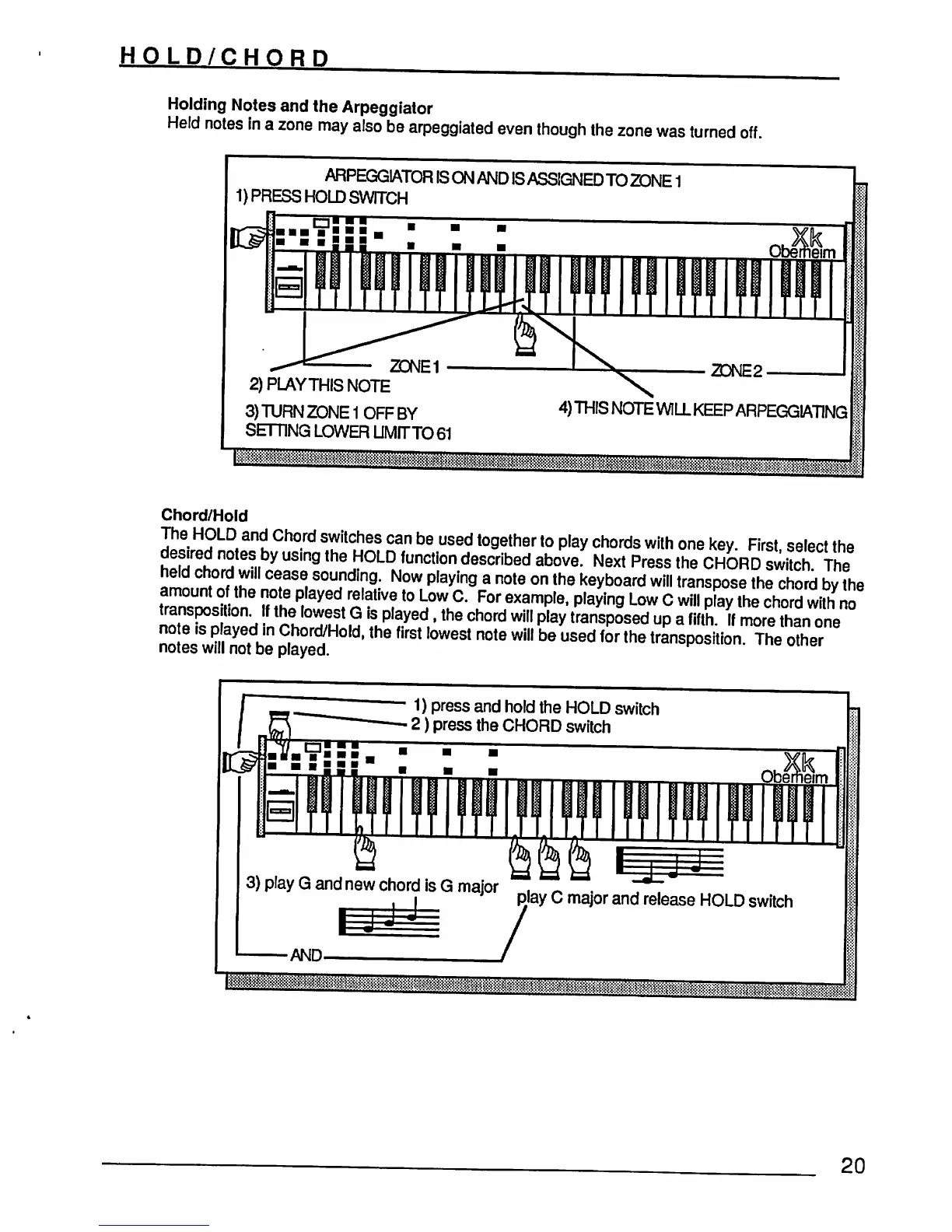
Holding
Notes
and
the
Arpeggiator
Held
notes
in
a
zone
may
also
be
arpeggiated
even
though
the
zone
was
turned
off.
ARPEGGIATOR
IS
ON
AND
IS
ASSIGNED
TO
ZONE1
1)
PRESS
HOLD
SWITCH
2)PLAYTHISNOTE
3)
TURN ZONE
1
OFF
BY
SETTING
LOWER
UMfTTO61
o
2DNE2
4)
THIS
NOTE
WILL
KEEP
ARPEGGIATING
liiflililii&ijgjiTO
I
Chord/Hold
IXEI^J^S^™*1*"t0^e!•»P|av°!™dswilhonekey"
First-selectthe
ng
the
HOLD
function
described
above.
Next
Press
the
CHORD
switch
The
sounding.
Now
playing
a
note
on
the
keyboard
will
transpose
the
chord
by
the
.1
,h
P|ayed/£latlv?t0
^ow
C*
For
examP'e.
Playing
Low
C
will
play
the
chord
with
no
If
the
lowest
G
is
played,
the
chord
will
play
transposed
up
a
firth
If
more
than
one
no
e
is
played
in
Chord/Hold,
the
first
lowest
note
will
be
used
for
the
transposition
The
notes
will
not
be
played.
1)
press
and
hold
the
HOLD
switch
2)
press
the
CHORD
switch
I/.
O
3)
play
G
and
new
chord
is
G
major
I
I
play
C
major
and
release
HOLD
switch
•AND-
20