EasyManua.ls Logo

Oberheim XK - Setting Levers; Setting The Continuous Controller Value

Oberheim XK
41 pages
Print Icon
To Next Page IconTo Next Page
To Previous Page IconTo Previous Page
Loading...
ZONES
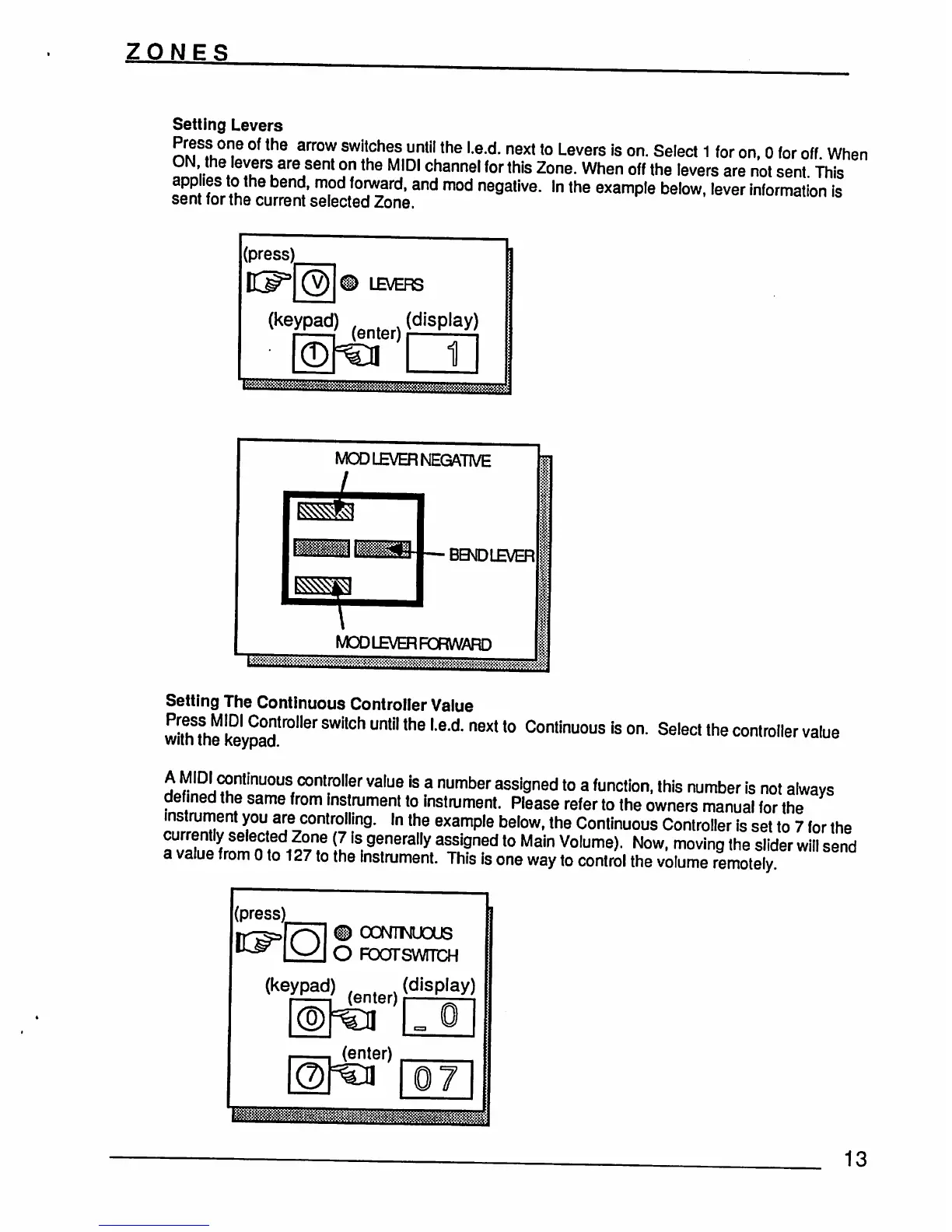
Setting
Levers
Press
one
of
the
arrow
switches
until
the
l.e.d.
next
to
Levers
is
on.
Select
1
for
on,
0
for
off
When
ON
the
levers
are
sent
on
the
MIDI
channel
for
this
Zone.
When
off
the
levers
are
not
sent
This
applies
to
the
bend,
mod
forward,
and
mod
negative.
In
the
example
below,
lever
Information
is
sent
for
the
current
selected
Zone.
MOD
LB/ER
NEGATIVE
BBDLEVER
MOD
LB/ER
FORWARD
raSSSgsSEffiSMffKSS&JJJ&j&SS
Setting
The
Continuous
Controller
Value
Press
MIDI
Controller
switch
until
the
l.e.d.
next
to
Continuous
is
on.
Select
the
controller
value
wiin
me
Keypad.
A
MIDI
continuous
controller
value
is
a
number
assigned
to
a
function,
this
number
is
not
always
defined
the
same
from
instrument
to
instrument.
Please
refer
to
the
owners
manual
for
the
instrument
you
are
controlling.
In
the
example
below,
the
Continuous
Controller
is
set
to
7
for
the
currently
selected
Zone
(7
is
generally
assigned
to
Main
Volume).
Now,
moving
the
slider
will
send
a
value
from
0
to
127
to
the
instrument.
This
is
one
way
to
control
the
volume
remotely
(press;
#
OONTMUOUS
O
FoarswmcH
(keypad)
(enter)
(d''Splay)
(enter)
13