EasyManua.ls Logo

Oberheim XK - Setting Voice Limit For MIDI Mono; Setting the Lower Keyboard Limit

Oberheim XK
41 pages
Print Icon
To Next Page IconTo Next Page
To Previous Page IconTo Previous Page
Loading...
ZONES
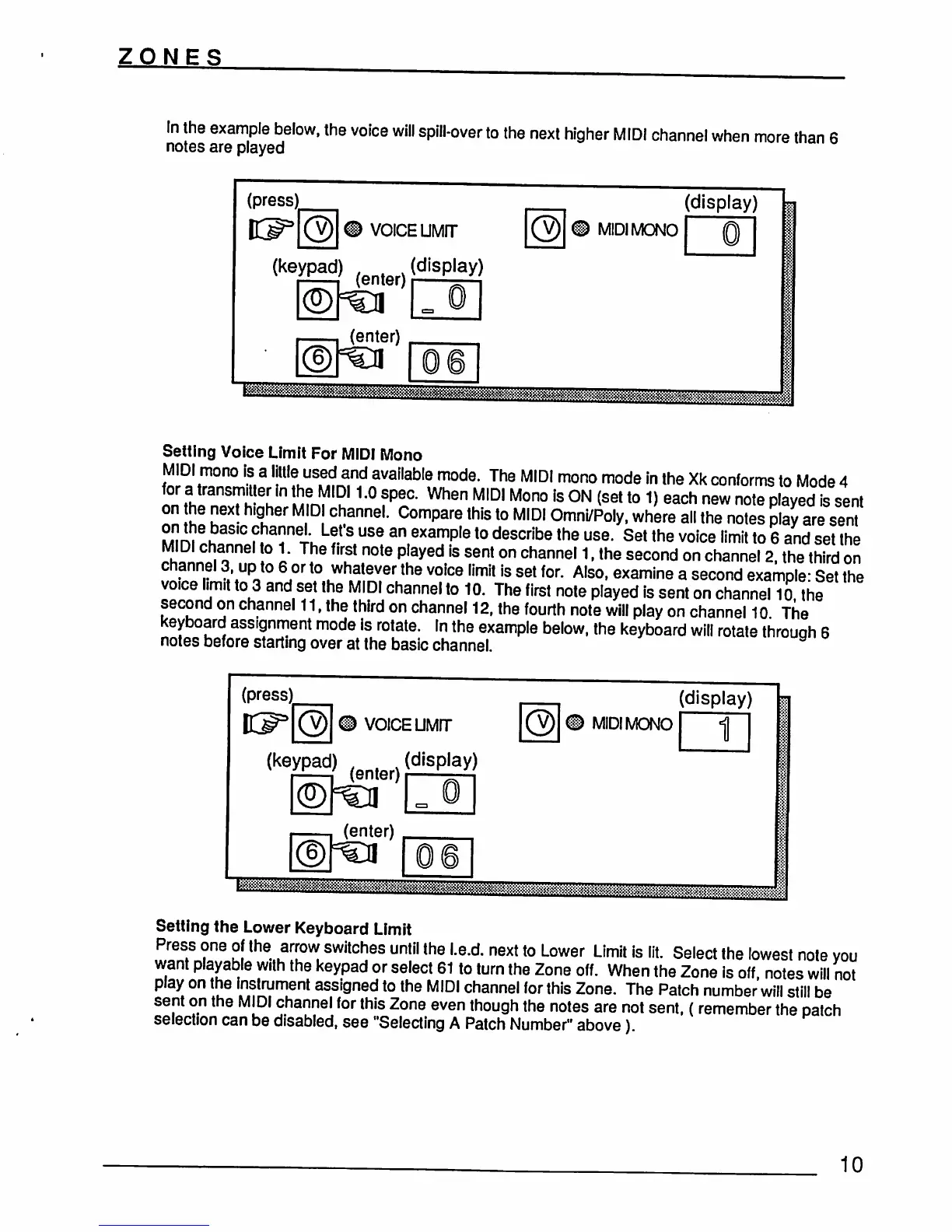
In
the
example
below,
the
voice
will
spill-over
to
the
next
higher
MIDI
channel
when
more
than
6
notes
are
played
(press;
VOICE
UMIT
(display)
MIDI
MONO
(keypad)
(enter)(dlSplay)
(enter)
Setting
Voice
Limit
For
MID!
Mono
MIDI
mono
is
a
little-usedand
available
mode.
The
MIDI
mono
mode
in
the
Xk
conforms
to
Mode
4
for
a
transmitter
in
the
MID11.0
spec.
When
MIDI
Mono
is
ON
(set
to
1)
each
new
note
played
is
sent
on
he
next
higher
MIDI
channel.
Compare
this
to
MIDI
Omni/Poly,
where
all
the
notes
play
are
sent
on
the
basic
channel
Let's
use an example
to
describe
the
use.
Set
the
voice
limit
to
6
and
set
the
MIDI
channel
to
1.
The
first
note
played
is
sent
on
channel
1,
the
second
on
channel
2,
the
third
on
channel
3,
up
to
6
or
to
whatever
the
voice
limit
is
set
for.
Also,
examine
a
second
example-
Set
the
voice
hmrt
to
3
and
set
the
MIDI
channel
to
10.
The
first
note
played
is
sent
on
channel
10
the
second
on
channel
11,
the
third
on
channel
12,
the
fourth
note
will
play
on
channel
10
The
keyboard
assignment
mode
is
rotate.
In
the
example
below,
the
keyboard
will
rotate
through
6
notes
before
starting
over
at
the basic
channel
(press)
(keypad)
VOICE
UMIT
(display)
(display)
MIDI
MONO
1
(enter)
(enter)
Setting
the
Lower
Keyboard
Limit
Press
one
of
the
arrow
switches
until
the
l.e.d.
next
to
Lower
Limit
is
lit.
Select
the
lowest note
you
want
playable
with
the
keypad
or
select
61
to
turn
the
Zone
off.
When
the
Zone
is
off,
notes
will
not
play
on
the
instrument
assigned
to
the
MIDI
channel
for
this
Zone.
The
Patch
number
will
still
be
sent
on
the
MIDI
channel
for
this
Zone
even
though
the
notes
are
not
sent,
(remember
the
patch
selection
can
be
disabled,
see
"Selecting
A
Patch
Number"
above)
10