EasyManua.ls Logo

Oberheim XK - Copying A Master Program; Block Copy Of Master Programs

Oberheim XK
41 pages
Print Icon
To Next Page IconTo Next Page
To Previous Page IconTo Previous Page
Loading...
MASTER
PROGRAM
Copying
A
Master
Program
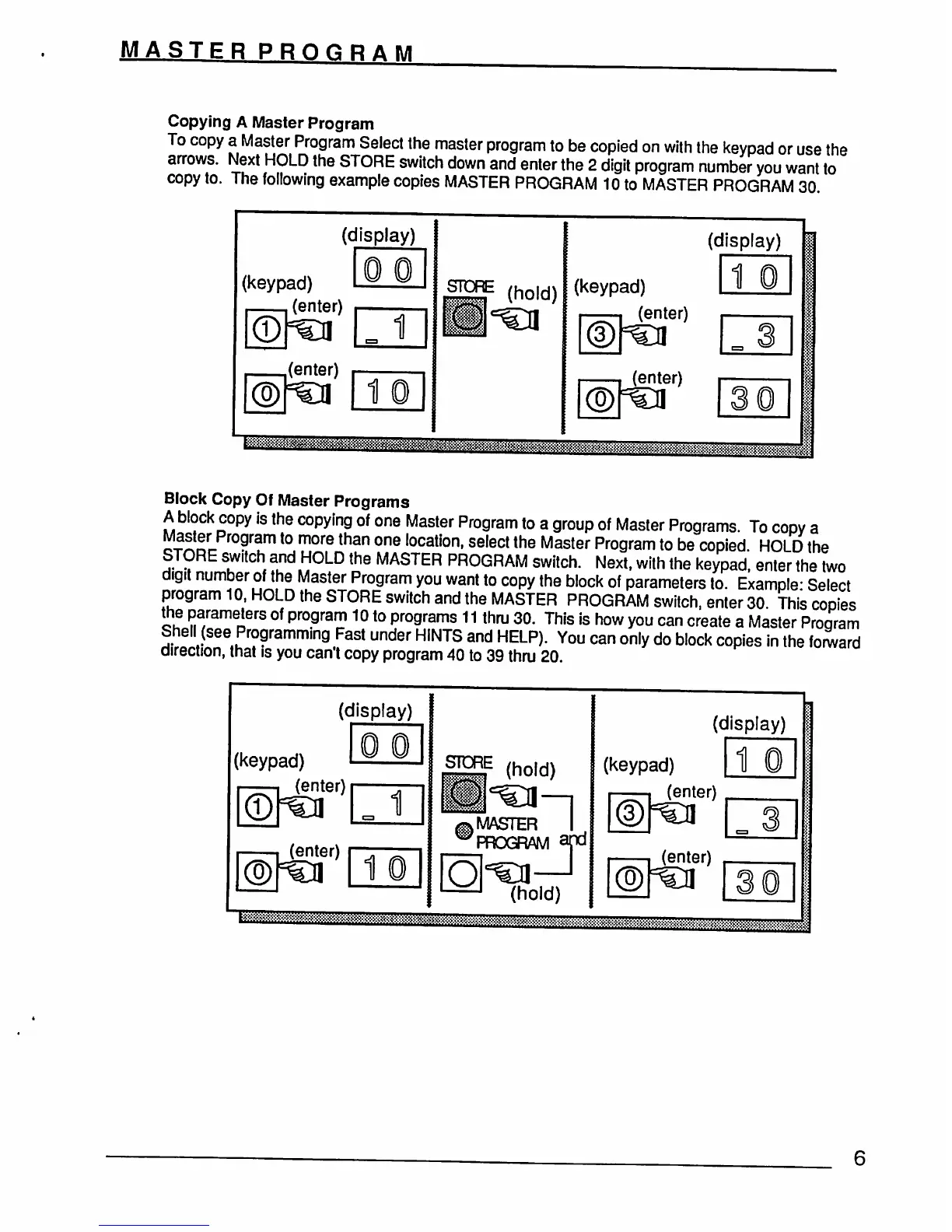
To
copy
a
Master
Program
Select the
master
program
to
be
copied
on
with
the
keypad
or
use
the
arrows.
Next
HOLD
the
STORE
switch
down
and
enter
the
2
digit
program
number
you
want
to
copy
to.
The
following
example
copies
MASTER
PROGRAM
10
to
MASTER
PROGRAM
30
(display)
(keypad)
(enter)
1
(enter)
1
STORE
(hold)
(display)
(keypad)
(enter)
1
(enter)
&gjasftflg
Block
Copy
Of
Master
Programs
A
block
copy
is
the
copying
of
one
Master
Program
to
a
group
of
Master
Programs.
To
copy
a
o-?iSrr-
°?ram
t0
more
than
one
Iocal|on,
select
the
Master
Program
to
be
copied
HOLD
the
STORE
switch
and
HOLD
the
MASTER
PROGRAM
switch.
Next,
with
the
keypad",
enter
the
two
digit
number
of
the
Master
Program
you
want
to
copy
the
block
of
parameters
to.
Example-
Select
program
10,
HOLD
the
STORE
switch
and
the
MASTER
PROGRAM
switch,
enter
30
This
copies
the
parameters
of
program
10
to
programs
11
thru
30.
This
is
how
you
can
create
a
Master
Program
Shell
(see
Programming
Fast
under
HINTS
and
HELP).
You
can
only
do
block
copies
in
the
forward
direction,
that
is
you
can't
copy
program
40
to
39
thru
20
(display)
(keypad)
(enter)
1
(enter)
1
STORE
(hold)
,
MASTER
PROGRAM
(hold)
(display)
(keypad)
1
(enter)
(enter)