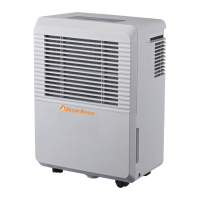
This document is an owner's manual for the Ocean Breeze dehumidifiers, models OBZ-30DHN and OBZ-60DHN, designed for comfortable living. It provides essential information for safe operation, maintenance, and troubleshooting.
Function Description:
The Ocean Breeze dehumidifier is designed to remove excess moisture from indoor air, creating a more comfortable and healthier environment. It operates by drawing in humid air, passing it over a cold evaporator coil where moisture condenses, and then expelling drier air back into the room. The collected water is stored in a removable bucket or can be continuously drained. The unit features various operating modes, including continuous dehumidifying, fan-only operation, and timer functions for automated start and stop times. It is intended for indoor residential use and should not be used outdoors or in commercial/industrial applications. The dehumidifier helps prevent moisture damage to books, valuables, and structural elements in areas like basements.
Important Technical Specifications:
The manual highlights several key technical specifications and operational parameters:
- Dehumidifier Capacity: Two models are covered: 30/40 pints and 60 pints.
- Water Tank Volume: The 30/40 pint models have a 6.3-pint water tank, while the 60-pint model has a 12.7-pint tank.
- Operating Temperature Range: The unit is designed to operate effectively between 41°F (5°C) and 95°F (35°C). Temperatures below 41°F (5°C) can cause frost buildup on the coils, reducing performance.
- Humidity Set Range: The humidity level can be set from 35%RH to 85%RH in 5% increments.
- Timer Settings: The auto start and auto stop times can be set from 0.0 to 24 hours in half-hour increments up to 10 hours, and then in 1-hour increments up to 24 hours.
- Air Circulation: A minimum of 7.9 inches of air space on all sides of the unit is required for good air circulation.
- Electrical Information: The unit requires a properly grounded wall receptacle. It is equipped with a three-prong grounding plug for safety. The use of extension cords or adapter plugs is generally discouraged, but if necessary, an approved "Dehumidifier" extension cord should be used.
- Safety Features: The unit includes an auto shut-off feature when the water bucket is full or incorrectly positioned, and an auto defrost function to manage frost buildup on the evaporator coils. It also has a 3-minute delay before resuming operation after being turned off to protect the unit from malfunction.
Usage Features:
The dehumidifier offers a range of features to enhance user experience:
- Control Panel: The control panel includes buttons for Power, Continuous operation, Filter reset, Fan speed (Turbo/Normal), Up/Down arrows for humidity and timer settings, and a Timer button. A display shows the set humidity level, actual room humidity, and error codes.
- Humidity Control: Users can set their desired humidity level, with the unit automatically shutting off when the target is reached.
- Fan Speed Control: Two fan speeds, Turbo and Normal, allow users to choose between maximum moisture removal and quieter operation.
- Continuous Operation: This mode allows the unit to run continuously, ideal for situations requiring extensive moisture removal.
- Timer Function: The auto start and auto stop timer allows users to program the unit to turn on or off at specific times, offering convenience and energy saving.
- Bucket Full Indicator: A light illuminates and the unit beeps when the water bucket is full or improperly placed, prompting the user to empty it.
- Continuous Draining: For extended operation without manual bucket emptying, the unit can be connected to a drain hose (not included) for continuous water removal. This involves installing an adapter and hose to a floor drain or suitable drainage facility.
- Caster Wheels: The unit is equipped with caster wheels for easy mobility, though users are cautioned not to force them over carpet or move the unit with a full water bucket to prevent spills.
- Error Codes: The display shows specific error codes (AS for humidity sensor error, ES for temperature sensor error, P2 for full/misplaced bucket, P1 for frost buildup, EC for unit malfunction) to help diagnose issues.
Maintenance Features:
Regular maintenance is crucial for the dehumidifier's efficiency and longevity:
- Filter Cleaning: The air filter should be cleaned every two weeks under normal operating conditions. A "Clean Filter" indicator light illuminates after 250 hours of operation as a reminder. The filter can be removed from the top or by removing the bucket and pulling it downwards, then washed with clean water and dried before reinstallation. Operating the unit without a filter can lead to clogging and reduced performance.
- Bucket Cleaning: The water bucket should be cleaned every few weeks with clean water and a mild detergent to prevent mold, mildew, and bacteria growth. It should not be cleaned in a dishwasher.
- Grille and Case Cleaning: The exterior of the unit, including the air intake and outlet grilles, can be cleaned with water and a mild detergent. Bleach or abrasives should not be used, and water should not be splashed directly onto the main unit.
- Storage: For long-term storage, the unit should be turned off, the bucket emptied after one day, and the main unit, water bucket, and air filter cleaned. The power cord should be wrapped and bundled, and the unit covered with a plastic bag and stored upright in a dry, well-ventilated place.
- Troubleshooting Tips: The manual includes a comprehensive troubleshooting guide to help users identify and resolve common issues before contacting customer service, such as the unit not starting, not drying air effectively, making loud noises, frost on coils, or water on the floor.

 Need help?
 General

 To Next Page