7 Patient Data Management
8 / 29 Instruction Manual Pentacam® / Pentacam HR® (G/70700/0109/en)
6.3 Switching the Pentacam off
Î Close the Pentacam program and Patient Data Management.
Î Shut down the Windows operating system.
Î Switch off the Pentacam at the power supply.
7 Patient Data Management
7.1 Starting Patient Data Management
After you have switched on the PC, it first loads the operating system. It then displays the
user interface for "Patient Data Management".
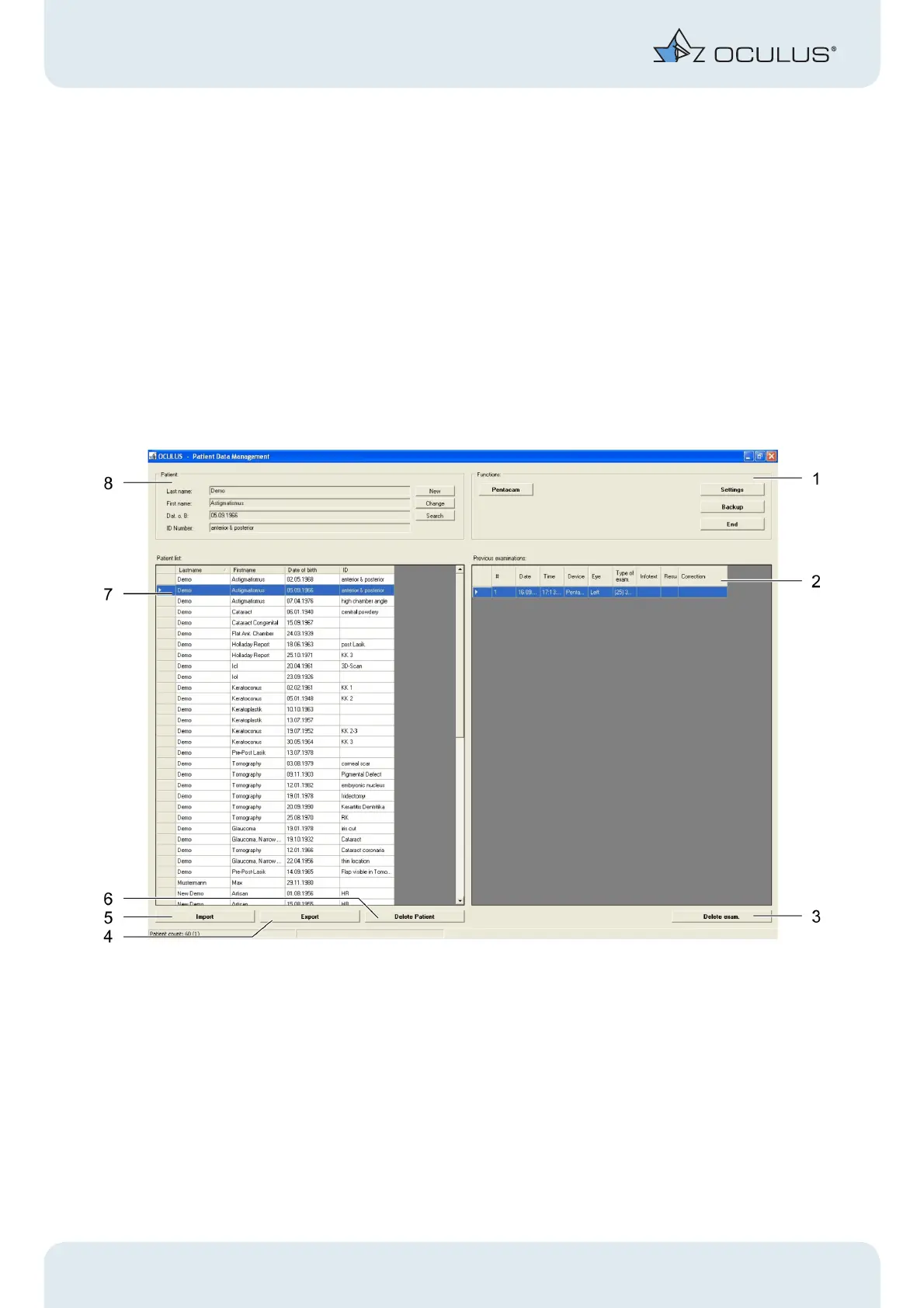
Fig. 7-1: Patient Data Management
Î To enter the Pentacam program, you must either enter a new patient (8) into the
"Patient" group box or select an existing patient (2) from the list.
1 "Functions" group box 5 [Import] button
2 Previous examinations 6 [Delete Patient] button
3 [Delete exam.] button 7 Patient list
4 [Export] button 8 "Patient" group box



 To Next Page