Hold Position: For more severe odor problems, turn dial to the left onto
the indenite “Hold” position and vacate the space. This will allow for much
longer sanitization. Upon return be sure to turn the dial to “O” immediately
and open outside windows and doors until sanitization smell is gone.
Warning: For use in unoccupied spaces only. Excess ozone
concentrations can cause mucous membrane and respiratory irritation. If
you detect the sanitizing smell when you walk into the room, make sure the
Timer dial is “O”. Then ventilate the area and vacate the room.
Cleaning and Maintenance
When the lter on the back of the unit is dirty, the ozone plates should be
cleaned. Some environments will cause ozone output to be reduced in a
shorter time, but other environments may take longer.
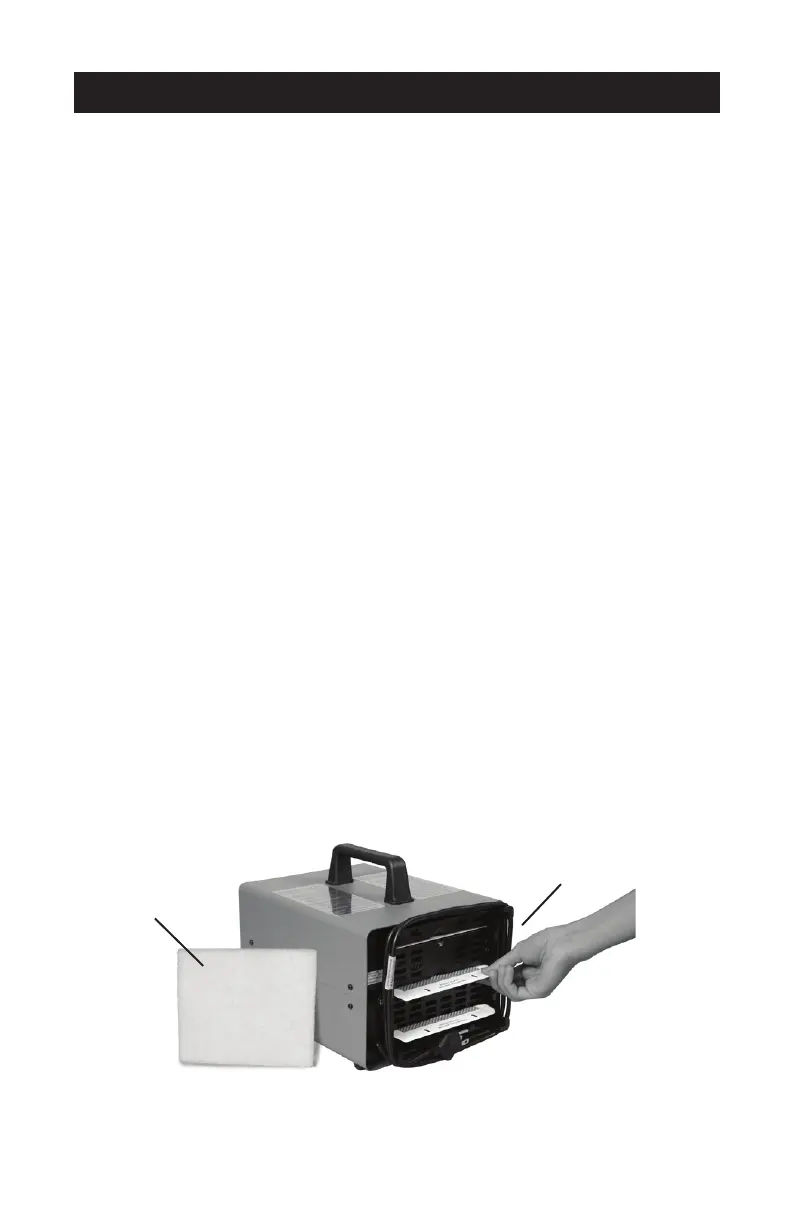
To clean a plate, turn the unit o and unplug from outlet. First, remove
the optional lter. Next, pull ceramic plate out of slot in rear of unit. Spray
the stainless steel screen and ceramic plate using a spray cleaner, grease
cutting detergent, or a spray liquid cleaner with ammonia or chlorine. Gently
scrub with a sti brush or scouring pad. Be careful not to drop the plate.
Rinse plate unit thoroughly in hot water and dry completely before
reinstalling. Reinstall plate, making sure it is ush with back of the unit. UV
models come with a UV bulb which should be replaced after 8000 hours’
usage or every 2 years, whichever comes rst.
Optional Air
Filter to Keep
Plates Clean
Easy to Install and
Remove Ceramic Plates
INSERT PLATES BEFORE USE
4



 To Next Page