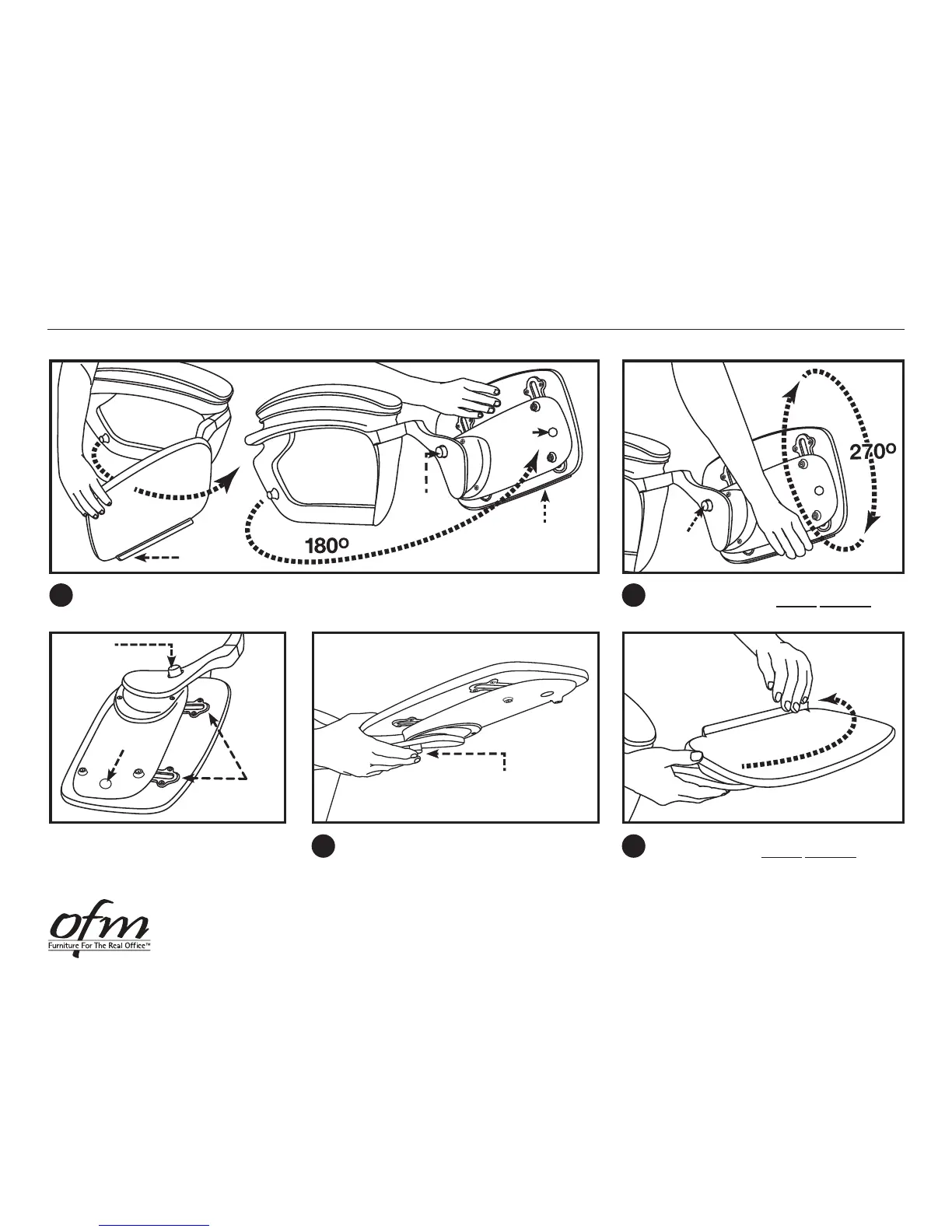
Pull tablet outward 180° from it’s Tucked Position at side of chair until it stops. Tablet is now
straight out and ready to be rotated.
180
O
With right hand on Bottom Edge/Shelf Edge of
tablet, lift up and over counter clockwise 270°
until it stops.
Tablet
Lock/Release
Button
Bottom Edge/
Shelf Edge
Bottom Edge/
Shelf Edge
Connection
Magnet
2
1
Tablet
Lock/Release
Button
Place right hand under tablet mechanism at the
bottom right corner and push the in the Tablet
Lock/Release Button. This will allow the tablet
to be rotated from this position.
Tablet
Lock/Release
Button
3
Distance
Adjustment
Channels
Connection
Magnet
Tablet
Lock/Release
Button
With left hand on Tablet Shelf Edge, pull
tablet towards you counter clockwise 90° until
it stops. Let go of Tablet Lock/Release Button
when tablet begins to rotate. Tablet is now
in nal position. At this time, Tablet Distance
from body can be adjusted.
4
Notice the Tablet Lock/Release
Button, The Distance Adjustment
Channels and the Connection
Magnet underneath the tablet.
NOTE:
5-2013OFM • 161 Tradition Trail • Holly Springs, NC • 27540
ORO Chair Tablet Arm Operating Instructions — OPEN Tablet


 To Next Page