Need help?
Do you have a question about the OFM ORO100 and is the answer not in the manual?
Insert casters into the chair base and cover the gas lift with bellows.
Attach the seat mechanism to the chair seat using screws.
Insert the gas lift into the seat mechanism on the chair base.
Attach chair arms to the chair seat using screws.
Attach the chair back to the chair arms using screws.
Cover screw holes with provided arm caps.
Pull the tablet outward 180° from its tucked position.
Lift and rotate the tablet counter-clockwise 270°.
Push the tablet lock/release button to allow rotation.
Pull tablet 90° and adjust its distance from the body.
Press the lock button and rotate the tablet clockwise 90°.
Lift and rotate the tablet clockwise 270°.
Tablet is now straight out and ready to be tucked away.
Pull tablet 180° towards the chair arm to return to tucked position.
 General
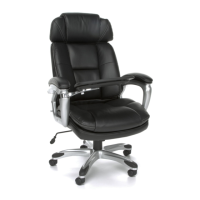
| Product Name | OFM ORO100 |
|---|---|
| Category | Indoor Furnishing |
| Type | Office Chair |
| Color | Black |
| Adjustable Height | Yes |
| Tilt Mechanism | Yes |
| Armrests | Yes |
| Wheels | Yes |
| Wheel Type | Caster |
| Material | Mesh |

 To Next Page