3ofs.com imagine a place® 800.521.5381 Assembly instructions
Impulse G2 assembly instructions
Part #: 1571835
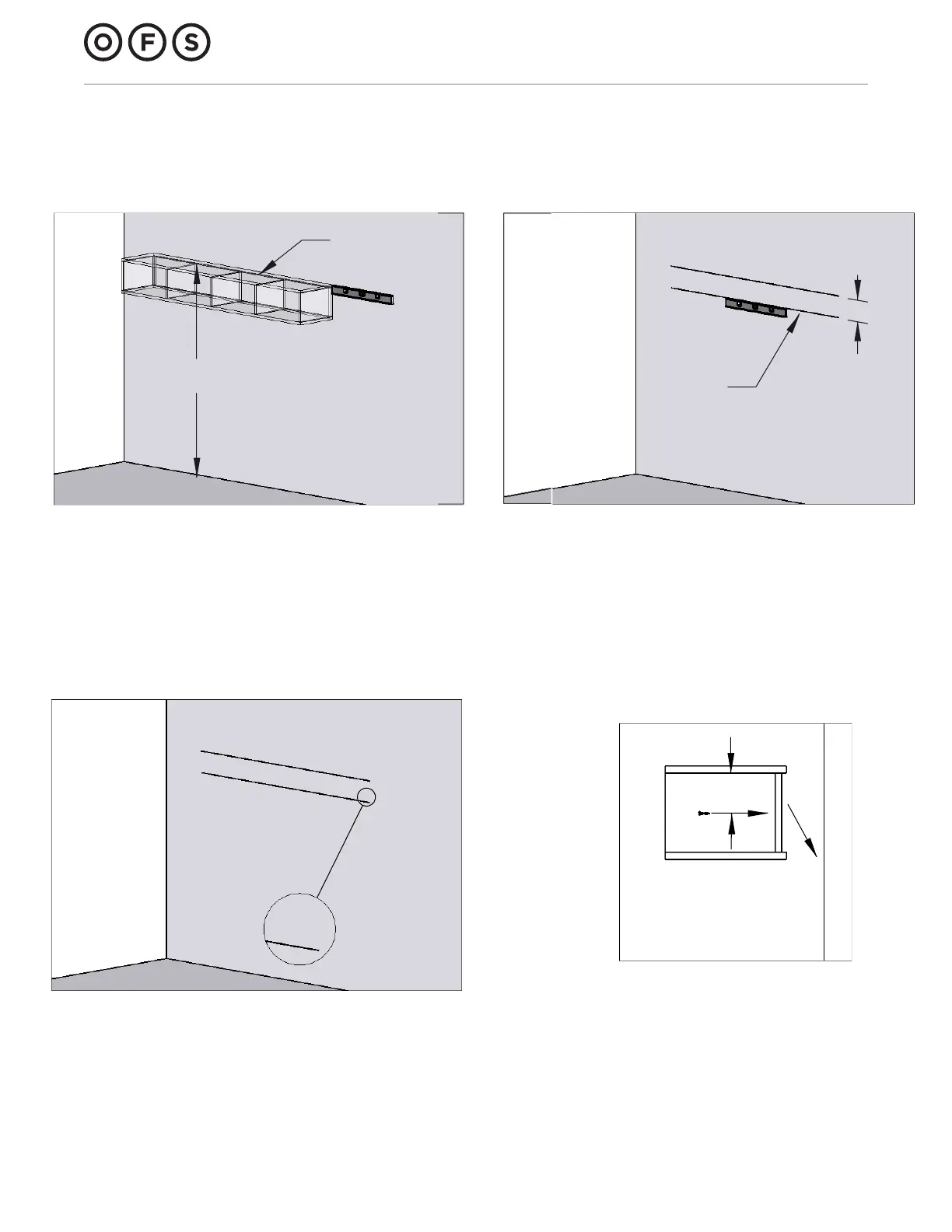
Wall mounted storage installation
1. Determine desired location of unit. Be sure to
leave enough space below unit for computer
monitors or other equipment that may be placed
under the cabinet.
Measure from the floor to where the top of the
cabinet will be and lightly draw a level, horizontal
line (Line A) using a carpenter's level.
2. Draw another line (Line B) 6.25" below line A. This
is where the mounting rail will be fastened to
the wall.
3. Drill holes for appropriate wall fasteners through
mounting rail.
Align bottom edge of mounting rail on Line B and
mark location of mounting holes.
Fasten mounting rail to wall.
4. Hang cabinet on mounting rail.
The mounting rail attached to the back of the
cabinet will rest on the wall mounted rail.
Secure unit to wall by screwing # 8 x 1 ¼" pan
head screw(s) (HK-100) into back panel.
Line A
Line B
6.25"
Desired
height
4"
Side view



 To Previous Page