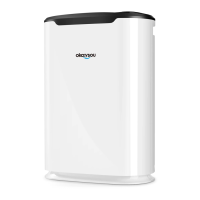
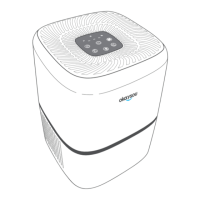
The Okaysou Apollo 718 is an H13 True HEPA Air Purifier designed to enhance indoor air quality and provide a cleaner, healthier living environment. This user manual outlines the device's functions, usage, and maintenance to ensure optimal performance and user satisfaction.
Function Description
The Apollo 718 air purifier utilizes a unique 3-stage purification technology to effectively remove various airborne contaminants. The purification process begins with a Washable Pre-filter, which captures large particles such as dust, lint, fibers, and hair. This initial stage is crucial for maximizing the life of subsequent filters by protecting them from premature clogging. Following the pre-filter, the air passes through an H13 True HEPA Filter. This high-efficiency filter is designed to remove at least 99.9% of dust, fiber, and any airborne particles with a size of 0.1 microns, including pollen, pet dander, and mold spores. The final stage of purification involves a High-Efficiency Activated Carbon Filter, which physically absorbs unwanted odors and fumes. This filter is particularly effective at removing compounds such as formaldehyde, benzene, ammonia, hydrogen sulfide, and volatile organic compounds (VOCs), ensuring that the air released back into the room is fresh and free from unpleasant smells.
The device is equipped with a Control Panel and an Ambient Light. The control panel allows users to manage various settings, while the ambient light indicates the device's operational status. The air purifier is designed to circulate air efficiently, covering rooms of up to 500 sq.ft. with two air changes per hour or 300 sq.ft. with four air changes per hour, making it suitable for medium to large rooms.
Usage Features
Operating the Apollo 718 is straightforward, with several user-friendly features accessible via the control panel.
Installation:
Before first use, it is essential to correctly install the filter. Users must remove all packaging from the machine and place it on a dry, flat surface. The front cover plate is then pressed and pulled out from the unlocking direction, allowing the base to be taken out. The plastic packaging around the filter must be removed before inserting the filter into the air purifier. Finally, the front cover plate is reinserted into the fixed groove and pushed into the slot of the machine. It is crucial to ensure the power plug is disconnected during installation and transportation. The air purifier should not be run without the filter.
Placement:
For optimal air circulation, the air inlet and outlet of the machine should be at least 20 cm away from any obstacles. It is recommended to place the air purifier at least 1 meter away from TVs, radios, and other electrical appliances, and to avoid plugging its power cord into the same socket as these devices. Prolonged use in the same spot may cause surrounding walls to become contaminated, so occasional repositioning might be beneficial. Keeping the air inlet and outlet unblocked is vital for adequate ventilation and maximum purification efficiency.
Controls:
The control panel features several buttons for managing the air purifier's functions:
- Timer Button: Allows users to set the operating time for 2, 4, 6, or 8 hours.
- Filter Reset Indicator: This light illuminates when it's time to replace the filter. After replacing the filter, press the filter reset button for 3 seconds to turn off the indicator light.
- On/Off Button: Powers the device on or off.
- Display Off Button: Turns off all indicator lights on the control panel, which can be useful for nighttime operation.
- Fan Speed Button: Cycles through different fan speeds: Low, Medium, High, and Sleep mode.
- Timer Indicator: Displays the selected timer setting.
- Fan Speed Indicator: Shows the current fan speed setting.
Sleep Mode:
When "sleep mode" is selected, the sleep indicator will light up and then gradually dim. In this mode, the fan operates at a low speed, and other indicators turn off to create a quiet environment suitable for sleeping. Pressing any button (except the power button) will exit sleep mode.
Safety Precautions:
Several safety guidelines must be followed to prevent fire, electric shock, or injury:
- Do not touch the power plug with wet hands.
- Use only the specified power supply and linked equipment.
- Ensure the plug is fully inserted into the socket.
- Do not use damaged plugs or loose power outlets.
- Avoid damaging the power cord and socket; do not bind, cut, refit, over twist, twist, poke, pull, or place heavy objects on wires or sockets.
- Regularly clean the power plug with a dry cloth to prevent dust accumulation.
- Do not disassemble or refit the air purifier without authorization.
- Do not place rods or other metal objects at the air outlet or opening.
- Avoid using benzene, thinner, or other solvents for cleaning.
- Hold the plug when pulling it out, not the wire.
- Do not use the air purifier in greasy environments (e.g., kitchens), high temperature/humidity areas (e.g., bathrooms), or rooms with chemicals.
- Prevent volatile or combustible materials (e.g., tobacco, sparks) from entering the air purifier.
- Do not wet the machine body.
- Unplug the air purifier before moving it, and move it slowly without pulling the power cord or while it is running.
- Immediately unplug the air purifier if any abnormal conditions occur, such as a non-working switch, tripped circuit breaker, abnormally hot power cord/plug, burnt odor, abnormal sound/vibration, or any other fault.
- The appliance has a polarized plug; ensure it fits correctly into the outlet.
Maintenance Features
Proper maintenance is crucial for extending the life and ensuring the efficiency of your Apollo 718 air purifier.
Cleaning the Air Purifier:
- Always unplug the air purifier before cleaning.
- Wipe the outside of the air purifier with a soft, dry cloth. If necessary, a damp cloth can be used, followed by immediate drying.
- Vacuum the inside of the air purifier to remove accumulated dust.
- Do not immerse the product in water or any other liquid.
- Avoid using abrasives, corrosive, or flammable cleaning agents (such as bleach or alcohol) on any parts of the air purifier.
- The original filter is not washable and should not be cleaned with water.
When to Change the Filter:
The filter should typically be replaced every 6-8 months. However, the replacement frequency may vary depending on how often the air purifier is used and the level of air pollution in the environment. In highly polluted areas, the filter may need to be replaced more frequently, even if the device is off.
Indicators that the filter may need replacement include:
- Increased noise when the air purifier is on.
- Decreased airflow.
- Unusual odors emanating from the device.
- A visibly clogged filter.
Important Notes on Filter Replacement:
- The air purifier can still operate normally even if the filter replacement indicator flashes and the buzzer sounds a "Ding Ding" alarm.
- Always shut down and unplug the air purifier before replacing the filter.
- After replacing the filter, if the filter reset indicator remains lit, press the filter reset button for 3 seconds to reset it.
- Remember to remove the plastic packaging from the new filter before inserting it into the air purifier.
- To maintain optimal performance, only use official Okaysou filters, which can be ordered from the official website.
Long Idle Periods:
If the air purifier will not be used for an extended period, unplug it (as standby mode still consumes power). Wrap both the air purifier and the filter in plastic packaging and store them in a dry and well-ventilated place to prevent moisture damage. Storing the air purifier flat or upside down may lead to product failure.
Troubleshooting:
The manual provides a troubleshooting guide for common issues such as the air purifier not turning on, the fan not working, unusual noise, strange smells, or reduced airflow. For issues that cannot be resolved using the guide, users are encouraged to contact Okaysou customer support.
Warranty and Support:
Okaysou offers a warranty covering material, craftsmanship, and service from the date of purchase. Defective products due to manufacturer flaws are eligible for replacement, and refunds are available within the first 30 days of purchase for the original purchaser. The warranty does not cover damage from abuse, accidents, alterations, misuse, tampering, vandalism, improper maintenance, or damage during return transit. Users can register their 2-year warranty online. For any questions or support needs, Okaysou customer support is available via email.


 To Next Page
 General