CONTROL PANEL
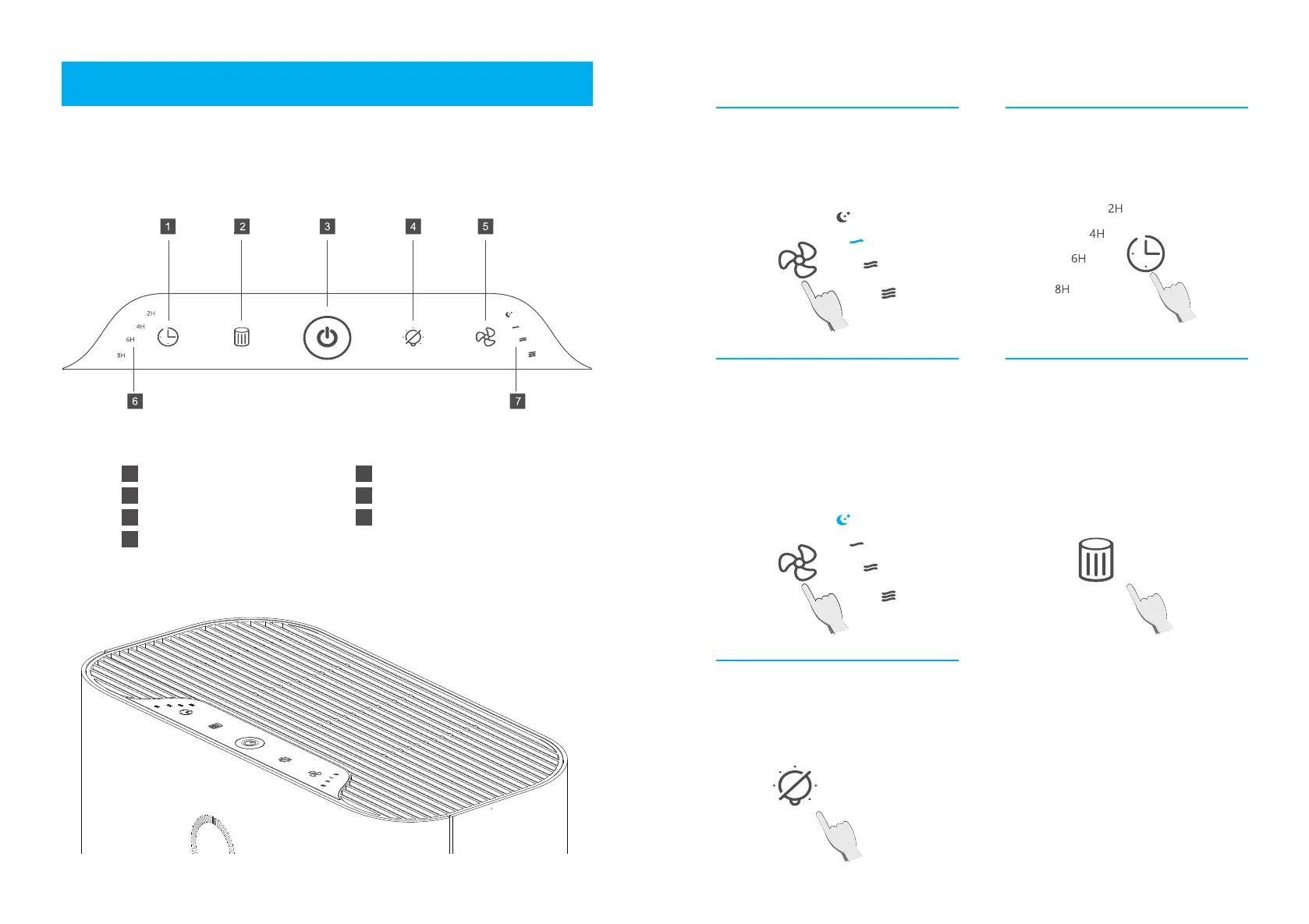
CONTROLS
Timer Button
Filter Reset Indicator
On/Off Button
Display Off Button
1
2
3
4
Fan Speed Button
Timer Indicator
Fan Speed Indicator
5
6
7
Fan Speed Setting
Press the fan speed button to choose
from Low, Medium, High, and Sleep
mode.
Timer Setting
Cycle through 2/4/6/8 hours based on
different needs.
Sleep Mode
When choosing the “sleep mode”, the
sleep indicator will light up and then
go out after a period of time. In the
sleep mode, the fan runs in a low
speed, and other indicators turn off.
Press any button (except the power
button) to exit the sleep mode.
Display Off Button
The ambient light will light up when
running the air purifier. Press the
“display off” button to turn off all the
light.
Filter Reset Indicator
Press the “filter reset” button for 3
seconds after replacing the filter, and
the indicator light for filter reset will
turn off.
1110
GETTING TO KNOW YOUR AIR PURIFIER


 To Next Page