BV1270SIP-OD OD Quick Start Guide Oki Electric Industry Co.,Ltd.
Page 23 of 33
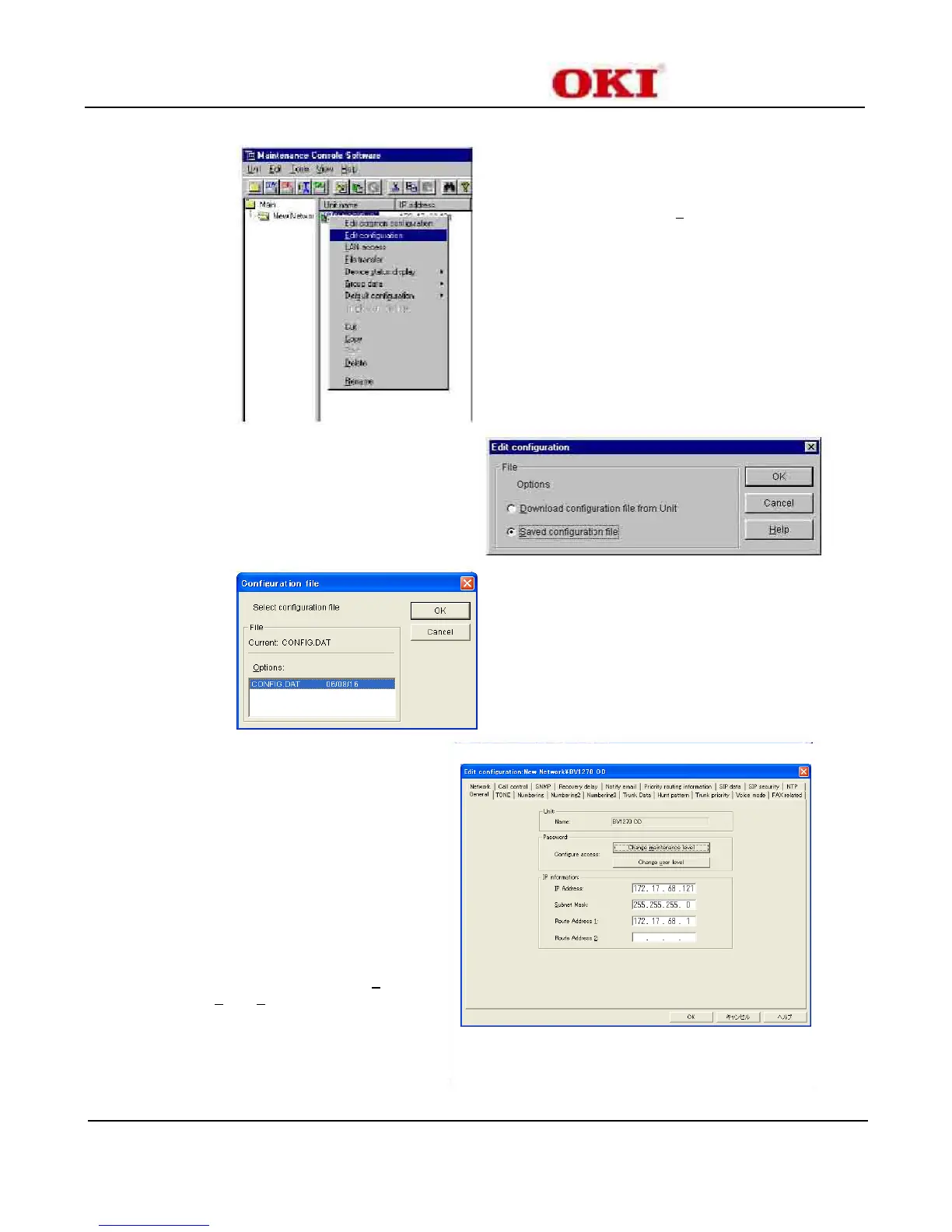
Click “BV1270 OD” under the Unit name
Right-click mouse and select “Edit configuration”
Select “Saved configuration file”
Click “OK”
This selects the default CONFIG.DAT configuration file.
A backup file called CONFIG.OLD is automatically created.
This is the Edit configuration Wizard.
A Tabbed Notebook Set to configure parameters related to
the BV1270SIP-OD E&M unit.
The “General” Tab is the first tab selected by default.
Note:
It is a good idea to Always double check the IP
Information to ensure the correctness of these settings. If
incorrect entries are discovered then select “Unit” from the
menu bar, “Edit Data”, “Change unit information” to recall
the Setup Wizard.
Repeat steps 6-11.


 To Next Page