9
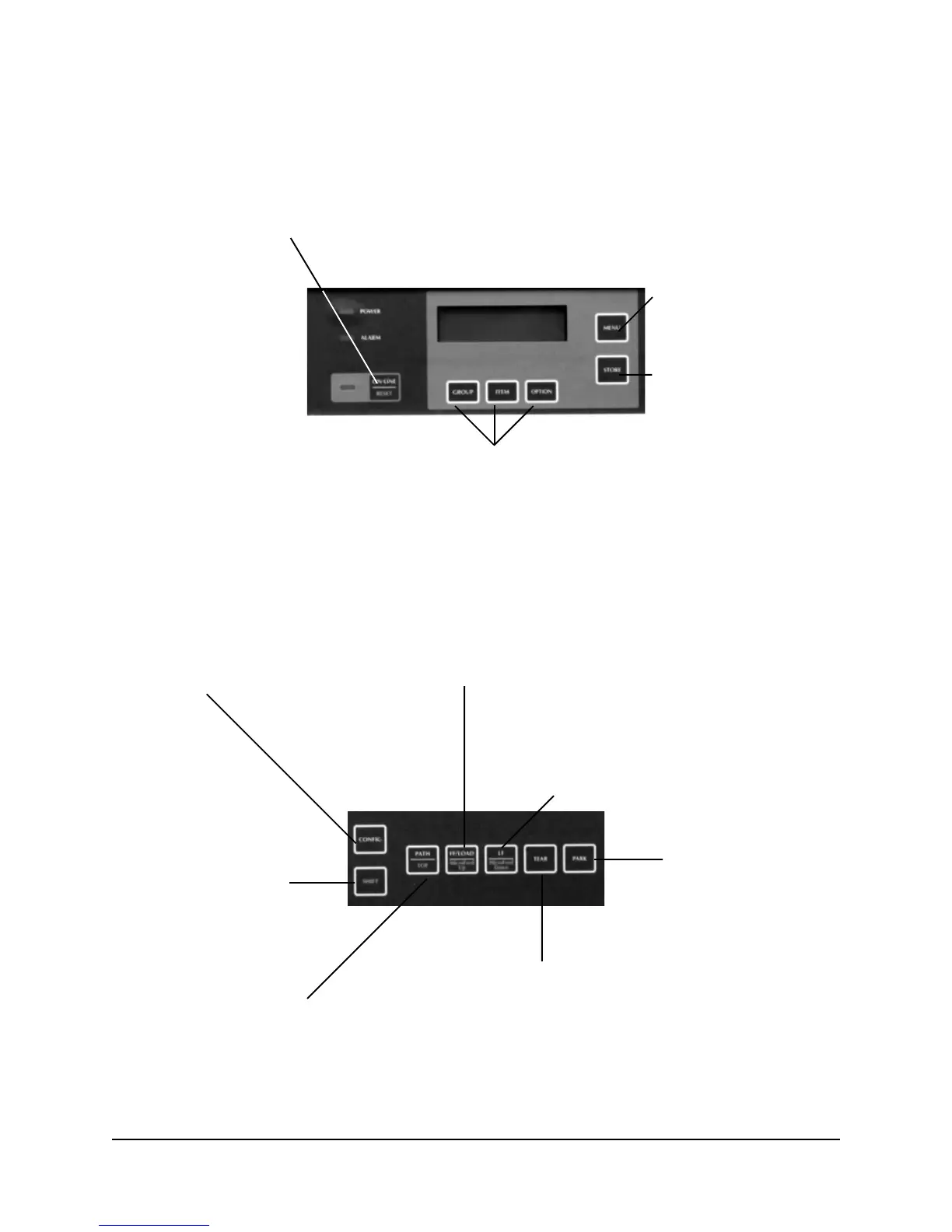
Print Mode: Control Panel Buttons
CONFIG Button:
With printer off-line and no data
being sent: press to switch between
menu configurations CFG1 and CFG2.
See Section 1 for information on how
to set CFG1 and CFG2.
PATH/TOF Button:
With printer off-line:
Press to switch paper paths.
Hold to set current paper position as Top of Form.
LF/Micro Feed Down Button:
Press to execute line feed.
With SHIFT, press for reverse fine line feeds
(1/144-inch increment).
PARK Button:
Press to park continuous
form currently in paper
path.
TEAR Button:
Press to move form up to tear position
FF/LOAD/Micro Feed Up Button:
Press to move paper to next Top of Form.
If paper is parked, press to feed paper into print position.
With SHIFT, press for fine line feeds (1/144-inch increments).
SHIFT Button:
Press and hold to engage
alternate (lower) button
functions.
ON-LINE/RESET Button:
Press: switches printer on/off line.
With SHIFT, hold to reset printer.
With SHIFT and printer off-line, press to initialize printer.
MENU Button:
Press to enter Menu mode.
STORE Button:
No function during printing
GROUP / ITEM / OPTION Buttons:
For use in Menu Mode.







 To Next Page