OKRA OKRA
34
35
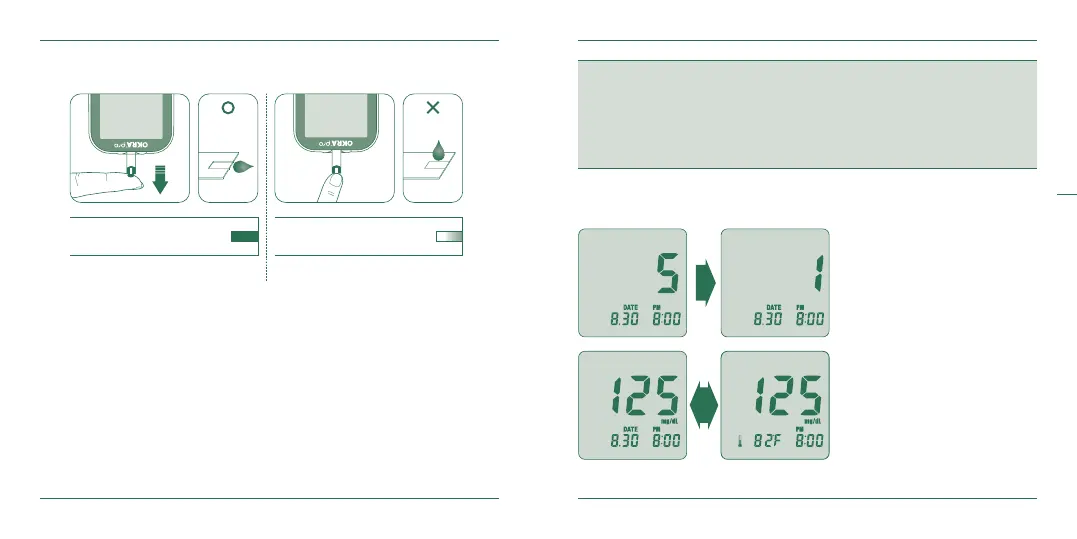
- Place the edge of the test strip to the drop of blood.
- The blood will be automatically ‘drawn’ into the test strip channel.
- When your blood sample size is enough, your meter will automatically count down.
- Apply the blood to the glucose test strip and do not take o your nger until you
get the completion sound.
Step 3
OKRA Pro test meter only requires 0.5 uL sample volume.
CAUTION
1. If the countdown does not start, do not add more blood to the glucose test strip. Discard the
glucose test strip and re-start testing.
2. If you do not conduct the test within 3 minutes, the glucose test meter will automatically power
o to save battery life. In this case the test procedure should start again from the beginning.
3. You may get an inaccurate result if the blood sample is not completely lled.
Correct
Completely Filled
Incorrect
Poorly lled
- After the beeping sound, the
test will start automatically
and your test result will appear
in 5 seconds. It will begin
counting down from 5 to 1
second on the LCD display
window. When nished, the
LCD window will display the
result of your blood glucose
level, temperature and time.
Step 4


 To Next Page