OKRA OKRA
20
21
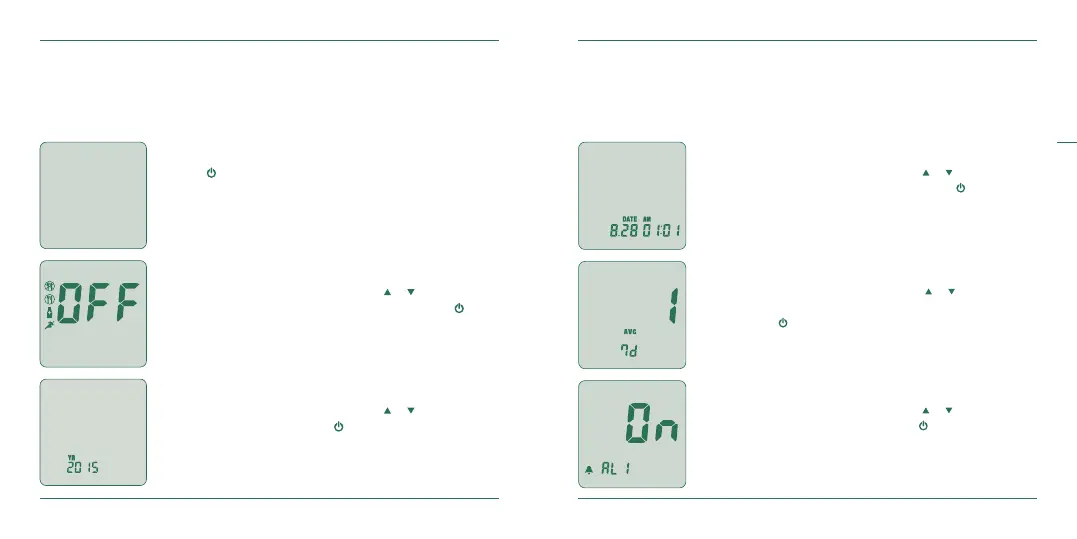
Setting Your Meter
The OKRA Pro meter has a wide variety of functions. In the setup mode you have the
ability to turn activity/meal ags on or o, set the date/time, designate the number
of days for your glucose average calculation and set up to ve daily alarms.
Power On
Press for at least 3 seconds.
User Activity Option
After pressing and releasing either the or buttons to turn
the User Activity Option on/o, conrm by pressing
.
Year
After pressing and releasing either the or buttons to set
the year, conrm by pressing
.
Date / Time
After pressing and releasing either the or buttons to set
the date and time, conrm both by pressing
.
Number of days for average
After pressing and releasing either the or buttons to set
the number of days (1~99) for average calculation, conrm
by pressing
.
Alarm on/o
After pressing and releasing either the or buttons to turn
the alarm on/o, conrm by pressing
.


 To Next Page