EasyManua.ls Logo

Okuma OSP-U100M - Return Search and Sequence Restart

Okuma OSP-U100M
511 pages
Print Icon
To Next Page IconTo Next Page
To Previous Page IconTo Previous Page
Loading...
4203-E
P-93
SECTION
5
AUTOMATIC
MODE
OPERATION
6.
Return
Search
and
Sequence
Restart
When
the
machining
cycle
is
interrupted
during
automatic
operation
because
of
tool
breakage
or
other
troubles,
this
function
is
used
to
restart
the
operation
after
necessary
measures
such
as
tool
replacement
have
been
taken.
After
locating
the
sequence
pointer
to
the
specified
sequence
by
return-search-operation,
in
which
the
commands
are
processed
in
the
CPU,
press
the
SEQ.
RESTART
switch.
This
positions
the
axes
at
the
point
commanded
last
at
the
manual
cutting
feedrate.
Press
the
CYCLE
START
switch,
then
the
operation
will
be
resumed
from
the
same
sequence.
6-1
.
Return
Search
When
the
main
program
is
selected
correctly
in
the
automatic
mode,
carry
out
the
steps
following:
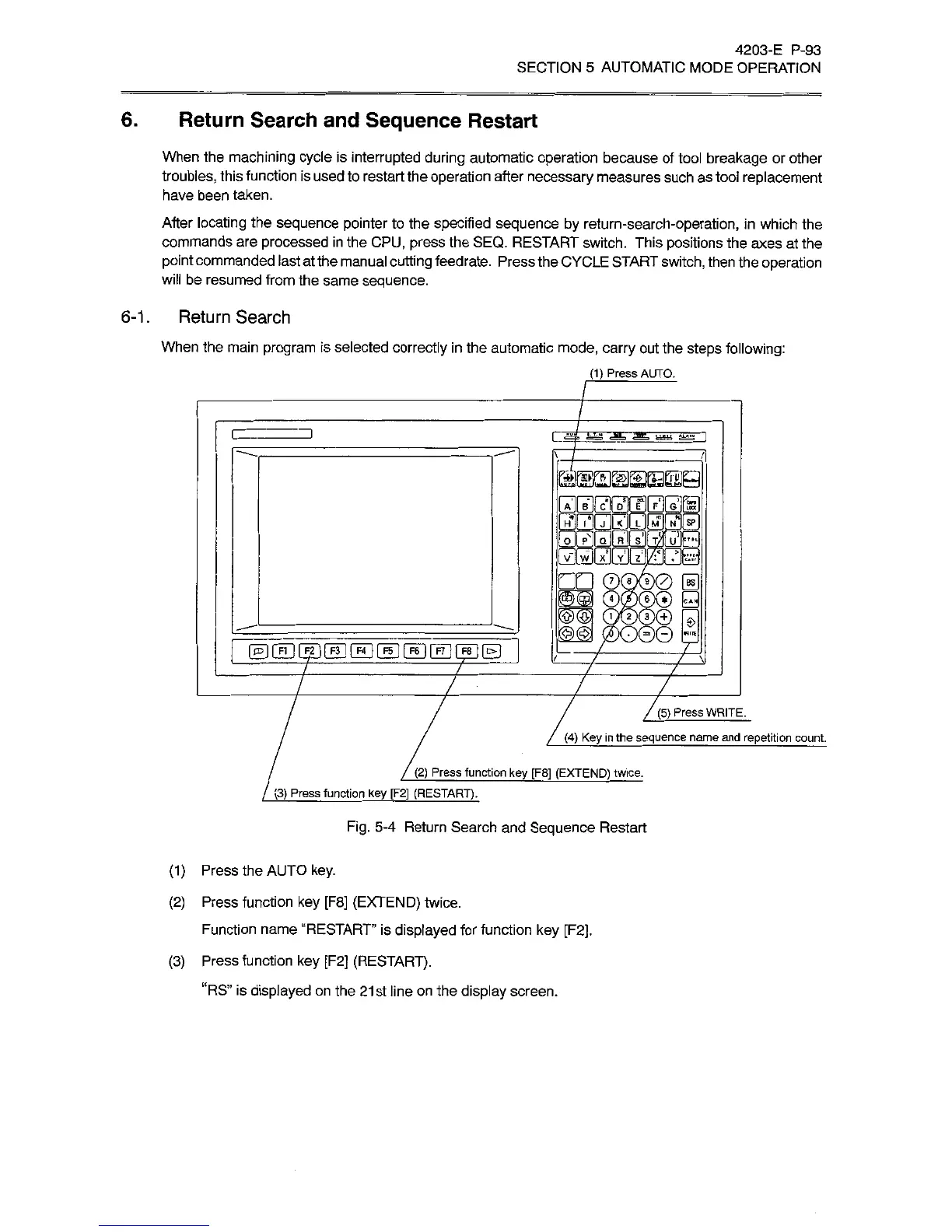
(1)
Press
AUTO.
I
Hi
MIJT
K'I
L
1|MTH|[SP|
a
jf)(V)(7)
BS
1
g®©
|]
©
i
@<ga
z
7
7
/
/
(5)
Press
WRITE.
(4)
Key
in
the
sequence
name
and
repetition
count.
(2)
Press
function
key
[F8]
(EXTEND)
twice.
(3)
Press
function
key
[F2]
(RESTART).
Fig.
5-4
Return
Search
and
Sequence
Restart
(1)
Press
the
AUTO
key.
(2)
Press
function
key
[F8]
(EXTEND)
twice.
Function
name
“RESTART”
is
displayed
for
function
key
[F2].
(3)
Press
function
key
[F2]
(RESTART).
“RS”
is
displayed
on
the
21st
line
on
the
display
screen.

Related product manuals