EasyManua.ls Logo

Okuma OSP-U100M - Page 36

Okuma OSP-U100M
511 pages
Print Icon
To Next Page IconTo Next Page
To Previous Page IconTo Previous Page
Loading...
4203-E
P-17
SECTION
1
FOREWORD
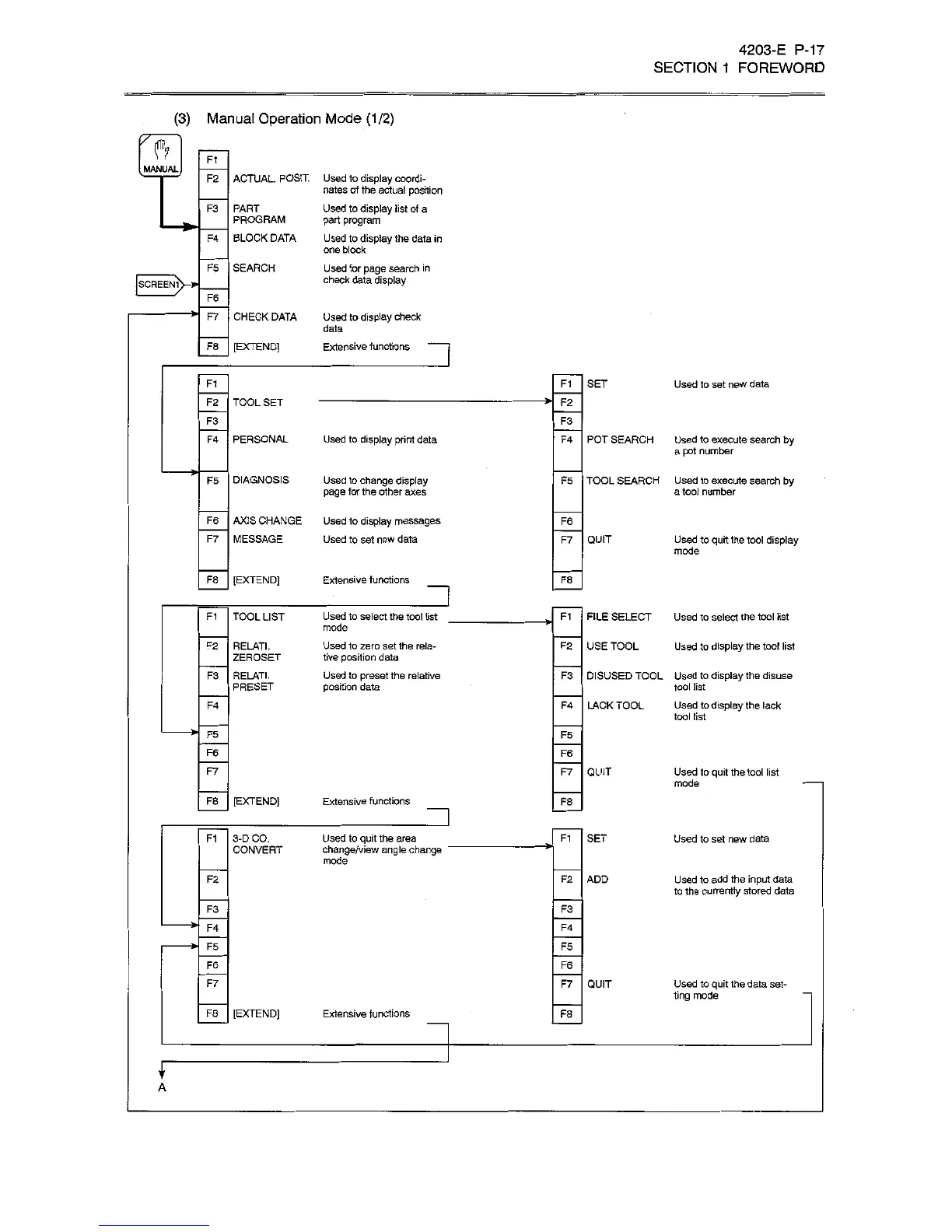
(3)
Manual
Operation
Mode
(1/2)
ft
Ft
MANUAL
ACTUAL.
POSIT.
F2
Used
to
display
coordi¬
nates
of
the
actual
position
Used
to
display
list
of
a
part
program
Used
to
display
1he
data
in
one
block
Used
for
page
search
in
check
data
display
F3
PART
PROGRAM
BLOCK
DATA
F4
F5
SEARCH
SCREEN1
F6
CHECK
DATA
Used
to
display
check
F7
data
F8
[EXTEND]
Extensive
functions
F1
F1
SET
Used
to
set
new
data
TOOL
SET
F2
*ÿ
F2
F3
F3
F4
PERSONAL
Used
to
display
print
data
F4
POT
SEARCH
Used
to
execute
search
by
a
pot
number
TOOL
SEARCH
Used
to
execute
search
by
a
tool
number
F5
DIAGNOSIS
Used
to
change
display
page
for
the
other
axes
F5
AXIS
CHANGE
F6
Used
to
display
messages
Used
to
set
new
data
F6
MESSAGE
F7
F7
QUIT
Used
to
quit
the
tool
display
mode
F8
Extensive
functions
[EXTEND]
F8
n
TOOL
LIST
F1
Used
to
select
the
tool
list
mode
Used
to
zero
set
the
rela¬
tive
position
data
Used
to
preset
the
relative
position
data
FILE
SELECT
Used
to
select
the
tool
list
F1
*ÿ
F2
RELATE
ZEROSET
USE
TOOL
F2
Used
to
display
the
tool
list
F3
RELATE
PRESET
DISUSED
TOOL
Used
to
display
the
disuse
tool
list
LACK
TOOL
Used
to
display
the
lack
tool
list
F3
F4
F4
F5
F5
F6
F6
F7
QUIT
F7
Used
to
quit
the
tool
list
mode
F8
[EXTEND]
Extensive
functions
F8
F1
3-D
CO.
CONVERT
Used
to
quit
the
area
change/view
angle
change
mode
F1
SET
Used
to
set
new
data
F2
F2
ADD
Used
to
add
the
input
data
to
the
currently
stored
data
F3
F3
>
F4
F4
F5
F5
F6
F6
F7
QUIT
F7
Used
to
quit
the
data
set¬
ting
mode
F8
[EXTEND]
Extensive
functions
F8
f
A

Related product manuals