EasyManua.ls Logo

Okuma OSP-U100M - Page 407

Okuma OSP-U100M
511 pages
Print Icon
To Next Page IconTo Next Page
To Previous Page IconTo Previous Page
Loading...
4203-E
P-385
SECTION
3
DESCRIPTION
OF
PARAMETER
AND
SETTING
PROCEDURE
Parameter
Initial
Setting
Value
Setting
Range
Item
Contents
No.
MANUAL
skip
feedrate
clamp
value
Clamping
will
occur
when
the
manual
skip
feedrate
exceeds
this
setting
value.
85
0
1
to
10000
(mm/min)
Feedrate
varia¬
tion
ratio
during
teaching
IN
mode
Set
the
feedrate
variation
ratio
(variation
ratio
for
each
pressing
of
the
cursor
key)
during
the
teaching
IN
mode
applied
by
the
cutting
condition
change
function.
101
0
to
100
{%)
0
Spindle
speed
variation
ratio
during
teaching
IN
mode
Set
the
spindle
speed
variation
ratio
(variation
ratio
for
each
pressing
of
the
cursor
key)
during
the
teaching
IN
mode
applied
by
the
cutting
condition
change
function.
102
0
0
to
100
(%)
103*
Designation
of
parameter
punch
out
device
Set
the
default
device
name
used
for
the
parameter
punch
out
function.
0
Oto
11
Setting
Device
Name
0
TT:
(CNO)
CN1:
Channel
1
,
RS232C
1
2
CN2:
Channel
2.
RS232C
3
CN3:
Channel
3,
RS232C
CN4:
Channel
4,
RS232C
4
5
PP:
Parallel
puncher
6
MD1:
Memory
disk
FD0:
Channel
0,
3.5”
FD
interface
7
FD1
:
Channel
0,
3.5"
FD
interface
8
FD2:
Channel
1
,
3.5"
FD
interface
9
FD3:
Channel
2,
3.5”
FD
interface
10
Designation
of
device
for
parameter
read/verify
operation
104*
Set
the
default
device
name
used
for
the
parameter
read/verify
function.
0
Oto
11
Setting
Device
Name
TT:
(CNO)
0
CN1:
Channel
1,
RS232C
1
CN2:
Channel
2,
RS232C
2
CN3:
Channel
3,
RS232C
3
CN4:
Channel
4,
RS232C
4
PP:
Parallel
puncher
5
MD1:
Memory
disk
6
FDO:
Channel
0,
3.5”
FD
interface
7
FD1
:
Channel
0,
3.5”
FD
interface
8
9
FD2:
Channel
1
,
3.5”
FD
interface
10
FD3:
Channel
2,
3.5”
FD
interface
First
approach
speed
in
interac¬
tive
gaging
operation
Set
the
first
approach
speed
in
the
interactive
gaging
operation.
105
0
0
to
2000
(mm/min)
Indexing
offset
amount
110
Sets
the
touch
probe’s
indexing
offset
amount
for
one-direction
gauging
at
the
AUTO
gauging
function.
0
to
359
0
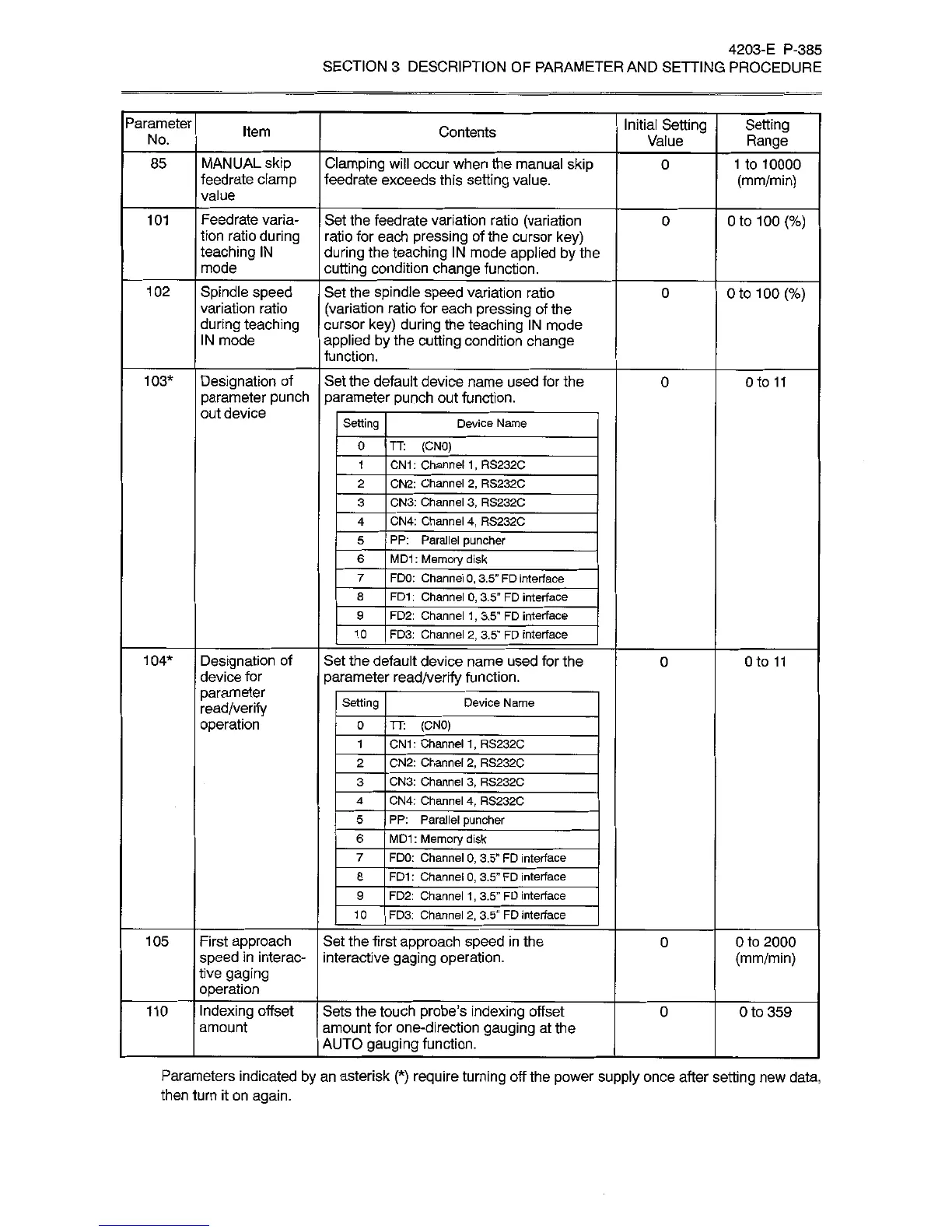
Parameters
indicated
by
an
asterisk
(*)
require
turning
off
the
power
supply
once
after
setting
new
data,
then
turn
it
on
again.