EasyManua.ls Logo

Okuma OSP-U100M - Page 409

Okuma OSP-U100M
511 pages
Print Icon
To Next Page IconTo Next Page
To Previous Page IconTo Previous Page
Loading...
4203-E
P-387
SECTION
3
DESCRIPTION
OF
PARAMETER
AND
SETTING
PROCEDURE
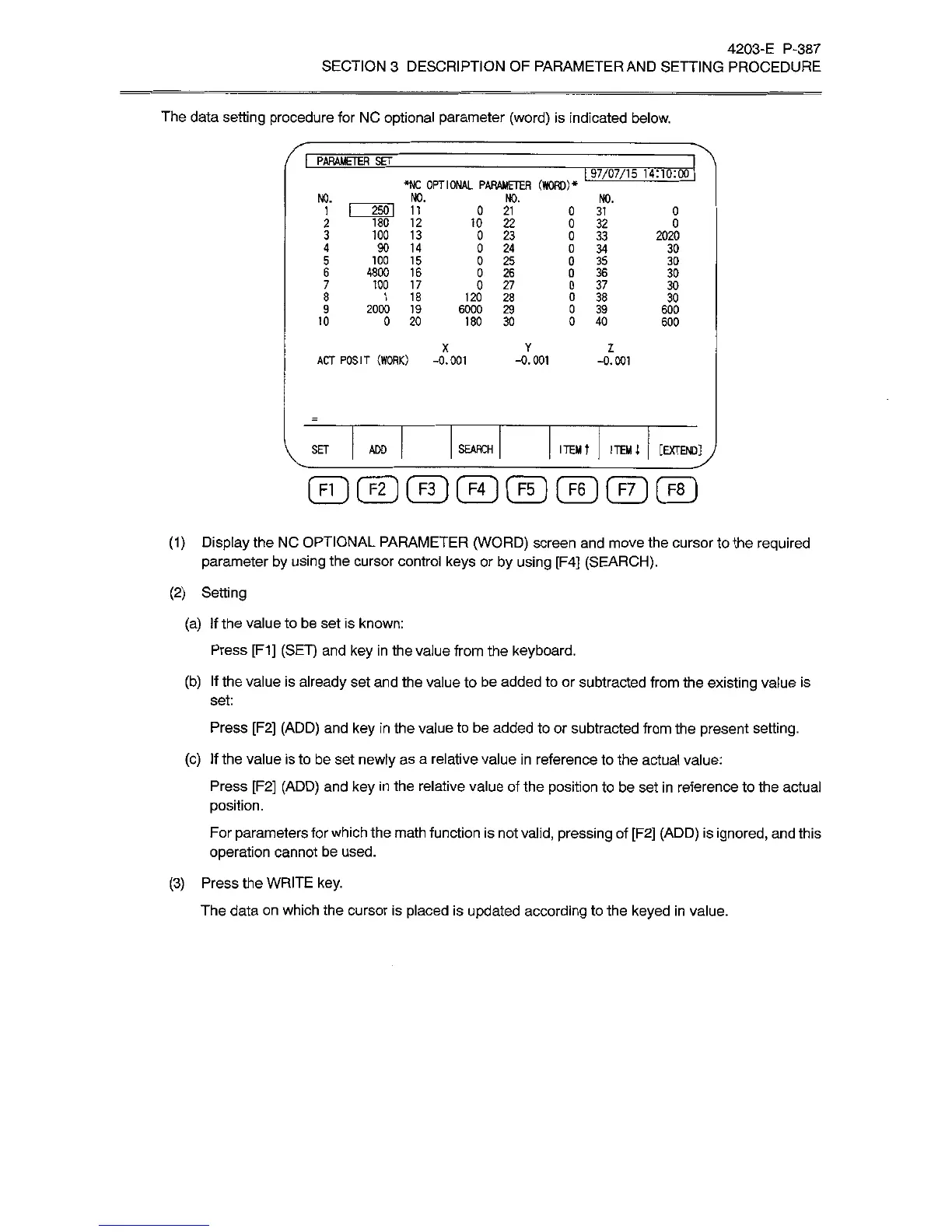
The
data
setting
procedure
for
NC
optional
parameter
(word)
is
indicated
below.
I
PARAMETER
SET
[
97/07/15
14110:00
*NC
OPTIONAL
PARAMETER
(WORD)*
NO.
NO.
NO.
NO.
~250l
IT
180
12
100
13
90
14
100
15
4800
16
100
17
1
18
2000
19
0
20
0
21
10
22
0
23
0
24
0
25
0
26
0
27
120
28
6000
29
180
30
0
31
0
32
0
33
0
34
0
35
0
36
0
37
0
38
0
39
0
40
1
0
2
0
3
2020
4
30
5
30
6
30
7
30
8
30
9
600
10
600
X
Y
2
ACT
POSIT
(WORK)
-0.001
-0.001
-0.001
ITEM
t
ITEM
i
[EXTEND]
SET
ADO
SEARCH
©©©©©©©©
(1)
Display
the
NC
OPTIONAL
PARAMETER
(WORD)
screen
and
move
the
cursor
to
the
required
parameter
by
using
the
cursor
control
keys
or
by
using
[F4]
(SEARCH).
(2)
Setting
(a)
If
the
value
to
be
set
is
known:
Press
[F1]
(SET)
and
key
in
the
value
from
the
keyboard.
(b)
If
the
value
is
already
set
and
the
value
to
be
added
to
or
subtracted
from
the
existing
value
is
set:
Press
[F2]
(ADD)
and
key
in
the
value
to
be
added
to
or
subtracted
from
the
present
setting.
(c)
If
the
value
is
to
be
set
newly
as
a
relative
value
in
reference
to
the
actual
value:
Press
[F2]
(ADD)
and
key
in
the
relative
value
of
the
position
to
be
set
in
reference
to
the
actual
position.
For
parameters
for
which
the
math
function
is
not
valid,
pressing
of
[F2]
(ADD)
is
ignored,
and
this
operation
cannot
be
used.
(3)
Press
the
WRITE
key.
The
data
on
which
the
cursor
is
placed
is
updated
according
to
the
keyed
in
value.