EasyManua.ls Logo

Okuma OSP-U100M - Page 424

Okuma OSP-U100M
511 pages
Print Icon
To Next Page IconTo Next Page
To Previous Page IconTo Previous Page
Loading...
4203-
E
P-402
SECTION
3
DESCRIPTION
OF
PARAMETER
AND
SETTING
PROCEDURE
Initial
Setting
Value
Bit
Parame¬
ter
No.
Contents
Set
1
SetO
No.
0
1
0
2
0
3*
A-axis
multi-turn
function
is
made
effective.
Effective
Ineffective
0
39
4*
B-axis
multi-turn
function
is
made
effective.
Effective
Ineffective
0
5*
C-axis
multi-turn
function
is
made
effective.
Effective
Ineffective
0
6
Animated
graphic
display
Not
Supported
0
supported
7
0
0*
CNO:
Designation
of
master
or
slave
station
for
RS232C
IF
channel
(DC
code)
CNO:
Use
of
RS/CS
control
in
units
of
RS232C
IF
channels
Slave
station
Used
Master
station
Not
used
0
CN1
:
Designation
of
master
or
slave
station
for
RS232C
IF
channel
(DC
code)
CN1:
Use
of
RS/CS
control
in
units
of
RS232C
IF
channels
1*
Slave
station
Used
Master
station
Not
used
0
CN2:
Designation
of
master
or
slave
station
for
RS232C
IF
channel
(DC
code)
CN2:
Use
of
RS/CS
control
in
units
of
RS232C
IF
channels
2*
Slave
station
Used
Master
station
Not
used
0
CN3:
Designation
of
master
or
slave
station
for
RS232C
IF
channel
(DC
code)
CN3:
Use
of
RS/CS
control
in
units
of
RS232C
IF
channels
3*
Slave
station
Used
Master
station
Not
used
0
40
CN4:
Designation
of
master
or
slave
station
for
RS232C
IF
channel
(DC
code)
CN4:
Use
of
RS/CS
control
in
units
of
RS232C
IF
channels
4*
Slave
station
Used
Master
station
Not
used
0
5
0
6*
In
read/punch
operation
of
RPD
or
PIP,
DC2
and
DC4
codes
are
not
input/output.
Input/
output
Not
0
input/outp
ut
Dummy
reading
and
DC
code
control
after
the
end
of
data
in
read
operation
of
RPD
or
PIP:
DC
code
control
type
2
without
end
code
DC3
(for
the
slave
station,
not
waiting
for
end
code
DC3
in
punch
operation)
7*
No
DC3
code
DC3
code
is
used
0
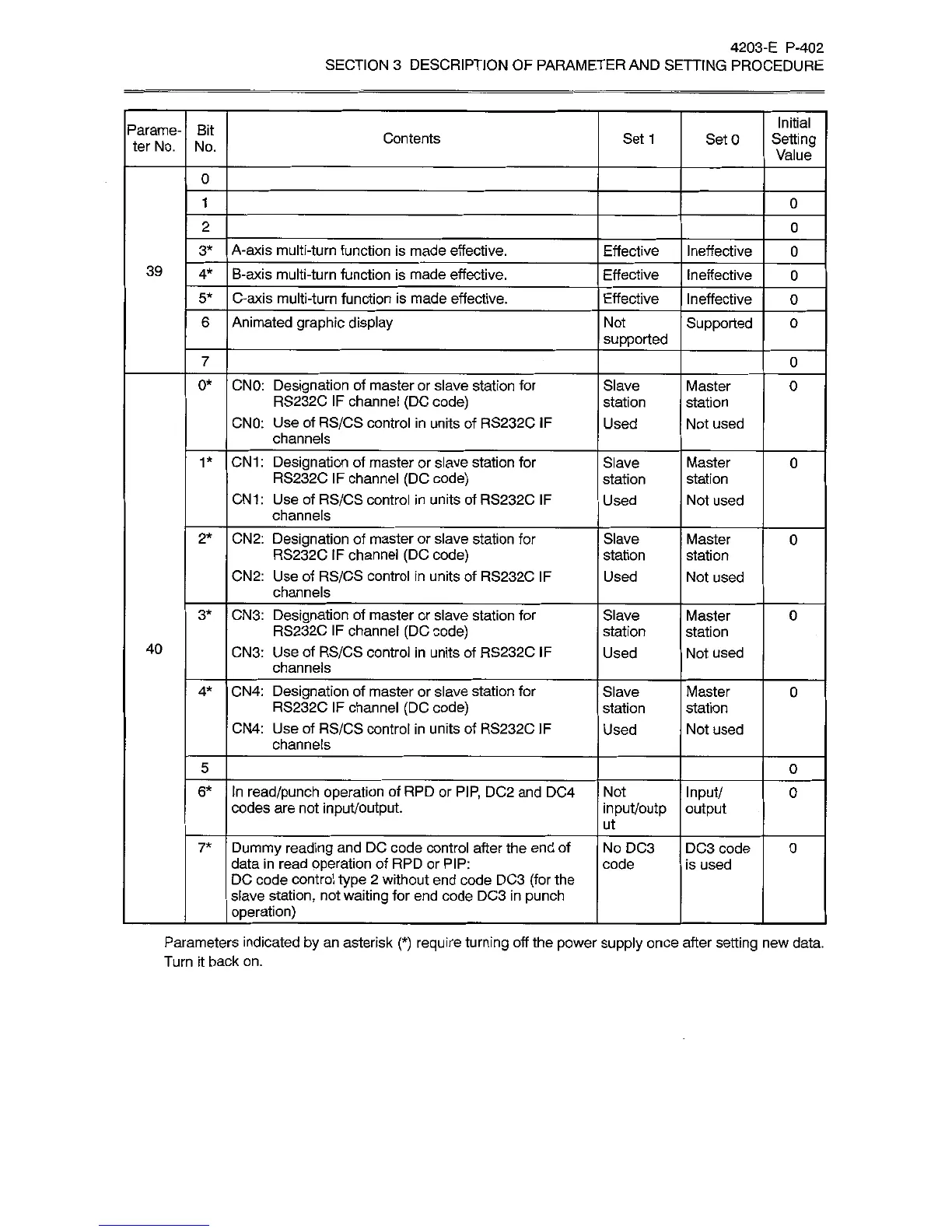
Parameters
indicated
by
an
asterisk
(*)
require
turning
off
the
power
supply
once
after
setting
new
data.
Turn
it
back
on.