EasyManua.ls Logo

Okuma OSP-U100M - Page 44

Okuma OSP-U100M
511 pages
Print Icon
To Next Page IconTo Next Page
To Previous Page IconTo Previous Page
Loading...
4203-E
P-25
SECTION
1
FOREWORD
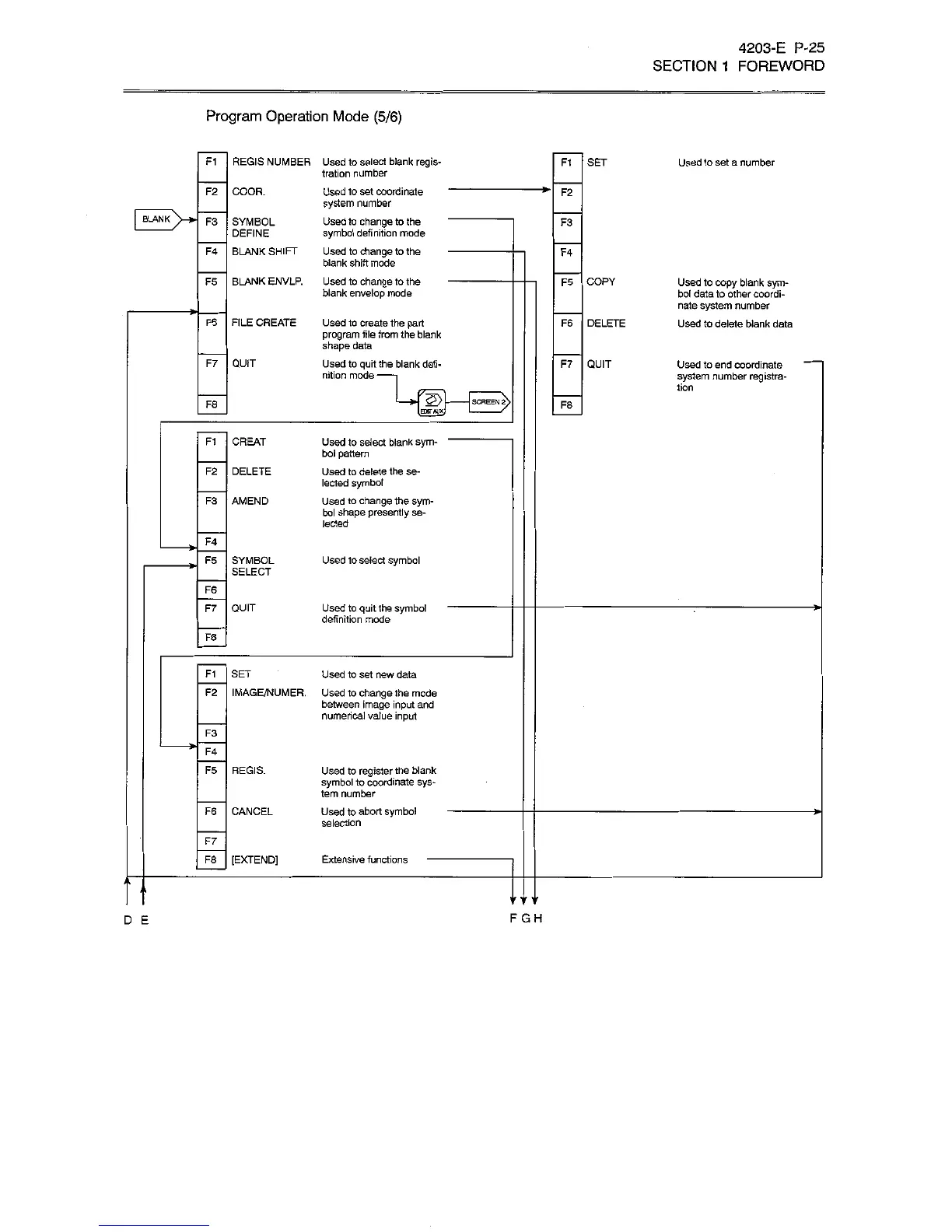
Program
Operation
Mode
(5/6)
REGIS
NUMBER
Used
to
select
blank
regis¬
tration
number
Used
to
set
coordinate
system
number
Used
to
change
to
the
symbol
definition
mode
BLANK
SHIFT
Used
to
change
to
the
blank
shift
mode
BLANK
ENVLR
Used
to
change
to
the
blank
envelop
mode
F1
Ft
SET
Used
to
set
a
number
F2
COOR.
F2
BLANK
F3
SYMBOL
DEFINE
F3
F4
F4
F5
F5
COPY
Used
to
copy
blank
sym¬
bol
data
to
other
coordi¬
nate
system
number
Used
to
delete
blank
data
FILE
CREATE
F6
Used
to
create
the
part
program
file
from
the
blank
shape
data
Used
to
quit
the
blank
defi¬
nition
mode
-
F6
DELETE
QUIT
F7
F7
QUIT
Used
to
end
coordinate
system
number
registra¬
tion
SCREENS
2>
F8
F8
B*r»ux
CREAT
FI
Used
to
select
blank
sym¬
bol
pattern
Used
to
delete
the
se¬
lected
symbol
Used
to
change
the
sym¬
bol
shape
presently
se¬
lected
F2
DELETE
F3
AMEND
F4
F5
SYMBOL
SELECT
Used
to
select
symbol
F6
F7
QUIT
Used
to
quit
the
symbol
definition
mode
>-
F8
F1
SET
Used
to
set
new
data
Used
1o
change
the
mode
between
image
input
and
numerical
value
input
F2
IMAGE/NUMER.
F3
F4
F5
REGIS.
Used
to
register
the
blank
symbol
to
coordinate
sys¬
tem
number
Used
to
abort
symbol
selection
F6
CANCEL
-*ÿ
F7
F8
[EXTEND]
Extensive
functions
j
i
F
GH
D
E

Related product manuals