EasyManua.ls Logo

Okuma OSP-U100M - Spindle Parameters

Okuma OSP-U100M
511 pages
Print Icon
To Next Page IconTo Next Page
To Previous Page IconTo Previous Page
Loading...
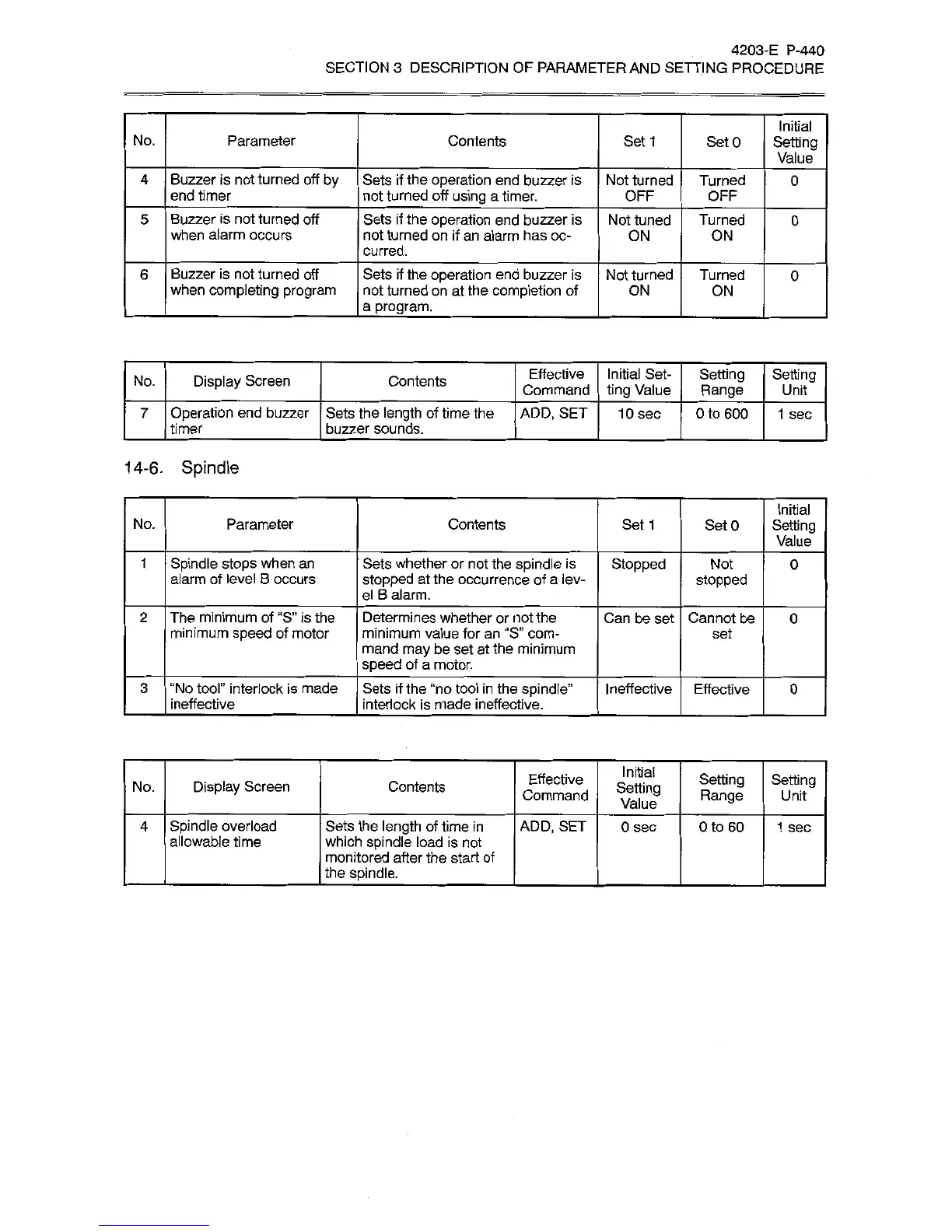
4203-E
P-440
SECTION
3
DESCRIPTION
OF
PARAMETER
AND
SETTING
PROCEDURE
Initial
Setting
Value
No.
Parameter
Contents
Set
1
SetO
Buzzer
is
not
turned
off
by
end
timer
Sets
if
the
operation
end
buzzer
is
not
turned
off
using
a
timer.
4
Not
turned
OFF
Turned
OFF
0
Buzzer
is
not
turned
off
when
alarm
occurs
Sets
if
the
operation
end
buzzer
is
not
turned
on
if
an
alarm
has
oc¬
curred.
5
Not
tuned
Turned
0
ON
ON
Buzzer
is
not
turned
off
when
completing
program
Sets
if
the
operation
end
buzzer
is
not
turned
on
at
the
completion
of
a
program.
_
6
Not
turned
Turned
0
ON
ON
Effective
Command
Initial
Set¬
ting
Value
Setting
Range
Setting
Display
Screen
Contents
No.
Unit
Operation
end
buzzer
timer
Sets
the
length
of
time
the
buzzer
sounds.
ADD,
SET
7
10
sec
0
to
600
1
sec
14-6.
Spindle
Initial
Setting
Value
Parameter
No.
Contents
Set
1
SetO
Spindle
stops
when
an
alarm
of
level
B
occurs
Sets
whether
or
not
the
spindle
is
stopped
at
the
occurrence
of
a
lev¬
el
B
alarm.
1
Stopped
Not
0
stopped
The
minimum
of
“S”
is
the
minimum
speed
of
motor
Determines
whether
or
not
the
minimum
value
for
an
“S”
com¬
mand
may
be
set
at
the
minimum
speed
of
a
motor.
2
Can
be
set
Cannot
be
0
set
“No
tool”
interlock
is
made
ineffective
Sets
if
the
“no
tool
in
the
spindle”
interlock
is
made
ineffective.
3
Ineffective
Effective
0
Initial
Setting
Value
Effective
Command
Setting
Range
Setting
Display
Screen
Contents
No.
Unit
Spindle
overload
allowable
time
Sets
the
length
of
time
in
which
spindle
load
is
not
monitored
after
the
start
of
the
spindle.
ADD,
SET
4
0
sec
Oto
60
1
sec

Related product manuals