EasyManua.ls Logo

Okuma OSP-U100M - Page 49

Okuma OSP-U100M
511 pages
Print Icon
To Next Page IconTo Next Page
To Previous Page IconTo Previous Page
Loading...
4203-E
P-30
SECTION
1
FOREWORD
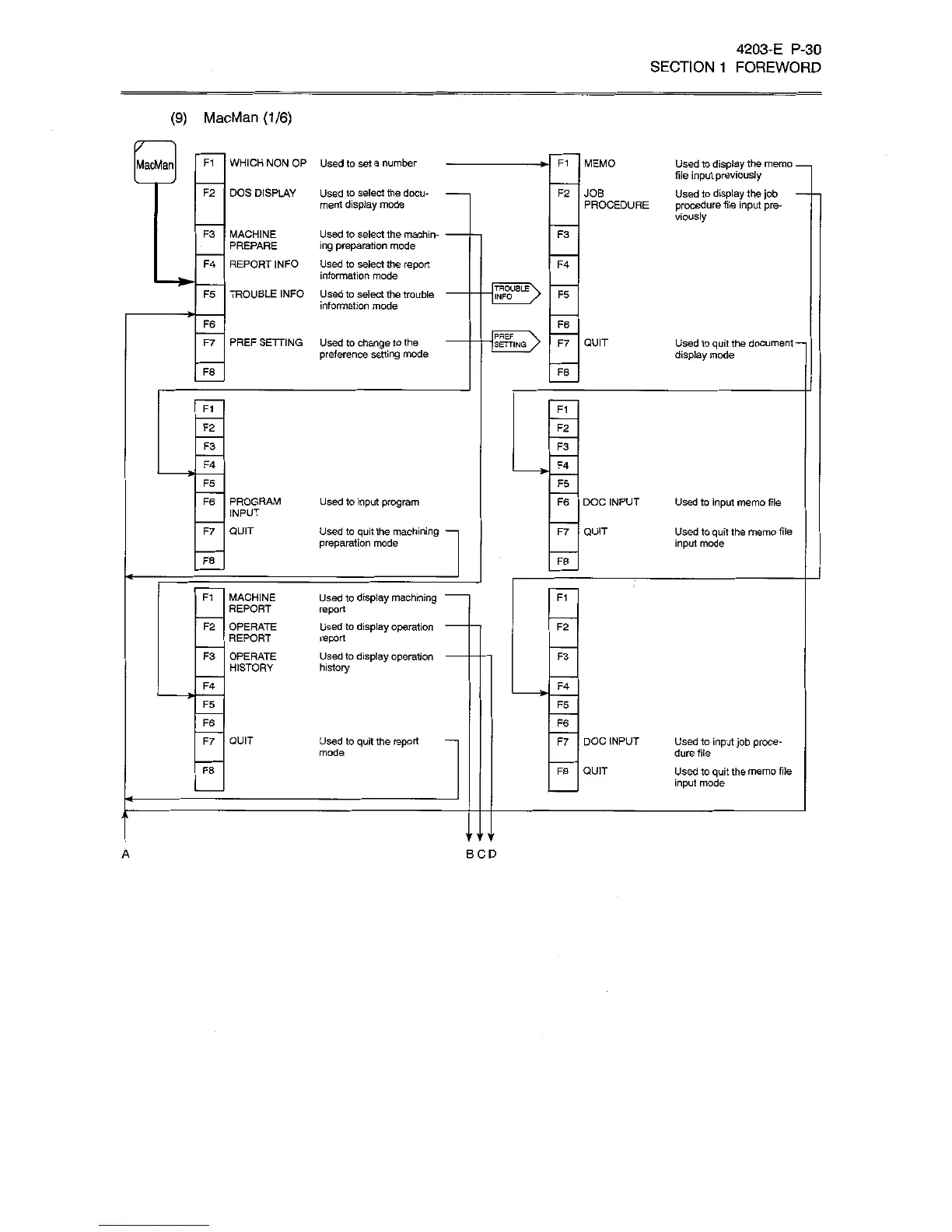
(9)
MacMan
(1/6)
F1
WHICH
NON
OR
Used
to
set
a
number
MEMO
MacMan
F1
Used
to
display
the
memo
file
input
previously
Used
to
display
the
job
procedure
file
input
pre¬
viously
DOS
DISPLAY
F2
Used
to
select
the
docu¬
ment
display
mode
F2
JOB
PROCEDURE
F3
MACHINE
PREPARE
Used
to
select
the
machin¬
ing
preparation
mode
Used
to
select
the
report
information
mode
Used
to
select
the
trouble
information
mode
F3
F4
REPORT
INFO
F4
*
TROUBLE
INFO
F5
TROUBLE
INFO
F5
F6
F6
PREF
I
SETTING
F7
PREF
SETTING
Used
to
change
to
the
preference
setting
mode
F7
QUIT
Used
to
quit
the
document
display
mode
F8
F8
Ft
F1
F2
F2
F3
F3
F4
F4
F5
F5
PROGRAM
INPUT
F6
Used
to
input
program
F6
DOC
INPUT
Used
to
input
memo
file
F7
QUIT
Used
to
quit
the
machining
preparation
mode
QUIT
F7
Used
to
quit
the
memo
file
input
mode
F8
F8
MACHINE
REPORT
OPERATE
REPORT
Used
to
display
machining
report
Used
to
display
operation
-
report
Used
to
display
operation
-
history
F1
F1
F2
F2
F3
OPERATE
HISTORY
F3
F4
F4
F5
F5
F6
F6
F7
QUIT
Used
to
quit
the
report
mode
F7
DOC
INPUT
Used
to
input
job
proce¬
dure
file
Used
to
quit
the
memo
file
input
mode
F8
QUIT
F8
'IIMI
A
BCD

Related product manuals