EasyManua.ls Logo

Okuma OSP-U10M - Page 53

Okuma OSP-U10M
511 pages
Print Icon
To Next Page IconTo Next Page
To Previous Page IconTo Previous Page
Loading...
4203-E
P-34
SECTION
1
FOREWORD
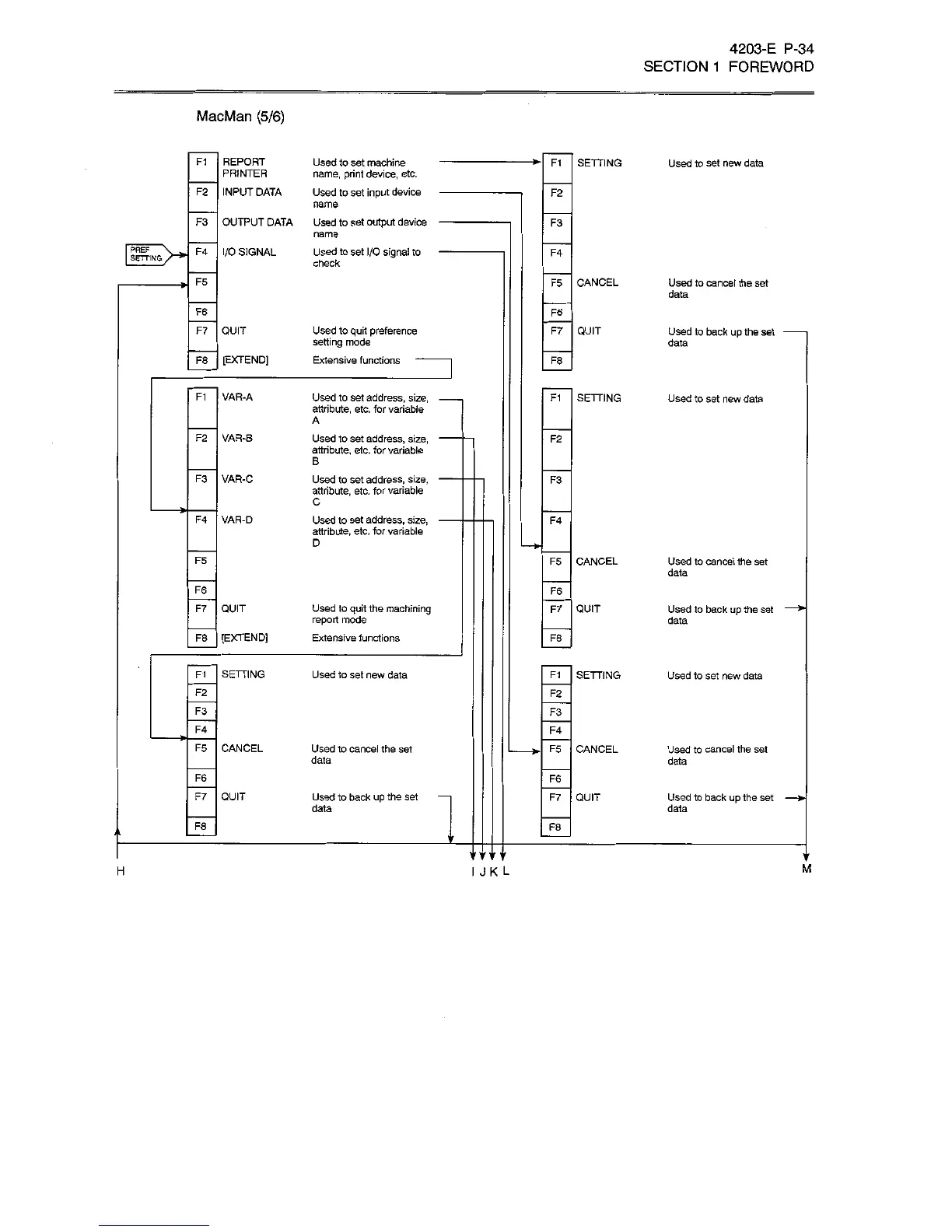
MacMan
(5/6)
F1
REPORT
PRINTER
Used
to
set
machine
name,
print
device,
etc.
Used
to
set
input
device
name
Used
to
set
output
device
name
Used
to
set
I/O
signal
to
check
SETTING
F1
Used
to
set
new
data
INPUT
DATA
F2
F2
F3
OUTPUT
DATA
F3
PREF
SETTING
I/O
SIGNAL
F4
F4
F5
F5
CANCEL
Used
to
cancel
the
set
data
F6
F6
F7
QUIT
Used
to
quit
preference
setting
mode
Extensive
functions
F7
QUIT
Used
to
back
up
the
set
data
F8
[EXTEND]
F8
F1
VAR-A
Used
to
set
address,
size,
attribute,
etc.
for
variable
SETTING
F1
Used
to
set
new
data
A
F2
VAR-B
Used
to
set
address,
size,
attribute,
etc.
for
variable
F2
B
VAR-C
F3
Used
to
set
address,
size,
attribute,
etc.
for
variable
F3
C
F4
VAR-D
Used
to
set
address,
size,
attribute,
etc.
for
variable
F4
D
*ÿ
F5
F5
CANCEL
Used
to
cancel
the
set
data
F6
F6
F7
QUIT
Used
to
quit
the
machining
report
mode
Extensive
functions
QUIT
F7
Used
to
back
up
the
set
data
F8
[EXTEND]
F8
F1
SETTING
Used
to
set
new
data
SETTING
F1
Used
to
set
new
data
F2
F2
F3
F3
F4
F4
>•
F5
CANCEL
Used
to
cancel
the
set
data
CANCEL
F5
Used
to
cancel
the
set
data
F6
F6
F7
QUIT
Used
to
back
up
the
set
F7
QUIT
Used
to
back
up
the
set
data
data
F8
F8
a
'MMi
'
r
V
M
I
J
K
L
H

Related product manuals