17
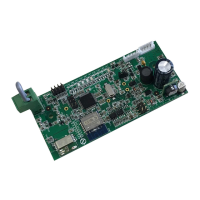
WIRELESS B1015
GB
Descripon Led1 [Green]Led 2 [Red] Led3 [Yellow]Led4 [Yellow]
Blue LED ON Wi-Fi module
Communicaon problems
between Wi-Fi card and
air condioner
L XX
Wi-Fi network
configured but not connected
to the internet
X L XX L
Wi-Fi network
NOT configured
X OFF XX L
Bluetooth not working XX L
Enable contact is OPEN XXX ON X
ON On steady
OFF Off steady
BLINK BLINKING
Xindiferrent
2.3.3 UNICOAIRINVERTERMODEL
TheslotinwhichtohousetheB1015cardislocatedonthemachine'sfrontpanelonthetopright.
• Disconnectairconditioner'spowersupply.
• Removetheltersabovetheevaporatingunit(Fig.5Ref.A).
• Removethemachinefromthewallbracket.
• Removethe3screwsindicatedinFig.5.
• RemovethemachinefromitsjointsbyslidingitoutandturningitasshowninFig.6.
• PlacetheB1015cardintotheappropriateslot(Fig.7)andthentightenitsscrews(Fig.7Ref.A)tosecureit.
• Routethecommunicationcableintotheappropriateslotbehindthennedheatexchanger(Fig.8Ref.C).
• Connectthecommunicationcabletotheserialport(Fig.8Ref.D)locatedbehindtheairconditioneronthetop
right.
• Retthemachine'sfrontcoverandsecureeverythingwiththe3screws(Fig.5).
• Inserttheltersabovetheevaporatingunit(Fig.5Ref.A).
• Retthemachineonthewall.
3. DOWNLOAD AND INSTALLATION
• YoucandownloadtheOLIMPIASPLENDIDUNICOAppfromGooglePlayStoreandiPhoneAppStore.
• ForoperatingsystemssupportedbyAndroidandIOS,refertotherelatingPlayStoreorAppStore.
• TheOLIMPIASPLENDIDUNICOAppmaybesubjecttochangewithoutnotice;changesaredesignedto
improveitscharacteristicsandperformance.
• Whenrststarted-up,theAppimmediatelyshowstheADDAIRCONDITIONERscreen.Foranyfurther
information,refertotheonlineguideintheAppordownloaditfromthedownloadareaofOlimpiaSplendid's
ofcialwebsite(http://www.olimpiasplendid.it/area-download).
4.TROUBLESHOOTING


 To Next Page
 Loading...