Home
Olitech
Cell Phone
EasyFlip OLT2908
Page 6
Olitech EasyFlip OLT2908 - Page 6
57 pages
Manual
Save Page as PDF
To Next Page
To Next Page
To Previous Page
To Previous Page
Loading...
6
Hardware D
escriptions
1.
Earpiece sp
eaker
2.
2MP camera
3.
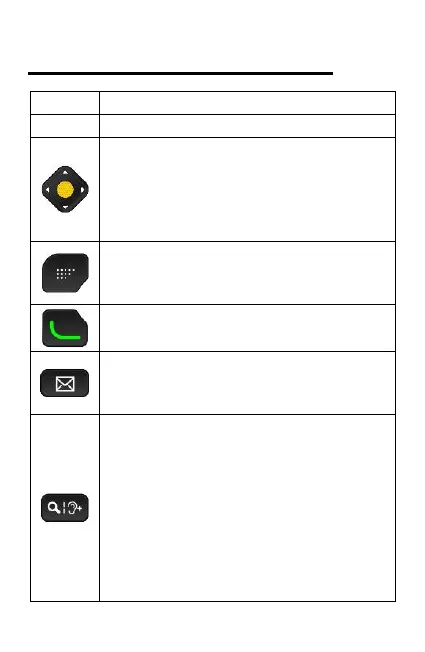
A
rrows:
Used to navigate menu and
sett
ings
Y
ello
w
“Select”
key:
Used to select an icon/list item
4. Selection key:
Used to select word written above
key
on screen eg “Options”
5. Gr
een k
ey
:
Used to
ans
wer
or make a call
6. Message k
ey:
Provides
direct access
t
o
mess
ages (SMS/MMS).
7. Magnifier/Amplify headset
volume k
ey:
Not during a call: Press to activate
magnifier.
During an active call: Press to
activ
ate amplification
/
boost mode
for earpiec
e speaker.
Note: the amplify receiver volume
must be
on in the phone
settings
5
7
Table of Contents
Main Page
Table of Contents
3
Specifications
4
Hardware Guide
5
Setting up the Phone
10
Charging the Battery
15
Myeasyassist
18
Messages
18
Writing Messages
19
Calls
21
Missed Call
23
Phonebook and Photo/Speed Dial
24
Multimedia
27
Safety Functions
29
Low Battery Notification
33
Organiser
34
File Manager
36
Settings
37
Answer Mode
38
Call Settings
40
Mobile Data
46
Mobile Hotspot
46
Airplane Mode
46
Troubleshooting
48
Safety Information
52
Traffic Safety
54
Operating Environment
54
Electronic Devices
55
Warranty
56
Related product manuals
Olitech EasyFlip 2
85 pages
Olitech EASY MATE+ OLT2914
55 pages
Olitech OT-Basic
45 pages



 To Next Page