14
6.3.2 - Brushless Electrical Micromotor - Built in (Optional)
Before starting the
operation, connect the handpiece to
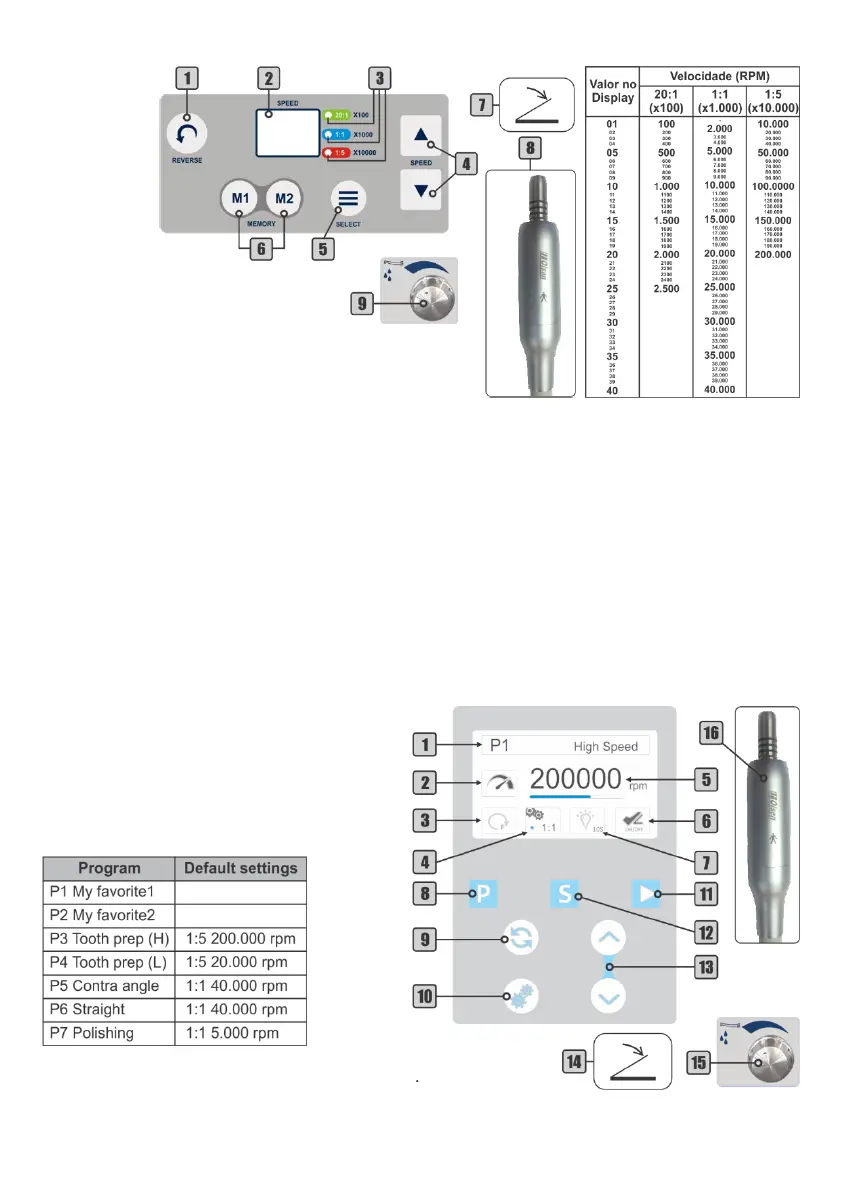
the electrical micromotor (8).
To activate the rotation: press the
propulsion/activation pedal (7).
To select the transmission: use the Select key (5). The
selection is indicated by LED’s (3): 20: 1; 1: 1 and 1: 5.
To reverse the rotation: use the Reverse key (1).
To adjust speed: use the adjustment key (4) The speed relation of each transmission with the value of the
display (2) is indicated in the side table.
Example:
Display value: 15
Selected gear ratio: 1:1 Factor: x1.000
Rotation speed: 15 x 1000 = 15.000 rpm
To activate memory: press the desired Memory key (6). The display will show the speed and the LED will
indicate the present transmission.
To record memory: select the transmission and adjust the speed of rotation to store. Press and hold one
of the Memory key (6) until the system emits 2 beeps, indicating that the memory has been recorded.
To save the second available memory repeat the same procedure.
To adjust the electrical micromotor water: use the water control knob (9) on the instruments control
panel.
6.3.3 - Brushless Electrical Micromotor - Side Panel (Optional)
Before starting the operation, connect the
handpiece to the electrical micromotor (16).
To activate the rotation: press the
propulsion/activation pedal (14) or the Manual
Start key (11).
To select a preset program: use the Program
key (8). There is 7 programs available, according
the table below:
The selected program is shown on the display (1).
To record program: select program P1 or P2, then select the desired
gear ration and adjust the speed. Press and hold the Program key (8) until the confirmation of the system.


 To Next Page