8
G
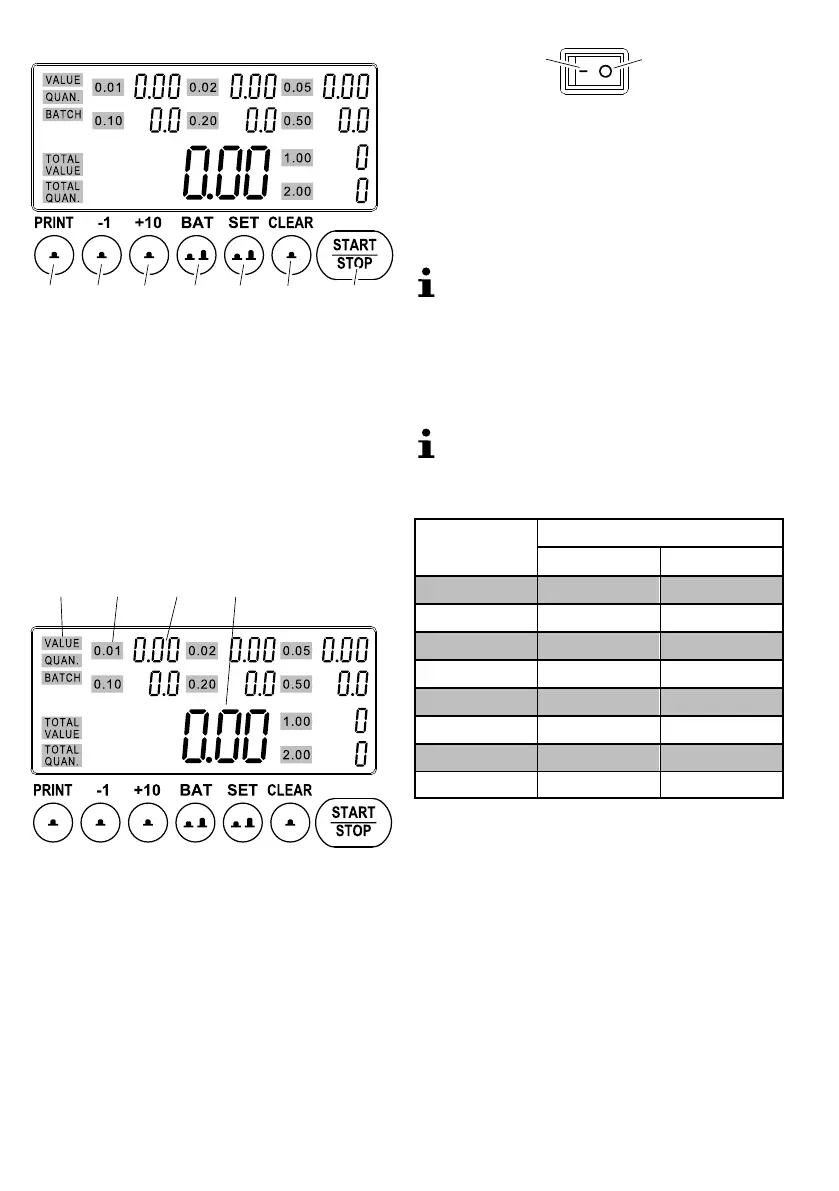
Operating Elements
1
23
45
6
7
3
1 PRINT Print the result
2 -1 Reduce the set value by 1
3 +10 Increase the set value by 10
4 BAT Batch function / Define the capacity
5 SET Set display of the count results / Define
settings
6 CLEAR Reset the count results
7 START/STOP Start/Stop the counting process /
Confirm settings
Display
8 9 10 11
4
8 Display of the count results
9 Display of the respective coin value
10 Individual count result of the adjacent coin value
11 Total quantity of coins / Total value of coins
Operation
Switching on/off
The coin counter is switched on and off using the switch
on the rear of the machine.
1
2
1On
2 Off
Self-Test
After switching the machine on, it performs a self-test.
Switch the machine on. A self-test is completed,
888888 appears in the display.
If the machine will not be used for a longer period,
disconnect it from the power outlet.
If an error occurs, refer to the "Self-Diagnosis" table.
Trays/Tubes
Before you start counting and sorting the Euro coins,
define whether trays or tubes are installed in the ma
chine . Trays and tubes have different capacities.
The machine is supplied with trays installed; tubes
are optional accessories available from our Service
Center.
Capacity of the trays / tubes
Coin value (€)
Capacity
Trays Tubes
0.01 280 50
0.02 200 50
0.05 160 50
0.10 150 40
0.20 110 40
0.50 90 40
1.00 100 25
2.00 80 25
Changing the capacity value to trays or tubes
BAT until 0.01 appears in the display [10] beside
300. The capacity of all the trays is displayed.
START/STOP The machine is ready to operate.
or
2 x BAT until 0.01 appears in the display [10] be
side
50. The capacity of all the tubes is displayed.
START/STOP The collector last selected is
reselected. The machine is ready to operate.
Inserting coins
Insert the coins to be counted at the top of the funnel.



 To Next Page