3
EN
Camera Settings
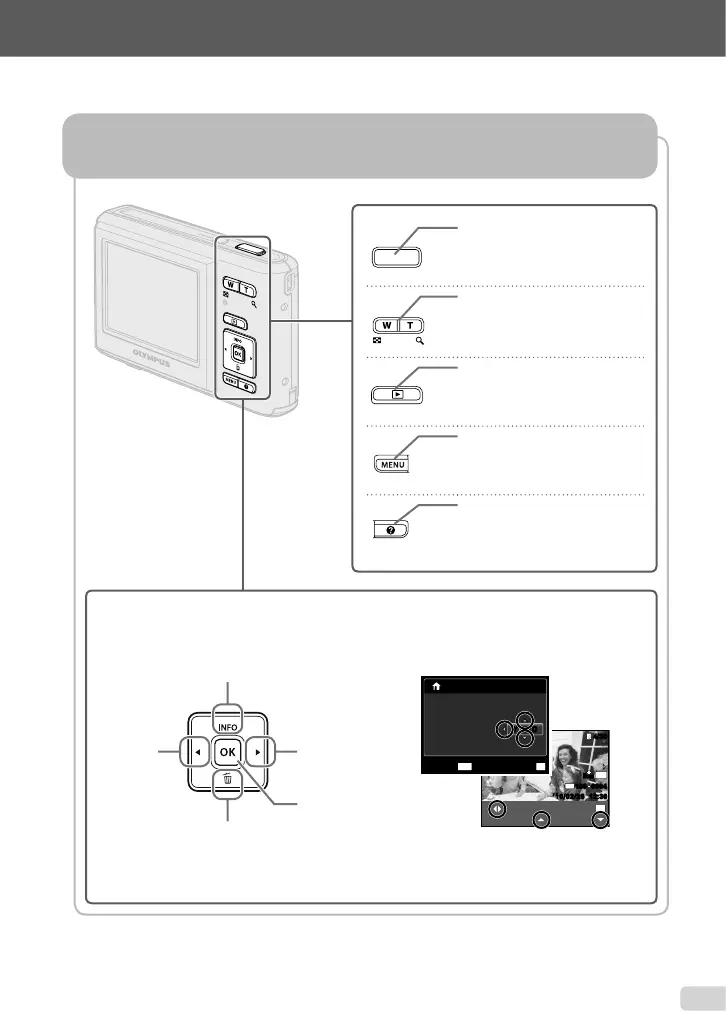
Using the Direct Buttons
Frequently used functions can be accessed using the direct buttons.
Shutter button (p. 14)
Zoom buttons (p. 16)
q button (switch between
shooting and playback) (p. 15)
m button (p. 4)
E button (menu guide) (p. 19)
Arrow pad
H (left)
G (down) /
D button (erase) (p. 18)
F (up) /
INFO button (change
information display) (p. 16, 19)
I (right)
H button
(p. 12)
The symbols FGHI displayed for image
selections and settings indicate that the arrow
pad is to be used.
N
ORM
OK
SINGLE PRINT
PRINT
4/304/30
MORE
’10/02/26 12:30’10/02/26 12:30
N
ORM
12M
FILE
100 0004100 0004
02 26 12 30:..2010
OK
SET
X
YMDTIME
MENU
CANCEL
Y/M/DY/M/D


 To Next Page