15
3
2
1
3
4
4
2
1
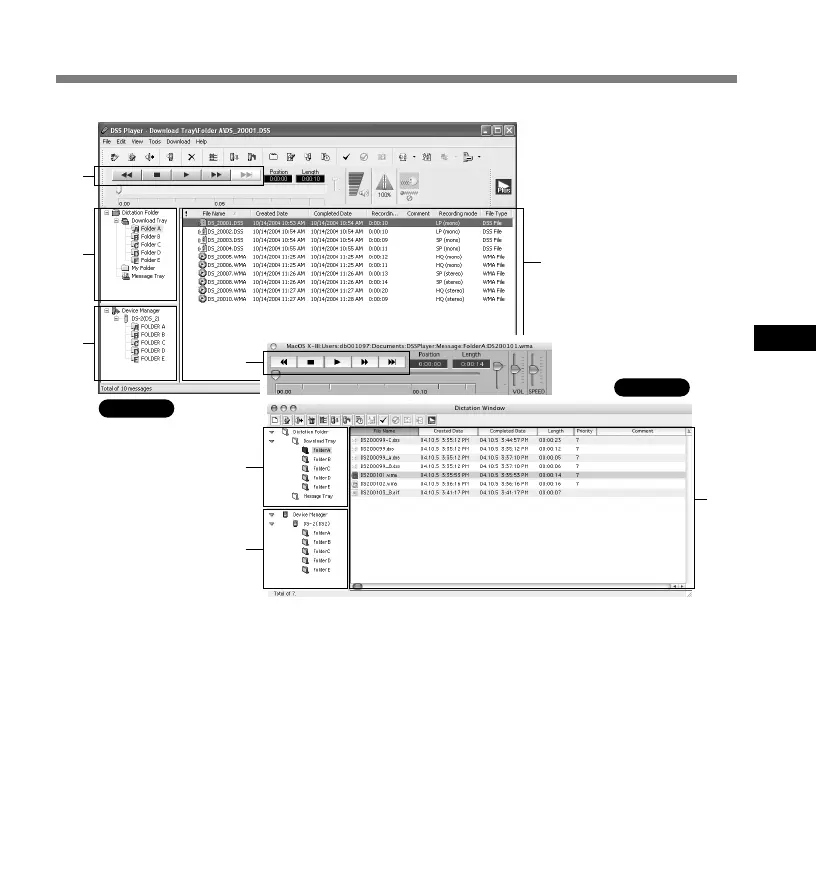
1 Play Control Bar
Control buttons to play and stop voice files.
2 Dictation Folder Window
Will display the directory structure of the DSS,
WMA, WAVE (Windows only) and AIFF
(Macintosh only)-format files stored on your
PC’s hard disk.
3 Device Manager Window
Will display the directory structure of the folders
in the recorder.
4 Voice File List Box
Will display the voice files in the folder selected
in 2 and 3.
* Main screen displayed when
DSS Player is started
Window Names
Windows
Macintosh
Window Names



 To Next Page