EasyManua.ls Logo

Olympus CELON ELITE ESG-200 - User Manual

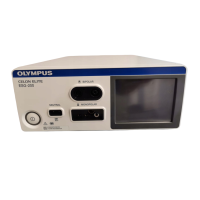
Olympus CELON ELITE ESG-200
9 pages
Print Icon
To Next Page IconTo Next Page
Loading...
QUICK REFERENCE GUIDE
PROCEDURE SETTING RECOMMENDATION
Question and Answer IconNeed help?

Do you have a question about the Olympus CELON ELITE ESG-200 and is the answer not in the manual?

Summary

System Components Overview

Main Components Identification

Overview of the CELON ELITE system's main physical components and associated accessories.

CELON ELITE Touchscreen Interface

Detailed explanation of the CELON ELITE's touchscreen interface, highlighting key buttons and indicators.

Assign Foot Switch Functionality

Foot Switch Assignment Process

Step-by-step guide on assigning functions to the foot switch pedals for bipolar and monopolar modes.

Change Procedure Settings

Procedure Setting Adjustment Steps

Instructions for modifying procedure settings, including selecting output modes and adjusting power levels.

Save Procedure Settings

Saving Custom Procedure Configurations

Guide on saving the current output settings, including naming the procedure for future use.

Celon Procedure Setting Recommendations

Procedure Setting Recommendations Table

Table detailing recommended settings for specific procedures like hypertrophic turbinates and palate stiffening.

Celon Procedure Mode Overview

Mode Overview Table

Table summarizing available modes for Bipolar and Monopolar techniques, including settings, power, and effects.

Compatible Accessories

Accessory Compatibility Details

Information on compatible accessories for bipolar, monopolar, and neutral connections, including plug types and dimensions.

Overview

The Olympus CELON ELITE ESG-200 is an electrosurgical generator designed for various medical procedures, particularly those involving radiofrequency-induced thermotherapy (RFITT). This quick reference guide provides essential information for its operation, focusing on procedure setting recommendations and system components.

Function Description:

The CELON ELITE ESG-200 serves as a versatile electrosurgical unit, capable of delivering both bipolar and monopolar radiofrequency energy. Its primary function is to facilitate precise tissue coagulation and cutting in a controlled manner, making it suitable for a range of surgical applications. The device is particularly highlighted for its use in RFITT procedures, such as volume reduction of hypertrophic turbinates and soft palate stiffening.

In bipolar mode, the device offers several coagulation options, including "Fine RFITT," "Pure RFITT," "Strong RFITT" (with and without RCAP), and "Soft Coag." These modes are designed to provide different levels of tissue interaction, from automatic end-of-procedure detection with audible feedback (Fine RFITT, Pure RFITT) to automatic deactivation based on tissue resistance (Strong RFITT) and minimal carbonization and adhesion (Soft Coag). The bipolar cutting modes include "Fine Cut," "Pure Cut," and "Strong Cut," offering varying spark intensities for different thermal effects.

For monopolar procedures, the device provides "Soft Coag" and "Forced Coag" for coagulation, with "Forced Coag" allowing for coagulation even with relatively small electrodes. Monopolar cutting modes include "Fine Cut," "Pure Cut," "Strong Cut," and "Pulse Cut." "Pulse Cut" is specifically designed for intermittent cutting, useful in endoscopic operations.

The device's intelligent design incorporates features like Resistance-Controlled Automatic Power (RCAP) in "Strong RFITT" mode to prevent premature tissue desiccation, ensuring safer and more effective treatment. The "Autostart" feature, available in "Soft Coag" mode, further streamlines the workflow by initiating energy delivery automatically.

Usage Features:

The CELON ELITE ESG-200 boasts a user-friendly interface centered around a touchscreen display, which provides intuitive control over its functions.

  • Main Components: The front panel of the device clearly displays the bipolar and monopolar output sockets, along with a neutral electrode indicator. The touchscreen is the primary interface for all operational settings.
  • User Interface with Touchscreen: The touchscreen displays crucial information such as the procedure name (or blank if none is selected), output socket indicators (showing active bipolar or monopolar mode), and the neutral electrode indicator. Key interactive elements include:
    • "Select Procedure" button: Allows users to choose from a list of predefined procedures.
    • "Foot Switch" button: Used to assign and configure the foot pedals.
    • "Mode" button: Enables selection of different output modes (e.g., SoftCoag, Pure RFITT).
    • Wattage display: Shows the current power level, which can be adjusted using "+" and "-" buttons.
    • "Menu" button: Provides access to additional settings and functions, including saving procedures.
  • Assign Foot Switch: The process of assigning foot switch functions is straightforward. Users tap the "Foot Switch" button on the main screen, then select the desired foot pedal (blue for coagulation, yellow for cutting) for either bipolar or monopolar planes. A "Return" button confirms the settings.
  • Change Procedure Settings: Adjusting procedure settings is an intuitive multi-step process:
    1. Tapping on the yellow or blue mode button on the "All Screen" brings up the "Mode Screen."
    2. From the "Mode Screen," users can select the desired output mode, such as "Pure RFITT."
    3. The output power level is then set by tapping the "+" and "-" buttons on the "Set Screen."
  • Save Procedure Settings: The device allows users to save customized procedure settings for future use:
    1. Tapping "Menu" on the "All Screen" displays the "Select Menu" screen.
    2. Users then tap "Save Procedure."
    3. An on-screen keyboard appears, allowing users to enter a name for the procedure settings, which are then saved by tapping "OK."
  • Procedure Setting Recommendation: The guide provides specific recommendations for common RFITT procedures:
    • Volume reduction of hypertrophic turbinates: Uses the CelonProBreath applicator with "Pure/Fine RFITT" mode. Recommended power settings are 15 W for adults and 18 W for smaller turbinates (e.g., children).
    • Soft palate stiffening: Uses the CelonProSleep Plus applicator with "Pure RFITT" mode at a recommended power setting of 12 W.
    • A crucial note emphasizes that higher power settings result in smaller coagulation volumes, and optimal settings may vary based on individual anatomy and application area. Users are advised to consult the procedure guide for further details.
  • Mode Overview: A comprehensive table details the various bipolar and monopolar modes, their effects, maximum power, Vp (peak voltage), and a short explanation of their characteristics. This includes information on automatic detection, tissue resistance control, carbonization levels, and spark intensity for different cutting effects.
  • Compatible Accessories: The guide lists compatible accessories, including various bipolar and monopolar HF cables and neutral electrodes. For bipolar, it supports International Standard 2-pin plugs (4 mm diameter) and Erbe Standard 1-pin coaxial plugs (8/4 mm diameter). For monopolar, it supports International Standard 3-pin plugs (4 mm diameter), Banana Plugs (1-pin, 4 mm diameter), and Bovie Plugs (1-pin, 8 mm diameter). A specific caution is given for monopolar banana plugs, advising connection only to the rightmost receptacle. Neutral electrodes can be split or non-split, with plugs featuring two 2.5 mm sockets spaced 10 mm apart.

Maintenance Features:

While the quick reference guide does not explicitly detail maintenance features, the presence of a "Delete Procedure" option in the "Select Menu" suggests that users can manage saved settings, which is a form of digital maintenance. The overall design for ease of use and clear display of settings implies that operational checks and adjustments are straightforward, contributing to efficient device management. The guide's emphasis on consulting the full Operators Manual and Instructions For Use (IFU) for comprehensive information indicates that detailed maintenance procedures, troubleshooting, and safety guidelines are covered in those documents.

Olympus CELON ELITE ESG-200 Specifications

General IconGeneral
Generator TypeRadiofrequency generator
Maximum Output Power200 W
DisplayLCD
Weight12 kg
Power Supply100-240 V AC, 50/60 Hz
CompatibilityCELON Applicators

Related product manuals