EasyManua.ls Logo

Olympus CV-160 - Page 16

Olympus CV-160
40 pages
Print Icon
To Next Page IconTo Next Page
To Previous Page IconTo Previous Page
Loading...
SPECIFICATIONS CV-160
1-13
Item Specification
11. Others
3. Standard setting of
display/function
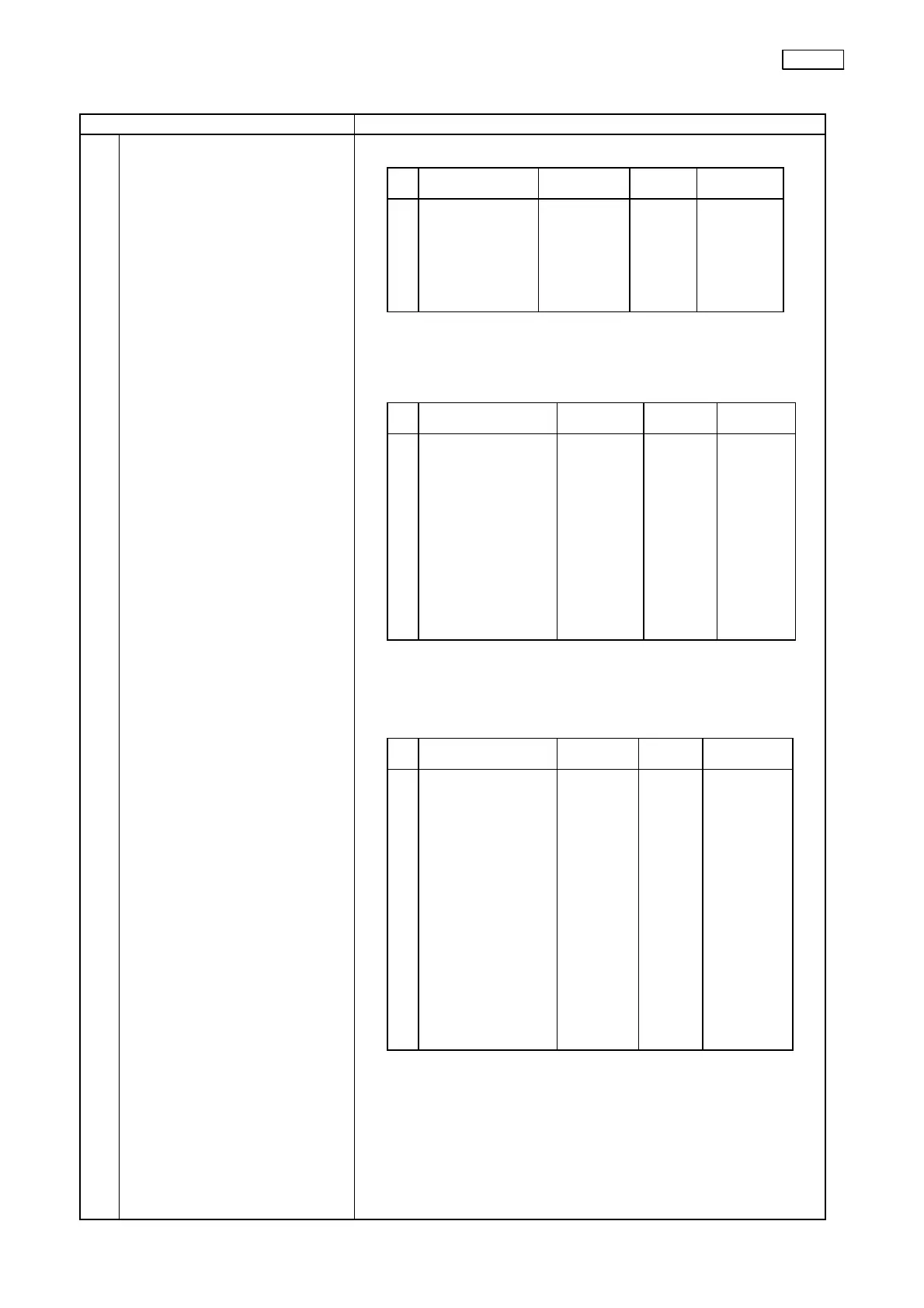
Patient Data
Scope Info.
(1) For the user
(2) For service
* Press the Ctrl + Shift + Scope Info. keys on the keyboard to
shift from the Scope Information screen to the above screen.
Function/display
Factory
setting
Reset Power ON
Patient Data
ID No.
Name
Sex
D.O.Birth
Age
Phy.Name
Cleared
Cleared
Cleared
Cleared
Cleared
Cleared
Stored
Stored
Stored
Stored
Stored
Stored
Stored
Stored
Stored
Stored
Stored
Stored
Function/display
Factory
setting
Reset Power ON
Scope Information
[Scope Infomation]
Scope Model
Serial No.
Comments
Cumulative Uses
Check Period
Service Contract
Warranty Date
Owner
Customer ID No.
ID Ver.
Stored
Stored
Cleared
Cleared
180
Cleared
Cleared
Cleared
Cleared
Cleared
Stored
Stored
Cleared
Stored
Stored
Stored
Stored
Stored
Stored
Stored
(Data read
out from
the scope)
Function/display
Factory
setting
Reset Power ON
Ctrl+Shift+Scope Information
[Scope Infomation]
Scope Model
Serial No.
Comments
Cumulative Uses
Check Period
Service Contract
Warranty Date
Owner
Customer ID No.
ID Ver.
Mfg. Comments
Service Comments
Repair Info.
Checkup Info.
Stored
Stored
Cleared
Cleared
180
Cleared
Cleared
Cleared
Cleared
Cleared
Cleared
Cleared
Cleared
Cleared
Stored
Stored
Cleared
Stored
Stored
Stored
Stored
Stored
Stored
Stored
Stored
Stored
Stored
Stored
(Data read
out from the
scope)