EasyManua.ls Logo

Olympus CV-160 - Page 17

Olympus CV-160
40 pages
Print Icon
To Next Page IconTo Next Page
To Previous Page IconTo Previous Page
Loading...
SPECIFICATIONS CV-160
1-14
Item Specification
11. Others
3. Standard setting of
display/function
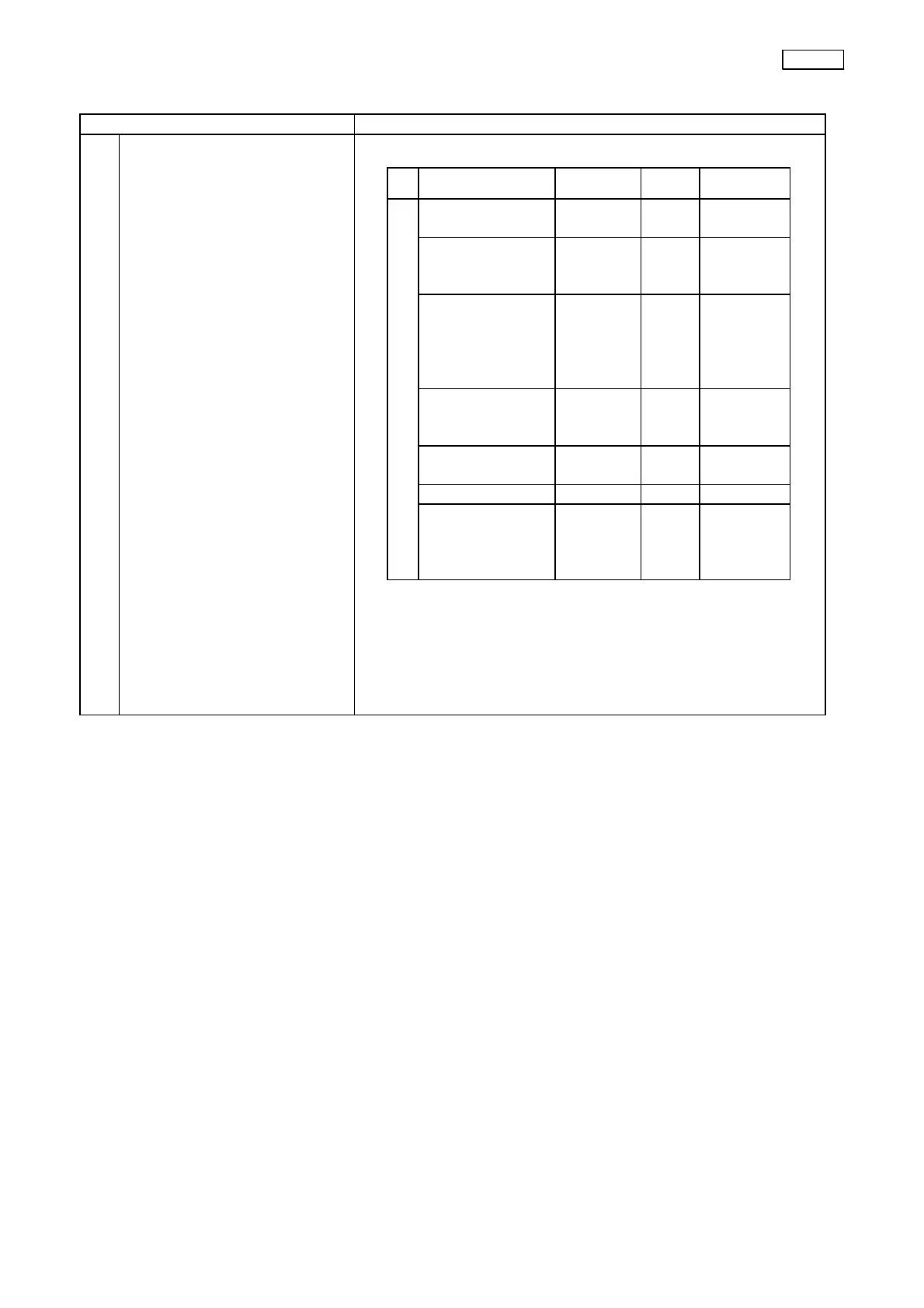
Hidden screen
Press the Ctrl + Shift + System Setup keys on the keyboard to
shift from the System Setup screen to the above screen.
Function/display
Factory
setting
Reset Power ON
[Shipping]
Country
Destination
Stored
Stored
[Printer]
Print Time
Auto Clear
40
ON
Stored
Stored
Stored
Stored
[Color]
Mon.Red
Mon.Blue
Prt.Red
Prt.Blue
±0
±0
±0
±0
Stored
Stored
Stored
Stored
Stored
Stored
Stored
Stored
[Clock]
Total
Trim
±0
Stored
Stored
Stored
Stored
[CPU Board]
Serial No.
Stored
Stored
[Video Board] – Stored Stored
Ctrl+Shift+Systemsetup
[Pat.Board]
Iris spd.
Iris L
Iris D
Med.
1
1
Stored
Stored
Stored
Stored
Stored
Stored