EasyManua.ls Logo

Olympus FE-190 - Page 7

Olympus FE-190
80 pages
Print Icon
To Next Page IconTo Next Page
To Previous Page IconTo Previous Page
Loading...
EN
7
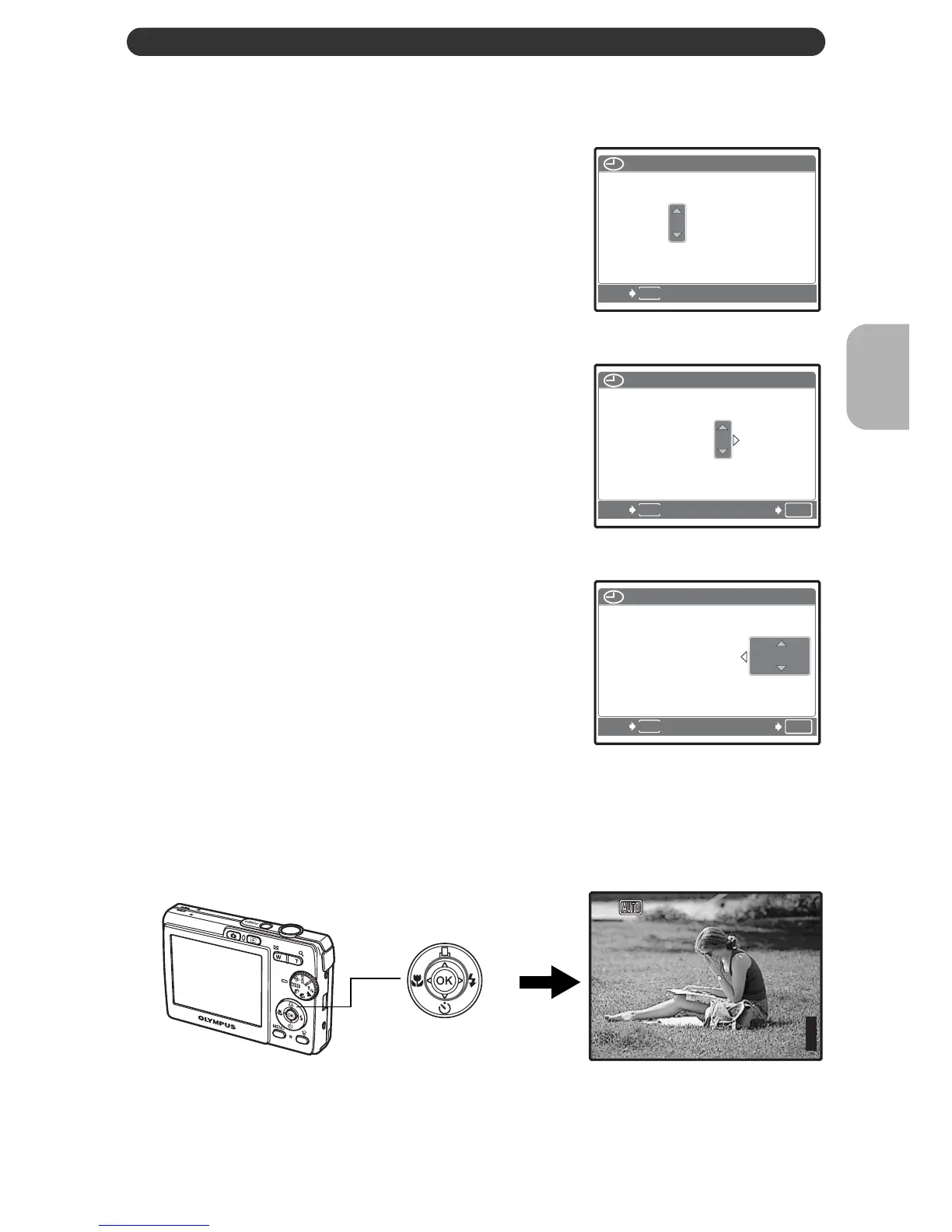
Set the date and time
Quick Start Guide
d. Press the Y# button.
e. Press the O< and NY
buttons to select [D].
f. Press the Y# button.
g. Press the O< and NY
buttons to select the hours and
minutes.
h. Press the Y# button.
i. Press the O< and NY
buttons to select [Y/M/D].
j. After all settings have been set, press Q.
The time is displayed in the 24-hour format.
For a more accurate setting, press Q when the time signal hits 00
seconds.
MENU
2006

2006
.
10
10
.
07
07
--:--
--:--
TIME
TIME
DMY
CANCEL
Y/M/
Y / M /
D
MENU
OK
2006
2006
.
10
10
.
07
07
12
12
:
30
30
TIME
TIME
DMY
CANCEL
Y/M/
Y / M /
D
SET
MENU
OK
2006
2006
.
10
10
.
07
07
12
12
:
30
30
SET
TIME
TIME
DMY
Y/M/
Y / M /
D
CANCEL
Q button
[
IN
IN
]
44
[ ]
HQ
HQ
2816
2816
×
2112
2112

Table of Contents

Related product manuals