EN
7
Quick Start Guide
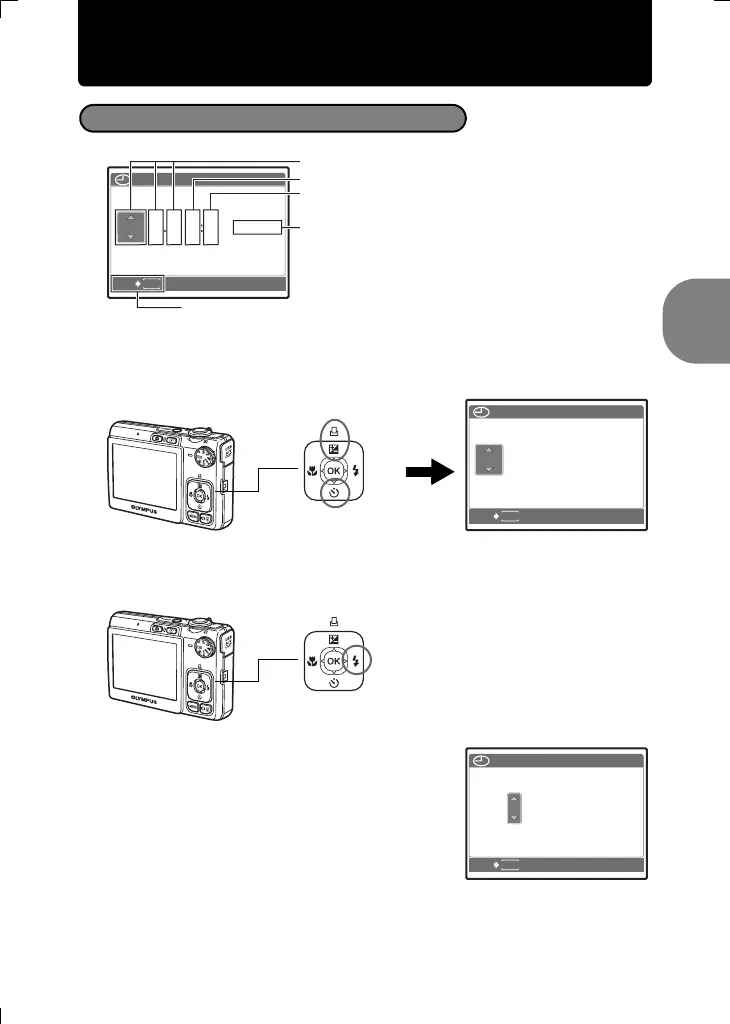
Set the date and time
a. Press the OF/< and NY buttons to select [Y].
• The first two digits of the year are fixed.
b. Press the Y# button.
c. Press the OF/< and NY buttons to
select [M].
About the date and time setting screen
MENU
TIME
DMY
----
.--.-- --:--
CANCEL
Y/M/
D
Y-M-D
Cancels the setting
Hour
Date formats (Y-M-D, M-D-Y, D-M-Y)
Minute
OF/< button
NY button
MENU
2007
.--.-- --:--
TIME
DMY
CANCEL
Y/M/
D
Y# button
MENU
2007
.
12
.-- --:--
TIME
DMY
CANCEL
Y/M/
D
d4348_33_e_0000_7.book Page 7 Thursday, June 21, 2007 7:24 PM











 To Next Page