23
EN
2
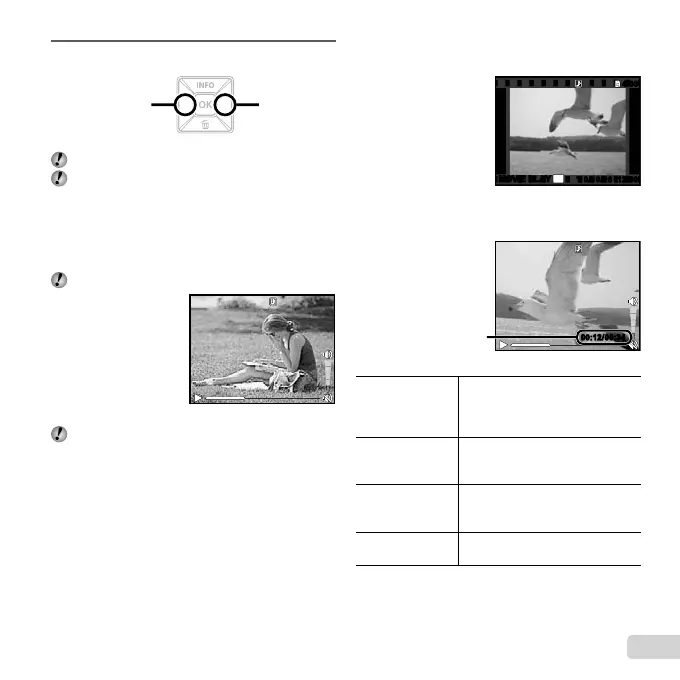
Use HI to select an image.
Displays
previous image
Displays next
image
Hold I to fast forward and hold H to reverse.
The display size of the images can be changed.
“Index view and close-up view” (p. 25)
To play sound recordings
To play sound recorded with an image, select the image
and press the H button. A ! icon appears on images
with which sound has been recorded.
[R] (still images) (p. 37)
During audio playback
Recorded audio can not be played back on the
FE-4050. Connect the camera to a television or
computer for playback.
To play back movies
Select a movie, and press the H button.
12:30’10/10/26’10/10/26 12:30
4/30
4/30
OK
MOVIE PLAYMOVIE PLAY
Movie
Operations during movie playback
Operations during movie playback
00:12/00:3400:12/00:34
During playback
Elapsed time/
Total recording time
Pausing and
resuming
playback
Press the H button to pause
playback. To resume playback
during pause, fast forward, or
rewind, press the H button.
Fast forward
Press I to fast forward. Press I
again to increase the fast forward
speed.
Rewind
Press H to rewind. The rewinding
speed increases each time H is
pressed.
Adjusting the
volume
*1
Use FG to adjust the volume.
*1
Available in the FE-5050 only.





 To Next Page