27
EN
2
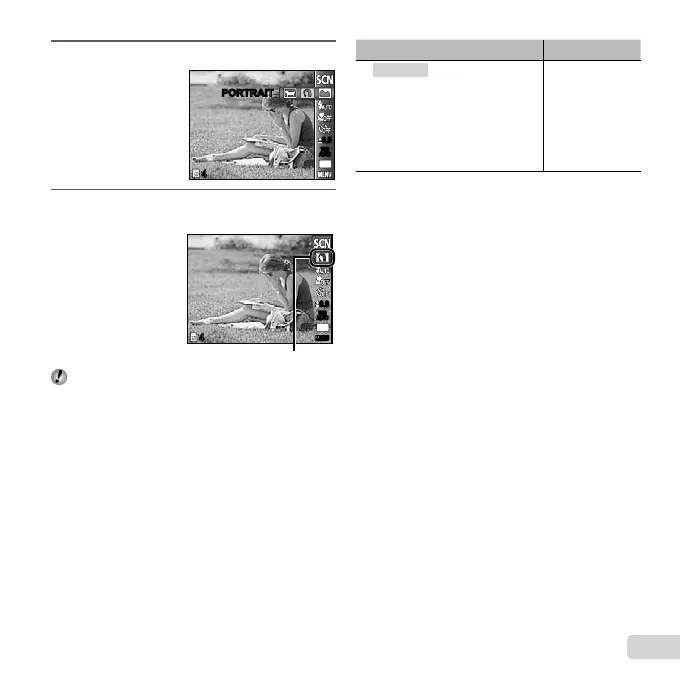
Press G to go to the submenu.
44
PORTRAITPORTRAIT
0.00.0
AUTO
WB
AUTO
WB
14
M
3
Use HI to select the best shooting mode for
the scene, and press the H button.
44
0.00.0
AUTO
WB
AUTO
WB
14
M
##
Icon indicating [SCENE MODE] that is set
In [SCENE MODE], the optimum shooting settings
are pre-programmed for specifi c shooting scenes.
For this reason, some settings cannot be changed in
some modes.
Option Application
B PORTRAIT/F LANDSCAPE/
G NIGHT SCENE
*1
/
M NIGHT+PORTRAIT/C SPORT/
N INDOOR/W CANDLE/
R SELF PORTRAIT/S SUNSET
*1
/
X FIREWORKS
*1
/V CUISINE/
d DOCUMENTS/
q BEACH & SNOW/ PET
The camera takes
a picture using the
optimum settings
for the scene
conditions.
*1
When the subject is dark, noise reduction is
automatically activated. This approximately doubles the
shooting time during which no other pictures can be
taken.
To take pictures of a moving subject like a
To take pictures of a moving subject like a
pet ([
PET])
1 Use HI to select [ PET], and press the H button
to set.
2 Hold the camera to align the AF target mark on the
subject and press the H button.
When the camera recognizes the subject, the
AF target mark automatically tracks the subject
movement to focus on it continuously. “To focus
on a moving subject continuously (AF Tracking)”
(p. 35).
●





 To Next Page