Shooting
2
86
EN
Adjusting i-Enhance eects (Eect)
Choose the strength of the i-Enhance eect when [i-Enhance] is selected for picture
mode (P. 72).
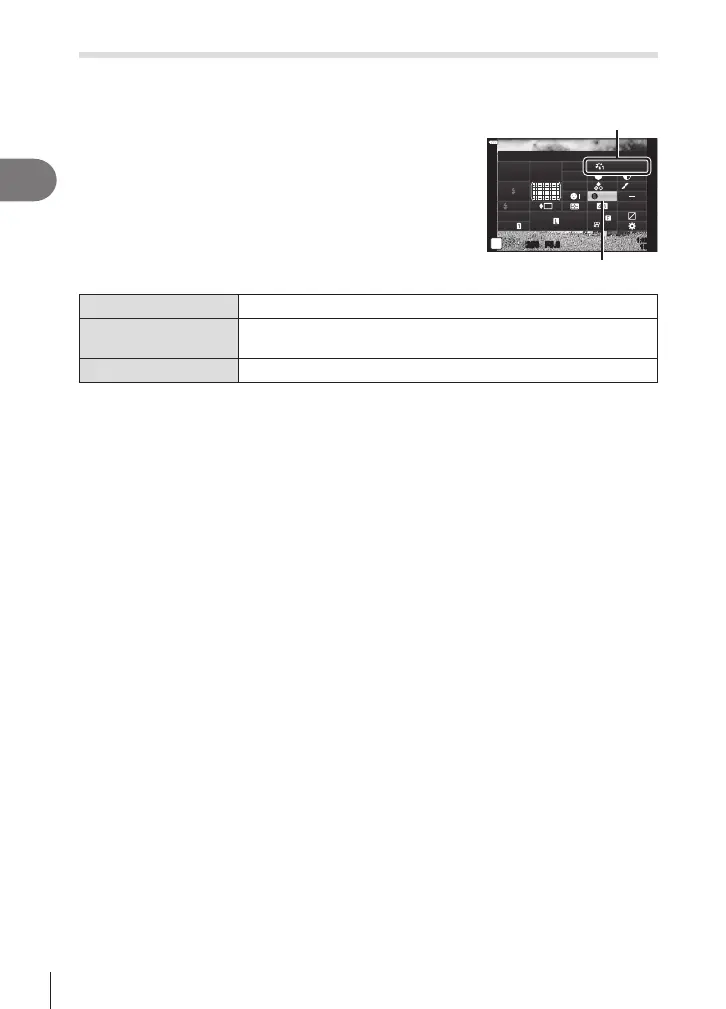
1
Press the u button in P/A/S/M modes.
• In B, ART, SCN, and Z modes, the display of the
LV super control panel is controlled via [KControl
Settings] (P. 115).
2
Use FGHI to select [Eect], then press the Q
button.
3
Adjust the eect using HI and press the Q
button.
Picture Mode
Standard
250250 F5.6
P
1:02:03
S
-
AF
N
WB
Auto
ISO
Auto
M-IS
S-IS On
sRGB
FHD
60p
S
Normal
A
±
0
±
0.0
±
0
±
0
±
0
G
±
0
Effect
i-Enhance
Eect
3Low (Eect: Low)
Adds a low i-Enhance eect to images.
3Standard
(Eect: Standard)
Adds an i-Enhance eect between “low” and “high” to images.
3High (Eect: High)
Adds a high i-Enhance eect to images.












 To Next Page