19
EXPOSURE COMPENSATION [ ]
18
2. Exposure Mode Button
Long Time [L.T.]
This mode is ideal for capturing pictures of fireworks and other bright lights at
night. You can select the shutter speed from 1-sec. to 60-sec. The aperture is
fixed at F8.
Press the exposure mode button 1 to
enter the Long Time mode (“L.T.”). As
you press the shift lever 2 downward,
the shutter speed changes in the order of
1, 2, 4, 8, 15, 30, and 60-sec.
(When you push the shift lever upward,
the shutter speed changes in the reverse
order.)
Use a tripod to keep
the camera steady.
In this mode, you can deliberately make your picture brighter or darker as
desired. Exposure compensation is possible up or down to ±2 EV by 0.5 step.
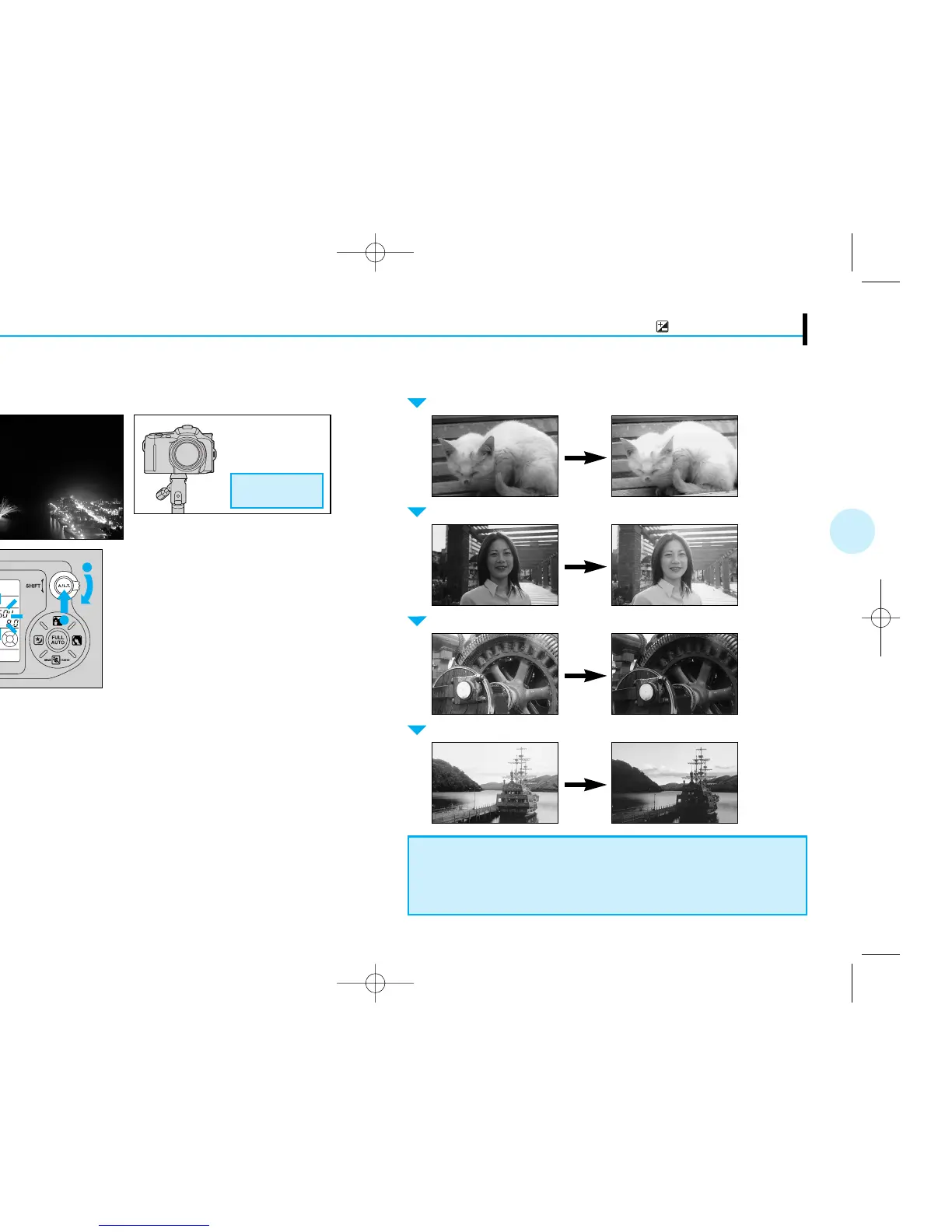
+ Compensation (to make the whole picture lighter)
Whitish subject Backlit subject Snow scene
– Compensation (to make the whole picture darker)
Blackish subject Subject with a black background
Subject in spotlight
To make a whitish subject whiter (+2 EV compensation)
To shoot a backlit subject (+1 EV compensation)
To make a blackish subject blacker (–2 EV compensation)
To mimic a twilight scene when shooting in daylight (–2 EV compensation)





 To Next Page