The OLYMPUS LC30 is a Microscope Digital Camera, designed for acquiring digital images in various microscopic applications. It is a CMOS color camera with a high frame rate, specifically developed for acquisitions using light microscopy. The LC30 is a compact design and can be connected to all common types of light microscopes by a C-Mount. The camera is intended for the acquisition of digital images, but not for clinical diagnostic purposes.
Technical Specifications
The OLYMPUS LC30 features a CMOS chip of Type 1/2 inch with an effective area of 6.55 mm x 4.92 mm. The pixel size is 3.2 µm x 3.2 µm, and it offers a maximum resolution of 2048 x 1532 pixels. The bit depth is 24 bit (8 bit per color channel), and the read-out speed ranges from 5 to 40 MHz. It uses a USB 2.0 interface and a Standard C-Mount for camera mounting.
The camera supports various binning modes to enhance sensitivity and achieve a shorter processing time, albeit at a lower resolution.
- Maximum resolution (no binning): 2048 x 1532 pixels, 10 frames per second, exposure times 57 µs - 750 ms.
- Binning 2x: 1024 x 768 pixels, 28 frames per second, exposure times 41 µs - 268 ms.
- Binning 3x: 680 x 512 pixels, 37 frames per second, exposure times 46 µs - 200 ms.
- Binning 4x: 508 x 384 pixels, 49 frames per second, exposure times 46 µs - 150 ms.
System Requirements for the Computer
To operate the camera, the following system requirements are recommended:
- Processor (CPU): Intel® Core 2 Quad or better, Intel® i5 or higher, Intel® XEON, compatible AMD processors.
- Hard disk: at least 30 GB free storage space.
- RAM: 8 GB.
- Screen resolution: at least 1920 x 1200 pixels.
- Drive: DVD-ROM drive.
- Interfaces: USB 2.0.
- Operating systems: MS-Windows 10 (32 bit or 64 bit), MS-Windows 8.1 (32 bit or 64 bit), MS-Windows 7 (32 bit or 64 bit).
- Computer power supply: > 300 W.
The camera is supplied with a USB 3.0 PCI express card and a USB 3.0 PCI express card power supply cable (SATA to IDE) for optimal performance. For Japan / Asia / Australia, the USB 3.0 PCI express card and power supply cable are not included in the scope of supply.
Operating and Storage Conditions
The camera should be operated and stored under the following conditions:
- Ambient temperature: +5°C to +40°C.
- Relative humidity: 80% (non-condensing).
- Storage/transport temperature: -20°C to +60°C.
- Indoor use only.
- Maximum altitude: 2000 m.
Usage Features
The OLYMPUS LC30 is designed for ease of installation and use. The installation process involves inserting the USB 3.0 PCI express card into the computer, installing the necessary software, and connecting the camera.
Installation Steps:
- Insert USB 3.0 PCI express card: This card is crucial for USB 2.0 cameras as well. Ensure proper connection to avoid damage and potential injuries.
- Install the software: The camera requires appropriate software to acquire images. Olympus provides cellSens (software for Life Science applications) and OLYMPUS Stream (software for industry applications). The software installation wizard guides the user through the process. It is recommended to log on as an administrator for installation.
- Connect the camera: Remove the camera's protective cap, mount the camera onto the microscope's camera adapter, and plug the USB cable into the camera socket and the USB 3.0 PCI express card. Ensure the USB plugs are inserted correctly, as they are not symmetrical.
System Environment and Application Contexts:
The camera can be used with many available microscopes. It is compatible with various Olympus microscopes and camera adapters.
- Using objectives with low magnification (< 10x): Depending on the microscope configuration, vignetting might occur. Switch on the shading correction or use a camera adapter with a higher magnification.
- Using objectives with high magnification (> 40x): The maximum exposure time might not be sufficient. Increase illumination intensity or use a camera adapter with a lower magnification.
- Darkfield and fluorescence microscopy: The OLYMPUS LC30 is not suitable for darkfield or fluorescence microscopy due to its limited exposure range. No countermeasure is available.
- Working with subarrays: Acquiring only a part of the image (subarray) does not increase the frame rate because the OLYMPUS LC30 does not support so-called hardware clipping. No countermeasure is available.
- Using different Live and Snapshot resolutions: If Live and Snapshot resolutions differ, measurements performed on the Live image may be slightly displaced on the Snapshot image (max. 2 pixels). Use identical resolutions for Live and Snapshot when performing measurements.
- Observing low contrast samples / Observing highly reflecting samples: When observing a low contrast sample or alternatively a highly reflecting one, a so-called spot flare may be noticeable if the AS diaphragm is almost completely closed. Switch on the shading correction or decrease illumination intensity and open the AS diaphragm.
- Observing high contrast samples: High contrast samples may cause auto exposure to fail, resulting in an underexposed image. In the Camera Control of the software, define an exposure compensation. Alternatively, switch to manual exposure mode.
- Acquiring images with a long exposure time: When acquiring images with a long exposure time (e.g. > 200 ms), an increasing amount of hot pixels may become visible. No countermeasure is available. This phenomenon is common to all camera sensors and not caused by a failure of the equipment.
- Accessing USB data storage devices: When attaching, removing or accessing USB data storage devices, for example an external hard drive, while the image acquisition is in progress, a temporary drop in frame rate might be observed. Only use or access USB devices when no image acquisition is in progress.
Maintenance Features
Proper care and maintenance ensure the longevity and optimal performance of the camera.
Cleaning the protective glass:
To clean the camera's protective glass, use a common blower bulb to blow dust away and wipe it gently with cleaning paper (or clean gauze). In the case of fingerprints or oil smudges on the protective glass, wipe it with clean gauze moistened with pure alcohol.
Cleaning the housing:
Parts other than the glass components should be cleaned by wiping with a clean cloth. Do not use organic solvents to remove major stains. Use a soft cloth moistened with a neutral detergent solution.
General Safety Instructions:
- Electric shock due to damaged cable: If a cable is frayed or damaged, it poses a risk of electric shock. Shut off the hardware and replace the cable immediately.
- Poisoning due to toxic gases: In case of fire, the camera material can give off toxic gases. Wear respiratory protection when fighting the fire.
- Tripping hazard: Lay cables along the wall or behind furniture to prevent tripping. Fix cables that run across the room.
- Never open the camera housing: The camera's CMOS chip is extremely sensitive to electrostatic discharge. Do not open the camera housing.
- Avoid vibration shocks: Mechanical shocks and strong vibrations can damage the camera. Do not drop the camera during installation. Securely mount the microscope.
- Secure microscopes with additional components: A top-heavy microscope can tip over or fall down. Secure the microscope if it is top-heavy or otherwise unstable.
- Don't touch the protective glass: The protective glass over the CMOS chip is extremely sensitive. Do not come into contact with bare hands or any other objects. Remove dust from the protective glass carefully with compressed air.
- Observe the operating conditions: Exposure to high temperatures or humidity can damage components. Always observe the operating and storage conditions specified in the manual.
- Don't expose the camera to strong light: Exposure to strong light can cause the camera to overheat, which may cause damage to its components. Do not expose the camera to strong light (such as sunlight) for long periods.
- Only use the USB cable that is delivered with your camera: Operate the camera only with the USB cable that is part of the camera's scope of supply. This ensures EMC basic standards are fulfilled.
Troubleshooting:
The manual provides a troubleshooting guide for common issues:
- Camera can't be found: This could be due to incorrect software installation or incorrect camera selection in the software. Ensure the correct software is installed and the camera is selected in the image source selection dialog.
- A faulty image appears: This might be caused by a power saving mode in the BIOS. Disable power saving modes in the BIOS.
- When starting the live-image, the "Camera time-out" error message appears: This indicates the USB cable is too long or other processes are requiring a lot of processing power. Use the supplied USB cable and ensure other processes are not running.
Disposal:
The device should not be disposed of as unsorted municipal waste but should be collected separately. Refer to local authority in the EU for return and/or collection systems available in your country.

 Need help?
 General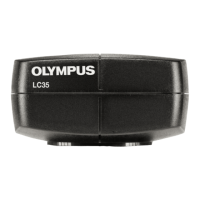








 To Next Page