3 System environment
13
3.3 PC
3.3.1 System requirements for the computer
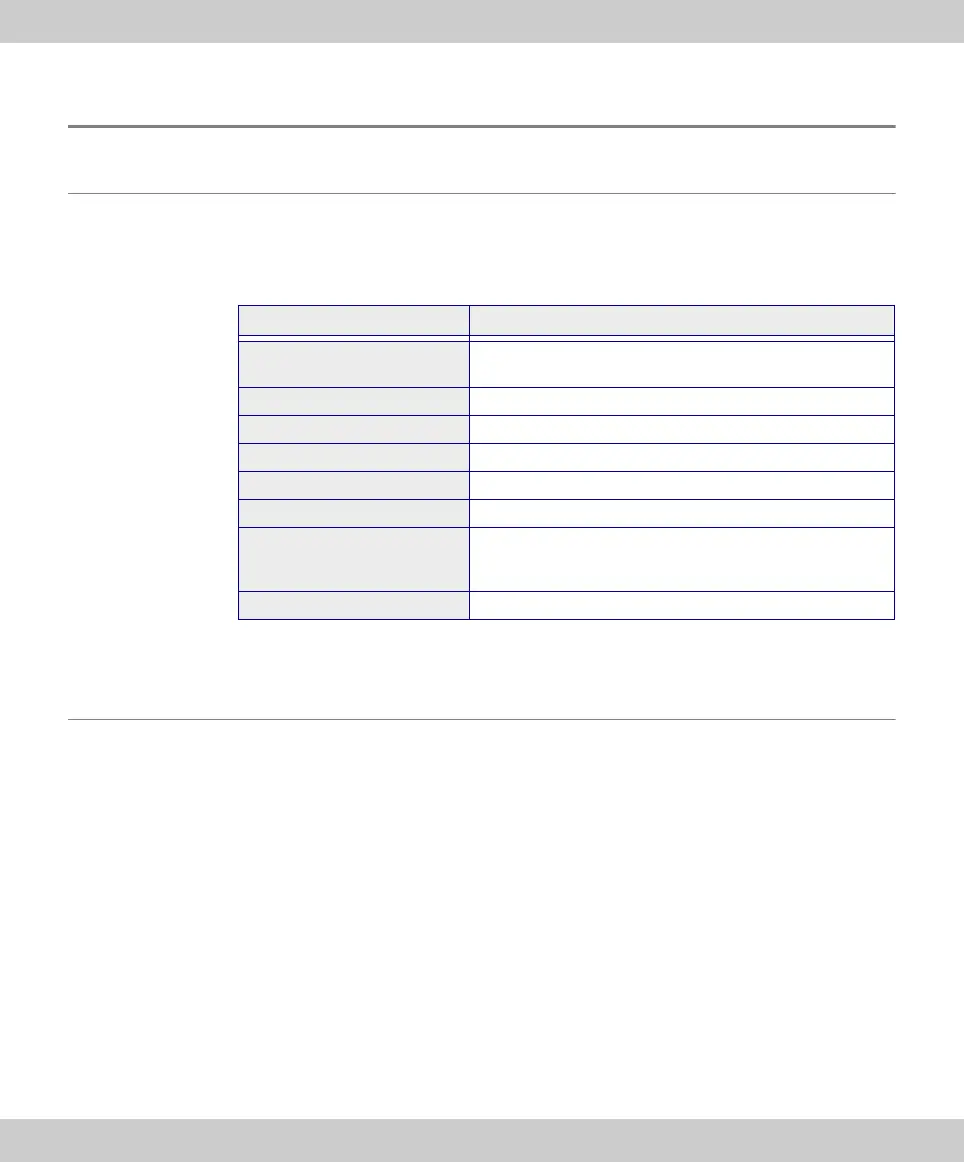
For optimal use, the system requirements listed in the table must be fulfilled.
Depending on the software used to operate the camera, there may be additional or
more extensive system requirements. Therefore, also check the system require-
ments for the camera you want to use.
* Make sure that the software you want to operate the camera with supports one of
the operating systems listed here.
3.3.2 Operating the camera with a laptop
Generally speaking, it is possible to operate the camera with a laptop. If the power
supply is not sufficient to operate the camera when an integrated USB interface is
used, connect the camera to the laptop via an external USB hub with its own power
supply.
System requirements
Processor (CPU) Intel
®
Core 2 Quad or better, Intel
®
i5 or higher,
Intel
®
XEON, compatible AMD processors
Hard disk at least 30 GB free storage space
RAM 8GB
Screen resolution at least 1920 x 1200 pixels
Drive DVD-ROM drive
Interfaces USB 2.0
Operating systems* MS-Windows 10 (32 bit or 64 bit)
MS-Windows 8.1 (32 bit or 64 bit)
MS-Windows 7 (32 bit or 64 bit)
Computer power supply > 300 W









 To Next Page