EasyManua.ls Logo

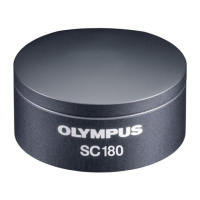
Olympus SC180 - User Manual

Olympus SC180
24 pages
Print Icon
To Next Page IconTo Next Page
Loading...
Installation Manual
SC180
Microscope Digital Camera
English
Optical Microscope Accessory
To obtain optimum performance of this camera and to ensure the
safety, study this manual thoroughly before operating the camera
and keep it on hand during operation of the camera.
Keep this instruction manual in a safe place.

Questions and Answers

  • C
    Cory WardAug 6, 2025
    How to fix Olympus SC180 Digital Camera if the camera can't be found?
    • T
      Thomas FloresAug 6, 2025
      If your Olympus Digital Camera can't be found, it might be because the camera wasn't selected during the software installation. To resolve this, you need to install the camera driver. Restart the software installation wizard, find the directory containing the cellSens or OLYMPUS Stream software, and double-click the setup.exe file. Then, select 'Install or maintain imaging software > Maintain imaging software > Provide licenses, update installation'. In the 'Image source selection' dialog box, choose 'Olympus' as the manufacturer and check the box next to your camera model. Follow the wizard's instructions to complete the installation.
  • E
    Erica WilliamsAug 16, 2025
    What to do if the 'Camera time-out' error message appears on my Olympus SC180 Digital Camera?
    • D
      Dylan SchultzAug 16, 2025
      If you encounter a 'Camera time-out' error message when starting the live image on your Olympus Digital Camera, it could be due to a couple of reasons. First, the USB cable might be too long; try using the USB cable that came with your camera. Second, other processes consuming significant processing power might be running simultaneously. Review the running processes and close any that aren't necessary.
  • S
    Sarah RoseAug 26, 2025
    Why does a faulty image appear on my Olympus SC180?
    • J
      John WalkerAug 27, 2025
      If a faulty image appears on your Olympus Digital Camera, a power-saving mode in your computer's BIOS might be the cause, preventing proper image acquisition. If you can, ask your system administrator to disable all power-saving modes in the BIOS. Note that changes to the BIOS can negatively affect your computer's operation, so ensure only qualified personnel make these adjustments.

Summary

The SC180 Color Camera

Scope of Supply

Lists all components included in the camera package.

Intended Use

Specifies the intended application and limitations of the camera.

Specifications

Details the technical data, resolutions, and frame rates of the SC180 camera.

Operating and Storage Conditions

Outlines the environmental conditions for operating and storing the camera.

General Safety Instructions

Explanation of Symbols Used

Defines warning symbols and their meanings for user safety.

Avoiding Personal Injuries

Provides guidance on preventing injuries, such as from electrical hazards or tripping.

Avoiding Device Damage

Details precautions to prevent damage to the camera and microscope.

System Environment

General Remarks

Provides general advice on configuring the microscope for optimal image acquisition.

Microscopes and Camera Adapters

Details compatible microscope types and necessary camera adapters.

PC System Requirements

Lists the system requirements for the computer to operate the camera.

Software Requirements

Identifies the necessary software for image acquisition and operation.

Installation

Step 1: Install the Software

Guide to installing the camera software, including administrator login and setup.

Step 2: Connect the Camera

Instructions for physically connecting the camera to the microscope and PC.

Care and Maintenance

Troubleshooting

Contacting Customer Service

Provides contact details and websites for OLYMPUS customer support.

Notes on Conformity and Disposal

CE Conformity (Europe)

Details the product's compliance with European electromagnetic compatibility standards.

WEEE Declaration (Europe)

Explains the proper disposal procedure for electronic waste in Europe.

RoHS Conformity (Europe)

Confirms the camera's compliance with EU directives on hazardous substances.

FCC Conformity (USA)

Outlines the product's compliance with US Federal Communications Commission rules.

Olympus SC180 Specifications

General IconGeneral
BrandOlympus
ModelSC180
CategoryDigital Camera
LanguageEnglish

Related product manuals