EasyManua.ls Logo

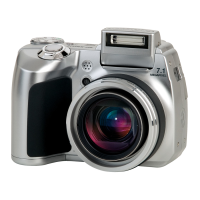
Olympus SP-500 UZ - User Manual

Olympus SP-500 UZ
84 pages
Print Icon
To Next Page IconTo Next Page
Loading...
Basic
Manual
DIGITAL CAMERA
ENGLISH 2
FRANÇAIS 28
ESPAÑOL 54
SP-500 UZ
d4267_e_basic_01_cover_oima_7.fm Page 1 Wednesday, August 3, 2005 5:03 PM

Table of Contents

Other manuals for Olympus SP-500 UZ

Question and Answer IconNeed help?

Do you have a question about the Olympus SP-500 UZ and is the answer not in the manual?

Summary

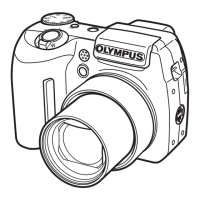
Camera Diagram Overview

Before You Begin

Camera Box Contents

Lists the items included in the camera's packaging.

Getting Started Guide

Attach Strap and Lens Cap

Step-by-step instructions for attaching the camera strap and lens cap.

Insert Batteries

Guide on how to properly insert the camera batteries.

Set Date and Time

Instructions for setting the camera's date and time.

Taking Photos

Zoom Functionality

Explains how to use the zoom lever to adjust focal length.

Focus Control

Describes how to use the AF target mark and half-press shutter for focus.

Taking a Picture

Instructions on how to fully press the shutter button to capture an image.

Photo Review and Deletion

Quick View Image Review

How to display the last taken picture using the QUICK VIEW button.

Zoom and Scroll Pictures

Using zoom lever and arrow pad to review pictures in detail.

Erase Pictures

Step-by-step guide to permanently delete images from the camera.

Transferring Photos

Install Transfer Software

Instructions for installing the OLYMPUS Master software.

Connect Camera to Computer

Steps to connect the camera to a computer via USB cable.

Transfer Images to Computer

Guide to selecting and transferring images using the software.

Basic Camera Operation

Holding the Camera Correctly

Tips on how to hold the camera for stable shooting.

Understanding the Mode Dial

Explanation of the Mode Dial and its various shooting modes.

Shooting Mode Buttons

Details the function of various buttons for quick access to features.

SCENE Modes

Explains how to use the SCENE modes for different shooting situations.

Flash Modes

Describes different flash modes and how to select them.

Power Save Feature

Explains the automatic sleep and power-off functions.

Menus and Settings Configuration

Top Menu Navigation

Access and navigate the camera's main menu.

Erase All Pictures

Steps to delete all images from the camera's memory.

Select Display Language

How to change the on-screen display language.

Macro Mode Operation

Instructions for shooting subjects at close distances.

Self-Timer Functionality

How to set and use the self-timer for delayed photo capture.

Monitor Display Symbols and Icons

Shooting Mode Icons

Explains indicators and symbols shown in shooting mode.

Playback Mode Icons

Details indicators and symbols displayed during playback.

Connecting Camera to Devices

TV Playback Setup

Instructions for connecting the camera to a TV for playback.

Thumbnail Image Display

How to view multiple images at once on the camera's monitor.

Direct Photo Printing

Guide to directly printing photos from the camera to a printer.

Olympus Master Software Guide

Software System Requirements

Lists the minimum hardware and software requirements for the software.

Upgrade to Master Plus

Information on upgrading the software to the Plus version.

User Registration

Instructions for registering the camera and software.

Camera Specifications

Camera Technical Specifications

Details on lens, shutter, aperture, operating environment, and physical dimensions.

Camera Safety Precautions

General Safety Guidelines

Important safety guidelines for using the camera.

Safe Camera Handling

Guidelines for safe handling and operation of the camera.

Battery Safety Precautions

Essential guidelines to prevent battery leakage, overheating, or explosion.

Battery Usage Cautions

Specific warnings and cautions regarding battery usage and handling.

Regional Compliance and Support

USA FCC Compliance

FCC compliance details for users in the USA.

Canada Regulatory Compliance

Canadian regulatory compliance for the apparatus.

Trademarks and Industry Standards

Lists trademarks and relevant industry standards.

Summary

Camera Diagram Overview

Before You Begin

Camera Box Contents

Lists the items included in the camera's packaging.

Getting Started Guide

Attach Strap and Lens Cap

Step-by-step instructions for attaching the camera strap and lens cap.

Insert Batteries

Guide on how to properly insert the camera batteries.

Set Date and Time

Instructions for setting the camera's date and time.

Taking Photos

Zoom Functionality

Explains how to use the zoom lever to adjust focal length.

Focus Control

Describes how to use the AF target mark and half-press shutter for focus.

Taking a Picture

Instructions on how to fully press the shutter button to capture an image.

Photo Review and Deletion

Quick View Image Review

How to display the last taken picture using the QUICK VIEW button.

Zoom and Scroll Pictures

Using zoom lever and arrow pad to review pictures in detail.

Erase Pictures

Step-by-step guide to permanently delete images from the camera.

Transferring Photos

Install Transfer Software

Instructions for installing the OLYMPUS Master software.

Connect Camera to Computer

Steps to connect the camera to a computer via USB cable.

Transfer Images to Computer

Guide to selecting and transferring images using the software.

Basic Camera Operation

Holding the Camera Correctly

Tips on how to hold the camera for stable shooting.

Understanding the Mode Dial

Explanation of the Mode Dial and its various shooting modes.

Shooting Mode Buttons

Details the function of various buttons for quick access to features.

SCENE Modes

Explains how to use the SCENE modes for different shooting situations.

Flash Modes

Describes different flash modes and how to select them.

Power Save Feature

Explains the automatic sleep and power-off functions.

Menus and Settings Configuration

Top Menu Navigation

Access and navigate the camera's main menu.

Erase All Pictures

Steps to delete all images from the camera's memory.

Select Display Language

How to change the on-screen display language.

Macro Mode Operation

Instructions for shooting subjects at close distances.

Self-Timer Functionality

How to set and use the self-timer for delayed photo capture.

Monitor Display Symbols and Icons

Shooting Mode Icons

Explains indicators and symbols shown in shooting mode.

Playback Mode Icons

Details indicators and symbols displayed during playback.

Connecting Camera to Devices

TV Playback Setup

Instructions for connecting the camera to a TV for playback.

Thumbnail Image Display

How to view multiple images at once on the camera's monitor.

Direct Photo Printing

Guide to directly printing photos from the camera to a printer.

Olympus Master Software Guide

Software System Requirements

Lists the minimum hardware and software requirements for the software.

Upgrade to Master Plus

Information on upgrading the software to the Plus version.

User Registration

Instructions for registering the camera and software.

Camera Specifications

Camera Technical Specifications

Details on lens, shutter, aperture, operating environment, and physical dimensions.

Camera Safety Precautions

General Safety Guidelines

Important safety guidelines for using the camera.

Safe Camera Handling

Guidelines for safe handling and operation of the camera.

Battery Safety Precautions

Essential guidelines to prevent battery leakage, overheating, or explosion.

Battery Usage Cautions

Specific warnings and cautions regarding battery usage and handling.

Regional Compliance and Support

USA FCC Compliance

FCC compliance details for users in the USA.

Canada Regulatory Compliance

Canadian regulatory compliance for the apparatus.

Trademarks and Industry Standards

Lists trademarks and relevant industry standards.

Olympus SP-500 UZ Specifications

General IconGeneral
Image Sensor TypeCCD
Optical Zoom10x
Screen Size2.5 inches
Video Resolution640 x 480
Battery TypeAA
Digital Zoom4x
Supported Flash MemoryxD-Picture Card
Sensor Size1/2.5 inch
Image ProcessorTruePic Turbo
Lens6.3 - 63 mm
Shutter Speed15 - 1/1000 sec
LCD Screen Pixels115, 000
Effective Pixels6.0 MP
Maximum ApertureF2.8
ISO Range80 - 400
TypeCompact
Storage Included32 MB

Related product manuals