EN 7
Quick Start Guide
Set date and time
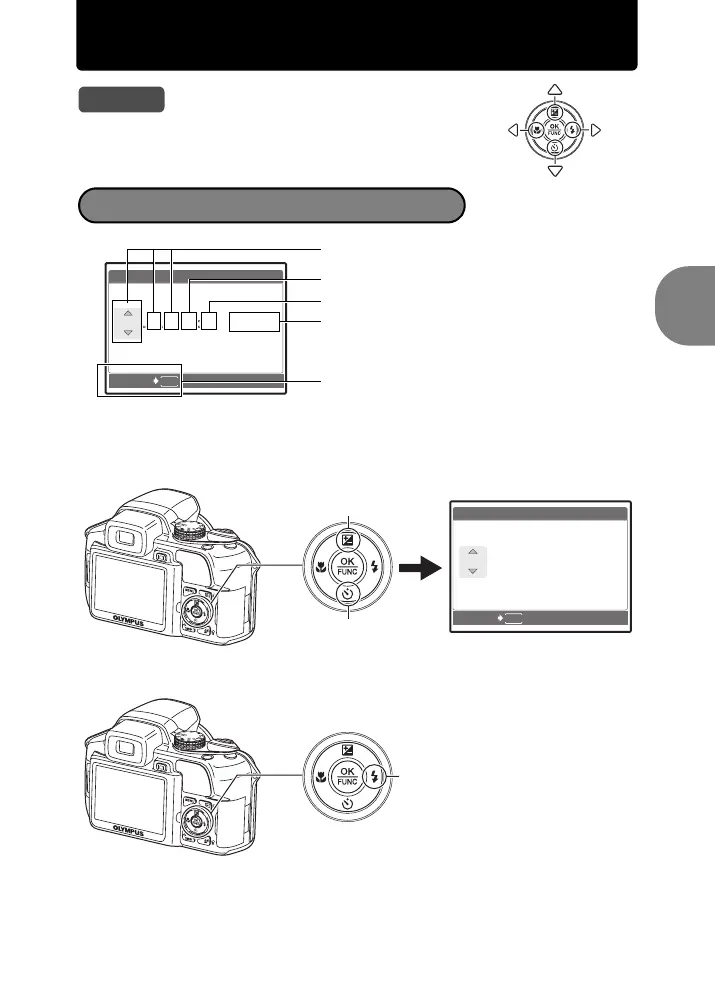
a. Press the 1 F button and the 2Y button to
select [Y].
The first two digits of the [Y] are fixed.
b. Press the 3# button.
Tips
The directions of the arrow pad are indicated with
124 3 in this manual.
About the date and time setting screen
MENU
CANCEL
X
Y/M/D
Y M D TIME
----.--.-- --:--
Y-M-D (Year-Month-Day)
Exits a setting.
Minute
Date formats (Y/M/D, M/D/Y, D/M/Y)
Hour
CANCEL
MENU
2007
.--.-- --:--
X
Y M D TIME
Y/M/D
1 F button
2Y button
3# button
d4355_e_unified_forU-Print_00_bookfile.book Page 7 Thursday, July 12, 2007 11:01 AM










 To Next Page