EN 73
Getting to know your camera better
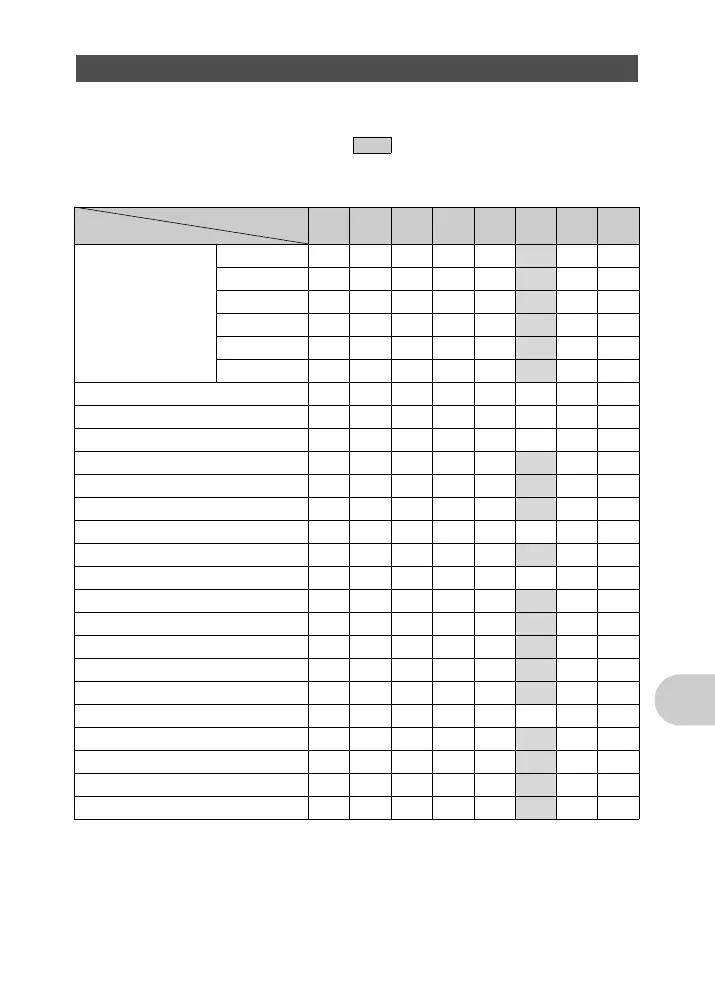
Some functions cannot be set in certain shooting modes. For more details, refer to the table below.
In r mode, available functions vary depending on the modes set in the [MY MODE SETUP] menu.
In s mode, in order to produce specialized effects, some scenes limit control of certain
functions. Those functions are indicated with an . For details, refer to “Functions with
restrictions in shooting scenes” (P.74).
( Modes and shooting functions
*1 When [R] (movies) is set to [ON], optical zoom cannot be used during the shooting. To zoom in when
[R] (movies) is set to [ON], set [DIGITAL ZOOM] to [ON].
*2 [RAW] is not available.
*3 [AUTO] and [HIGH ISO AUTO] are not available.
*4 [BKT] is not available.
Functions available in shooting modes and scene modes
Shooting mode
Function
h P A S M s n
Ref.
Page
Flash mode AUTO 999—— —P.19
! 999—— —P.19
# 99999 —P.19
H 99999 —P.19
#SLOW 999—— —P.19
$ 99999 —P.19
F 9999— 99P.19
Aperture value — — 9 — 9 ——P.11
Shutter speed — — — 99——P.12
& 99999 9 P.19
% 99999 9 P.19
Y 99999 9 P.20
INFO 999999—P.17
Optical zoom 99999 9
*1
P.28
IMAGE STABILIZER 9999999P.16
AE LOCK — 999— —P.16
AF LOCK — 9999 —P.16
AF LOCK + AE LOCK — 999— —P.16
f 99999 9 P.18
IMAGE QUALITY 9
*2
9999 9 P.23
WB — 999999P.25
ISO — 9999
*3
—P.26
DRIVE — 9999
*4
—P.27
FINE ZOOM — 9999 —P.27
DIGITAL ZOOM — 9999 9 P.28
d4355_e_unified_forU-Print_00_bookfile.book Page 73 Tuesday, July 17, 2007 10:40 AM








 To Next Page