18
EN
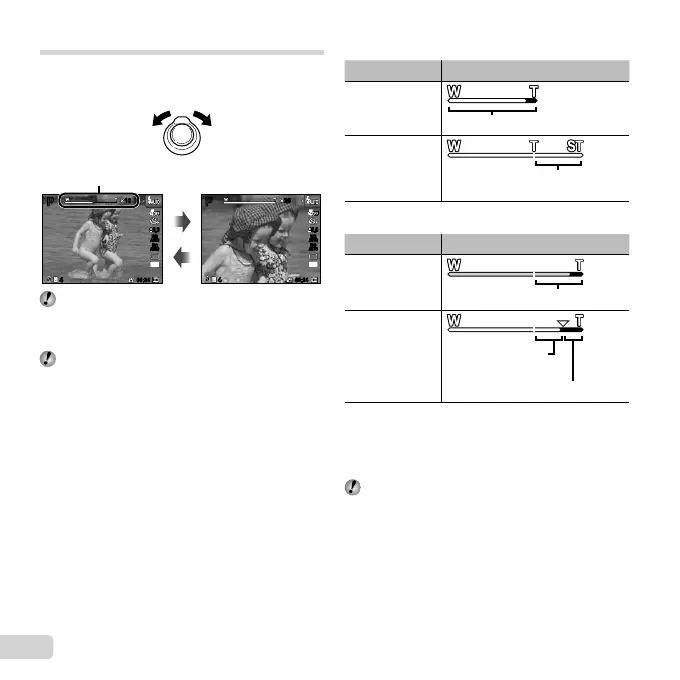
[Off] selected for [Digital Zoom]:
Image size Zoom bar
14M
Optical zoom range
Other
The magnifi cation ratio changes
depending on the image size setting.
*1
[On] selected for [Digital Zoom]:
Image size Zoom bar
14M
Digital zoom range
Other
The magnifi cation
ratio changes
depending on the
image size setting.
*1
Digital zoom range
*1
If [Image Size] is less than the full resolution, after
reaching the maximum optical zoom, the camera will
automatically resize and crop the image to the selected
[Image Size], then enter the digital zoom range if [Digital
Zoom] is [On].
Photographs taken with the zoom bar displayed in
red may appear “grainy”.
Using the zoom
Turning the zoom lever adjusts the shooting range.
W side T side
PP
1010
0.00.0
AUTO
WB
AUTO
WB
AUTO
ISO
AUTO
ISO
14
M
2626
44
00:3400:34
44
00:3400:34
PP
0.00.0
AUTO
WB
AUTO
WB
AUTO
ISO
AUTO
ISO
14
M
Zoom bar
Optical zoom: 26×
Digital zoom: 4×
To take larger images [Digital Zoom] (p. 36)
To take larger images [Digital Zoom] (p. 36)
The type and amount of zoom can be identifi ed from
the appearance of the zoom bar. The display differs
depending on the options selected for [Digital Zoom]
(p. 36) and [Image Size] (p. 33).


 To Next Page